MP Size Chart vs Pify Size Chart: Which Shopify Size Chart App Is Better for Growing Stores?
Both apps help Shopify merchants add size charts — but if you want more than a basic setup, MP Size Chart delivers size recommendations, advanced analytics, a dedicated sizing page, and 20+ languages, while Pify focuses on simpler chart display with templates and unit conversion.
for Shopify

Need the Short Answer?
Here’s the fastest way to decide which app fits your store better.
Choose MP Size Chart if you want:
- ✓More than a static size chart — including decision support
- ✓Smart size recommendations to guide shoppers toward the right fit
- ✓Deeper analytics and chart performance visibility
- ✓A dedicated sizing page for your storefront
- ✓Stronger support for growing product catalogs
- ✓Broader multi-language support (20+ languages) for global stores
- ✓Multi-tier pricing that scales with your usage
Choose Pify Size Chart if you only need:
- •A straightforward size chart solution
- •Quick setup with ready-made templates
- •Automatic cm / inch unit conversion
- •Product-specific size chart display
- •A simpler, lighter feature scope
- •You don’t need size recommendations, analytics, or multi-language support yet
Main Differences at a Glance
| Feature Area | MP Size Chart | Smart Size Chart |
|---|---|---|
| App Store rating & reviews | ✓ 5.0★ · 829 reviews | 5.0★ · 27 reviews |
| Size recommender | ✓ Yes | Not emphasized |
| AI size recommendations | ✓ Higher plan | Not available |
| Dedicated sizing page | ✓ Yes | Not highlighted |
| Chart & recommender analytics | ✓ GA + Advanced | Not highlighted |
| Multi-language support | ✓ 20+ languages | English only |
| Automatic unit conversion | ✓ Yes | ✓ Yes |
| Size chart templates | ✓ 23+ templates | Pre-built templates |
| Product-specific display | ✓ Yes | ✓ Yes |
| Import / export | ✓ CSV, image, webpage, desc. | Export / Import basics |
| Advanced display styles | ✓ Tab, dropdown, gallery | More basic layouts |
| Pricing stucture | ✓ Multi-tier (Free → Advanced) | Free plan only shown |
| Best fit for scaling stores | ✓ Strong depth | PSimple setup forcus |
Where MP Size Chart Stands Out
A closer look at the areas where MP Size Chart gives merchants more control, more insight, and a stronger long-term setup.
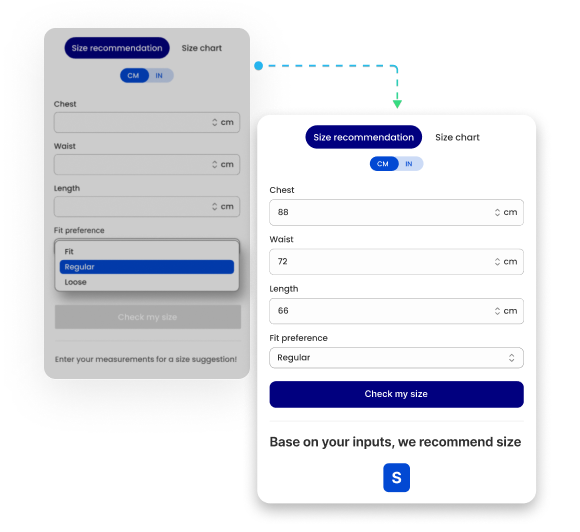
More Than Static Charts: Guide Shoppers to the Right Size
MP Size Chart includes smart size recommendations and lists AI size recommendation in higher tiers — a stronger option for merchants who want to help shoppers go from browsing sizing information to choosing a fit with confidence.
Pify focuses on professional size charts, templates, and real-time size info prompts, but does not emphasize recommendation-led guidance in the same way.
Why it matters: Shoppers do not only need sizing information — they often want help making a size decision. Recommendations reduce hesitation and wrong-size purchases.
Analytics That Help Merchants Optimize
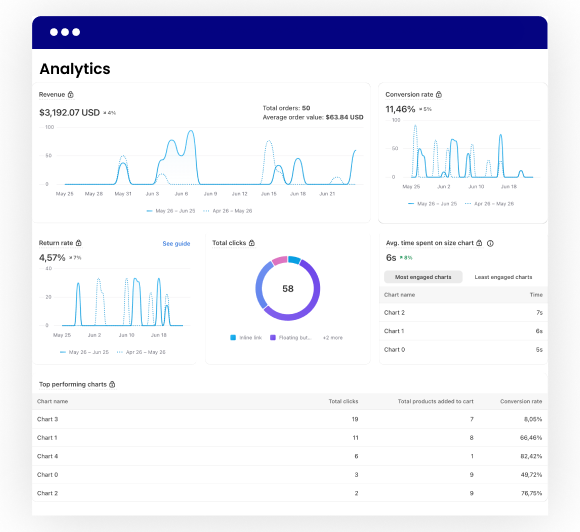
MP includes Google Analytics, advanced analytics in higher tiers, and recommender analytics — giving merchants more visibility into how shoppers interact with size guidance.
Pify’s listing does not highlight analytics as a core strength, leaving merchants with less visibility into chart usage.
Why it matters: Without visibility into chart usage, merchants are guessing. Better analytics help improve chart placement, shopper engagement, and optimization over time.
A Dedicated Sizing Page, Not Just Product-Level Charts
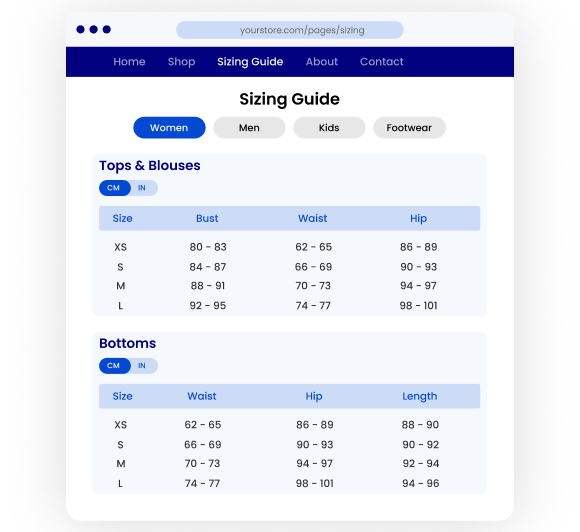
MP highlights a dedicated sizing page that keeps all charts auto-synced and organized in one place — giving merchants a broader sizing experience beyond a single product page.
Pify focuses primarily on creating and displaying size charts, but does not prominently position a dedicated sizing-page experience on its listing.
Why it matters: A centralized sizing page improves shopper trust and makes size guidance easier to manage across a larger catalog.
Better Prepared for International Selling
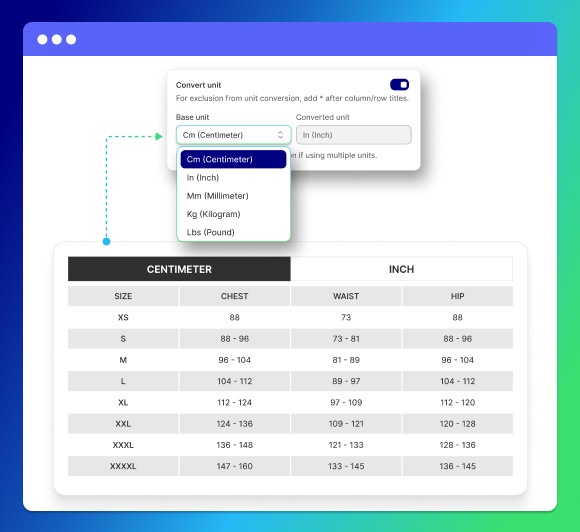
MP supports automatic unit conversion and 20+ languages, making it better suited for stores serving global shoppers across markets.
Pify clearly supports automatic metric & imperial conversion, but only English is shown in the listing’s language section.
Why it matters: If your store sells across markets, broader language support and localization flexibility reduce confusion before purchase.
Stronger Depth as Your Usage Grows
MP offers multiple pricing tiers that expand into recommendations, advanced analytics, advanced display styles, and support for larger stores — a real path from free-to-start to enterprise-ready.
Pify’s listing currently shows a free plan and a simpler feature set, which may suit smaller merchants but offers less visible depth for scaling needs.
Why it matters: A store may start with simple charts, but growing merchants often need more advanced control and data over time. MP gives you room to scale without switching apps.
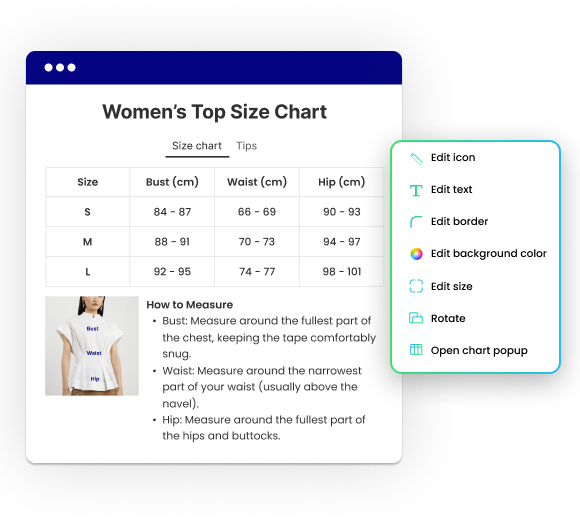
Which App Is Better for Your Store?
MP Size Chart is the better fit if:
- ✓You want more than a static size chart
- ✓You need size recommendations to support shopper decisions
- ✓You want analytics and stronger chart optimization insight
- ✓You need a dedicated sizing page
- ✓You serve international shoppers and need broader language support
- ✓You want a solution that can scale with your store
- ✓You want a free plan with a real path to advanced tiers
Pify Size Chart may be enough if:
- •You want a simpler size chart setup
- •You only need templates, product-specific display, and unit conversion
- •You have a smaller or less complex catalog
- •You do not need analytics or size recommendations yet
- •You only sell in English-speaking markets
- •You do not need a dedicated sizing page
Pricing Comparison
Multi-tier pricing — Starter, Growth, Pro, and Advanced plans.
- ✓Free install — essentials from day one
- ✓23+ industry-specific templates
- ✓Automatic unit conversion
- ✓20+ languages support
- ✓Size recommender (paid tiers)
- ✓AI size recommendation (higher tier)
- ✓Dedicated sizing page
- ✓Google Analytics + advanced analytics
- ✓Advanced display styles & layouts
- ✓Support for larger stores
Simpler entry point — a lightweight starting option.
- ✓Pre-built size chart templates
- ✓Automatic metric & imperial conversion
- ✓Product-specific size chart display
- ✓Real-time size information prompts
- ✓Export / import basics
- ✓English language support
Why Merchants Choose MP Size Chart
More Than Static Charts
Size recommendation helps shoppers move closer to the right fit before they buy.
Built for Customization
From chart design to button text, layout, icons, and CSS — full control.
Better Insight Through Analytics
Analytics help merchants optimize chart visibility and improve performance.
Ready for Growing Catalogs
Bulk imports, flexible chart assignment, and advanced sizing options.
Built for Growth
MP Size Chart is the stronger choice for merchants scaling tomorrow.
Switching from Smart Size Chart Is Easier Than You Think
Your charts move with you. Our team handles the migration so you do not start from scratch.
Install MP Size Chart
Free to start. No coding required. No disruption to your live store.
We Move Your Charts
Our support team migrates your existing charts from Smart. Most merchants are set up within a day.
Go Live with Confidence
Full access to recommendation, analytics, and customization — ready from day one.
Frequently Asked Questions (FAQs)
Choose the Shopify Size Chart App Built for Better Shopper Guidance
If you want more than a basic size chart — including stronger recommendation, deeper analytics, better global support, and a more scalable setup — MP Size Chart is the stronger choice. Start free, upgrade when your store is ready for more.