MP Size Chart vs Smart Size Chart: Choose the App Built for Complete Size Guidance
Both apps add size charts to Shopify stores — but MP Size Chart goes further with size recommendation, advanced customization, analytics, and stronger import tools.
for Shopify


Need the Short Answer?
Choose MP Size Chart if you want:
- ✓Full import/export flexibility including bulk CSV, image extraction, and HTML import
- ✓Advanced button customization — icons, float buttons, dropdown triggers
- ✓Size recommendation to guide shoppers to their perfect fit
- ✓Google Analytics integration and advanced chart analytics
- ✓More chart layouts — tabs, dropdowns, 2-column, gallery
- ✓Custom CSS, chart permalinks, embed snippets, and history rollback
Choose Smart Size Chart if you only need:
- •Basic size chart import and display
- •Simple chart button with text customization
- •Standard size conversion (cm/inch)
- •A true-to-size scale feature
Main Differences at a Glance
| Feature Area | MP Size Chart | Smart Size Chart |
|---|---|---|
| Size recommender | ✓ Yes | Not available |
| CSV import & bulk chart setup | ✓ Yes | Limited |
| Migration support between stores | ✓ Yes | Not available |
| Custom button text & styling | ✓ Advanced | Basic |
| Float button & dropdown support | ✓ Yes | Not available |
| Product, collection, tag, vendor conditions | ✓ | ✓ |
| Flexible chart placement & width control | ✓ Advanced | Basic |
| Country-based display rules | ✓ Yes | Not available |
| Quick view size info on variant hover | ✓ Yes | Not available |
| Size chart reminders | ✓ Yes | Not available |
| Auto unit conversion (cm/inch) | ✓ | ✓ |
| Auto unit selection by buyer location | ✓ Yes | Not available |
| International size conversion in chart | ✓ Yes | Not available |
| Custom templates & layout flexibility | ✓ Advanced | Basic |
| Google Analytics integration | ✓ Yes | Not available |
| Basic & advanced chart analytics | ✓ Yes | Not available |
| Recommender analytics | ✓ Yes | Not available |
| True to size scale | Not available | ✓ |
Where MP Size Chart Stands Out
Faster Setup for Growing Catalogs
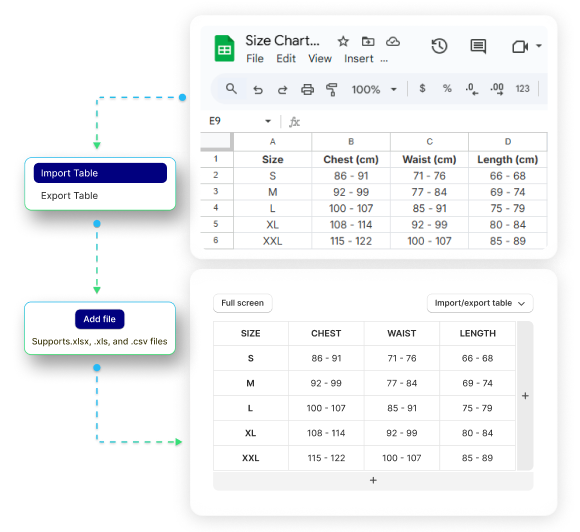
MP Size Chart gives merchants more ways to create and manage charts efficiently — especially when working with larger product catalogs. CSV import, bulk chart import workflows, webpage and image data extraction, and cross-store migration mean less manual work.
Smart Size Chart covers basic CSV and image import, but offers less flexibility for bulk operations or stores migrating from another platform.
Why it matters: If your store has more than a handful of products, better import support and bulk workflows can save hours of manual setup.
More Control Over How Your Size Chart Looks
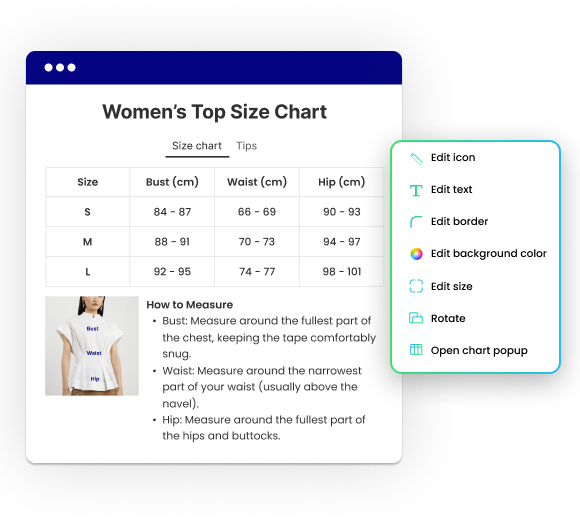
MP Size Chart gives merchants stronger storefront control — custom button icons and text, float button and dropdown support, custom CSS, and more styling flexibility. The size chart should feel like a native part of your store, not a generic widget.
Smart Size Chart covers the basics, but offers fewer storefront-facing controls for merchants who want a tailored chart experience across different product types.
Why it matters: A better-looking, better-placed size chart improves trust and creates a smoother shopping experience. Shoppers can not use a size chart they do not notice.
Better Control Over Where and When Charts Appear
MP Size Chart gives merchants stronger display logic, making it easier to show the right chart in the right context — especially for stores with multiple categories or brands.
Product Matching
MP Size ChartConditions by product, collection, tag, and vendor. Fine-grained control over which chart appears where.
Smart Size ChartBasic assignment flexibility with fewer condition options.
Placement Control
MP Size ChartStronger chart position and width options, CSS reinject support, and country-based display rules.
Smart Size ChartMore limited placement behavior and no country-based display.
Shopper Experience
MP Size ChartQuick view size info on variant hover, size chart reminders, and auto unit selection by buyer location.
Smart Size ChartSimpler display setup without these shopper-facing enhancements.
Why it matters: For apparel stores with multiple categories or brands, precise chart display reduces confusion and improves usability. The right chart on the right product, in the right place.
More Than Static Charts: Help Shoppers Choose the Right Size
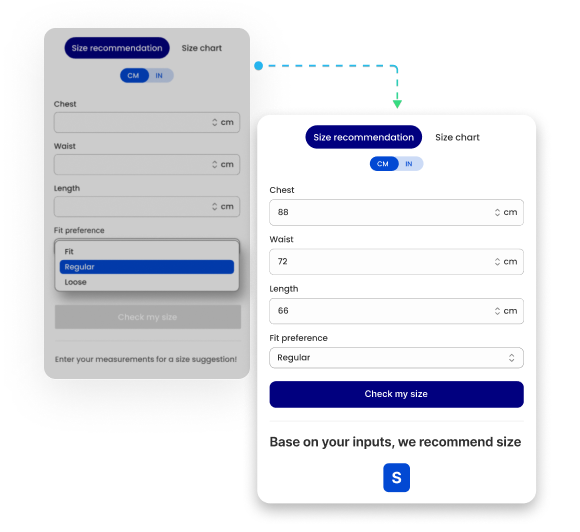
MP Size Chart goes beyond static sizing information by helping merchants guide shoppers toward a more confident size decision. Shoppers enter their measurements and receive a personalized size suggestion — moving them from "I see the sizing info" to "I know which size to choose."
Smart Size Chart is more focused on static chart display, with less emphasis on guided size recommendation.
Why it matters: Shoppers do not just want size information — they want help choosing the right fit. Guided recommendations reduce hesitation, returns, and support volume.
Better Visibility Into Chart Performance
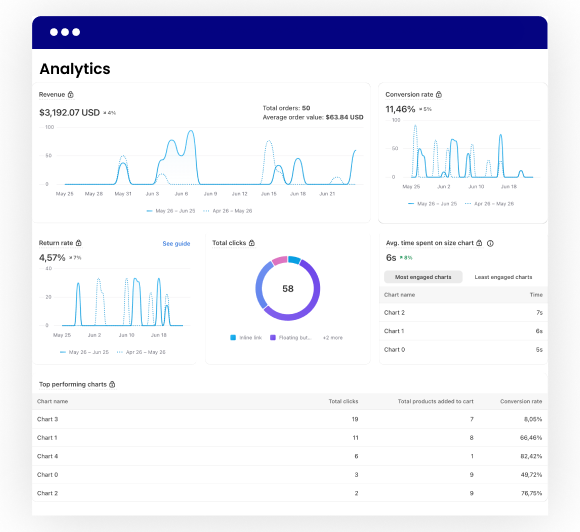
MP Size Chart gives merchants stronger insight into chart usage, performance, and recommendation engagement — with Google Analytics integration, basic and advanced chart analytics, and recommender-specific reports.
Smart Size Chart offers more limited analytics depth, making it harder to understand engagement or identify where improvements are needed.
Why it matters: Without analytics, you are guessing. Better tracking makes it easier to improve chart visibility, engagement, and sizing confidence over time.
Which App Is Better for Your Store?
MP Size Chart is the better fit if:
- ✓You sell apparel or other size-sensitive products
- ✓You want size recommendation, not just static charts
- ✓You need advanced button customization and float buttons
- ✓You want analytics to understand chart usage and performance
- ✓You need flexible chart layouts (tabs, dropdowns, gallery, 2-column)
- ✓You need bulk import, HTML import, or cross-store migration
- ✓You want custom CSS, permalinks, embed snippets, and version history
- ✓You expect your catalog to grow
Smart Size Chart may be enough if:
- •You only need a basic size chart with simple display
- •You have a smaller product catalog
- •You do not need size recommendation or analytics
- •You want a true-to-size scale feature
- •You do not need advanced button or layout customization
Pricing Comparison
Full-featured free plan — no trial, no time limit.
- ✓3 published size charts
- ✓23 industry-specific templates
- ✓Automatic unit conversion
- ✓Basic sizing page
- ✓Fully customizable size charts
- ✓Inline link & floating chart button
- ✓Placement next to Size label
- ✓Image upload
- ✓20 chart imports
- ✓In-app translation
Paid plan required to access core features.
- ✓6 published size charts
- ✓Automatic unit conversion
- ✓True to size scale bar
- ✓Multi size charts in one product
- ✓Floating button
- ✓Image upload
- ✓Style customization
Why Merchants Choose MP Size Chart
More Than Static Charts
Size recommendation helps shoppers move closer to the right fit before they buy.
Built for Customization
From chart design to button text, layout, icons, and CSS — full control.
Better Insight Through Analytics
Analytics help merchants optimize chart visibility and improve performance.
Ready for Growing Catalogs
Bulk imports, flexible chart assignment, and advanced sizing options.
Built for Growth
MP Size Chart is the stronger choice for merchants scaling tomorrow.
Switching from Smart Size Chart Is Easier Than You Think
Your charts move with you. Our team handles the migration so you do not start from scratch.
Install MP Size Chart
Free to start. No coding required. No disruption to your live store.
We Move Your Charts
Our support team migrates your existing charts from Smart. Most merchants are set up within a day.
Go Live with Confidence
Full access to recommendation, analytics, and customization — ready from day one.