Having trouble connecting your domain to your Shopify store? You might see a message about a domain already being connected elsewhere. Don’t worry, this guide will provide detailed step-by-step instructions on how to verify your domain on Shopify.
We’ll walk you through both automatic and manual verification methods, so you can choose the easiest option for you.
How To Verify Domain On Shopify (Two Methods)
There are two ways to verify your domain on Shopify: automatically and manually.
Method 1: Verifying your domain automatically
The automatic verification method is the simplest and most recommended option for most users. It leverages Shopify’s existing connection with your domain registrar to streamline the process.
Step 1: Access the Domains Settings
- Log in to your Shopify admin panel.
- From the main menu, navigate to Settings > Domains.
Step 2: Connect Your Existing Domain
- Click the Connect existing domain button.
- Enter your desired domain name (e.g., yourstore.com) in the provided field.
- Click Next.
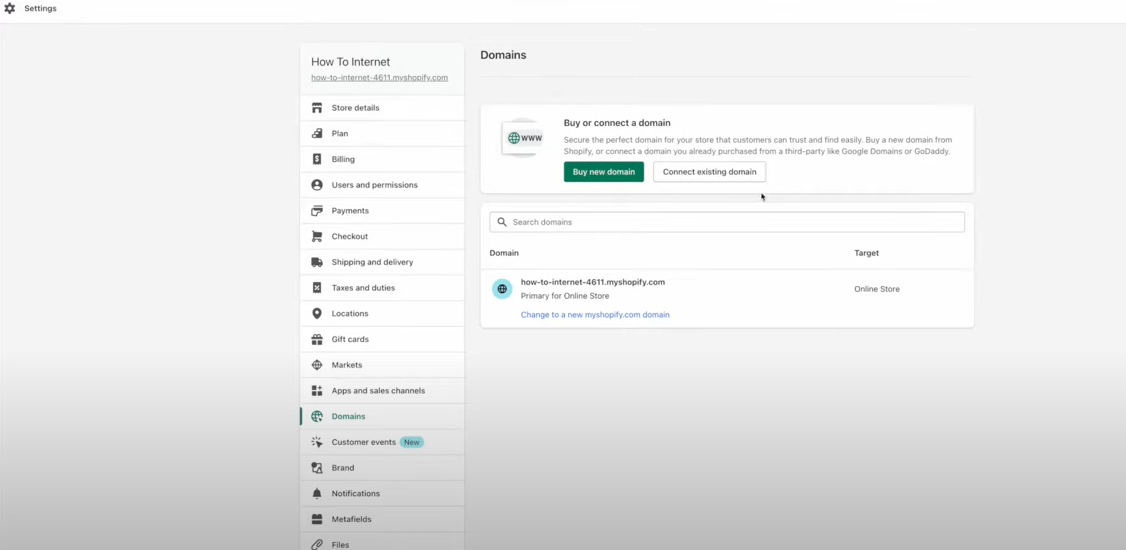
Step 3: Verification Process (Automatic) Shopify will attempt to automatically verify your domain ownership through DNS records. This only works if your domain registrar supports automatic verification. If successful, your domain will be connected to your Shopify store, and you’ll see a confirmation message.
Method 2: Manually verifying your domain
The manual verification method requires adding a TXT record to your domain’s DNS settings. This process involves logging in to your domain registrar’s control panel and making some modifications.
Important note: Make sure your domain is registered with a third-party domain provider (like GoDaddy, Namecheap, etc.) and is set up to connect with Shopify.
Step 1: Access Verification Code
- Shopify will provide you with a unique TXT record (verification code).
-
Copy this code carefully, as you’ll need to paste it into your domain registrar’s DNS settings.
- Log in to your Shopify admin.
- Go to Settings > Domains.
- Click Connect existing domain.
- Enter your domain name (e.g., elysia-apparel.info) and click Next.
- If a message appears stating “domain already connected,” click Connect manually. (Skip this step if the message doesn’t appear.)
- Copy the unique TXT record value provided by Shopify.
Step 2: Add TXT Record at Your Domain Provider:
- In a separate browser tab, log in to your domain provider’s website.
- Locate the DNS settings or domain management area. (Contact your provider if you need help finding it.)
- Create a new TXT record.
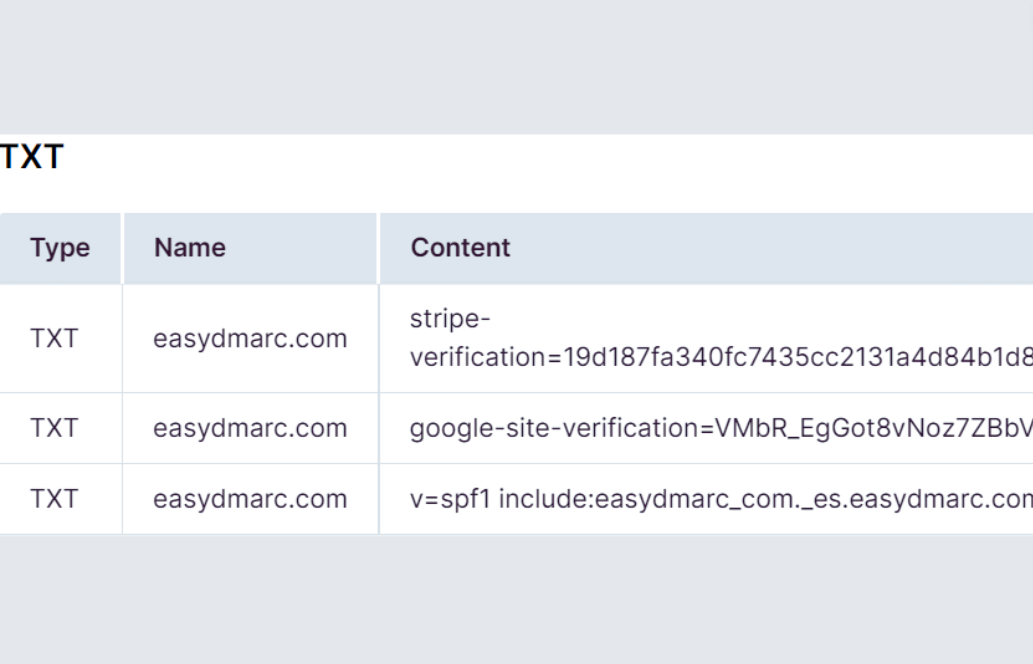
- Enter the following details:
- Name:
shopify_verification(If using a subdomain, add a period and your subdomain name after “shopify_verification.” For example, for shop.elysia-apparel.info, use shopify_verification.shop) - Value: Paste the unique TXT record value you copied from Shopify.
- Save your changes.
Step 3: Verify Connection in Shopify:
- Go back to the Shopify tab with your domain settings.
- Click Verify connection.
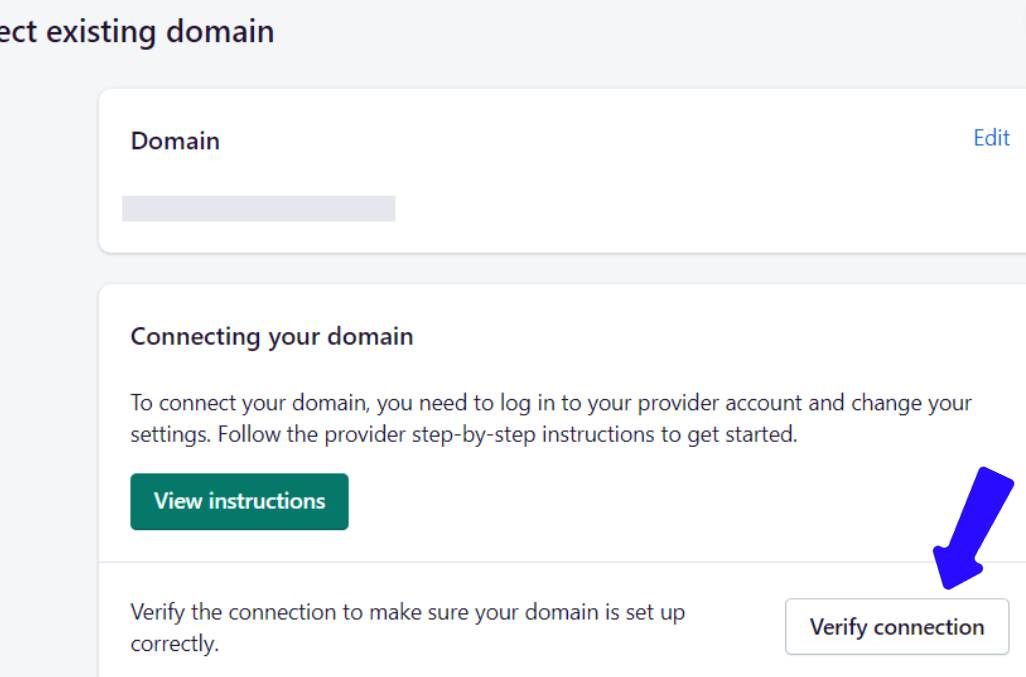
If successful, your domain will be listed as “connected” on the Domains page.
If unsuccessful, you can try clicking Verify connection again or choose Add domain anyway. Adding the domain anyway will display a “Verifying” banner until verification is complete.
Success! Once verified, your domain will be connected to your Shopify store.
Related topic: How To Connect Domain To Shopify
How To Verify Domain On Shopify: FAQs
Q: How long does Shopify take to verify a domain? A: Shopify typically verifies a domain within 48 hours, but it can take longer in some cases.
Q: Is it possible to verify a domain that was not bought from Shopify? A: Absolutely! You can verify a domain on Shopify even if you purchased it from a different registrar. The verification process confirms you own the domain and allows Shopify to connect it to your store.
Q: What will occur if I do not authenticate my domain on Shopify? A: Not authenticating your domain may result in lower email delivery rates and possible security threats. This is because it is easier for malicious individuals to fake unverified domains.
Q: Do only Shopify Plus users need domain authentication? A: Certain domain authentication features are only available on Shopify Plus. Yet, it is important for all Shopify users to verify their domains to enhance security and ensure emails are received successfully.
The Bottom Line
Knowing how to verify a domain on Shopify is crucial for business owners and entrepreneurs. This may appear difficult initially, yet understanding its importance and implementing the discussed steps can make it simple. Authenticating your domain ensures the security of your brand and guarantees safe interactions with customers.