A Complete
Quote Workflow
for Shopify
Let buyers request custom pricing, negotiate offers, and accept quotes online. Manage the entire process in one place without scattered emails or spreadsheets.
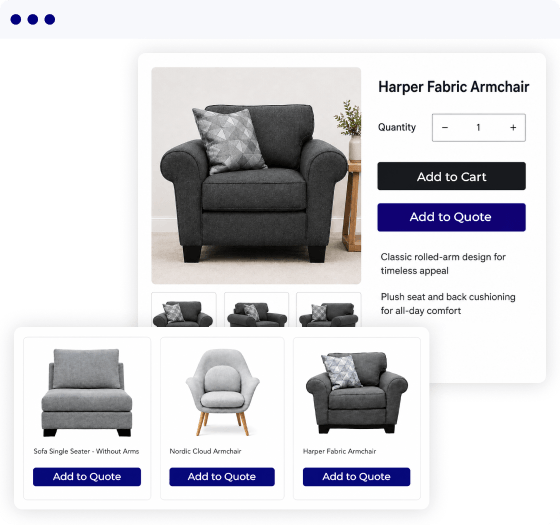
Quote Requests Shouldn’t Live in Emails and Spreadsheets
Without a built-in quote system, requests, pricing, and negotiations become difficult to manage, slowing your team down and putting potential orders at risk.
No Direct Quote Requests
Buyers must leave your store and contact your team by email or phone for custom pricing, adding friction to their buying journey.
Manual Quote Management
Creating and updating quotations across emails and spreadsheets requires repetitive work and makes quote details harder to track.
Missed Replies and Follow-Ups
Scattered conversations make it easy to overlook buyer responses, delay follow-ups, and lose promising deals.
One App to Manage Your Entire Quote Journey
Let Buyers Request Quotes Anywhere
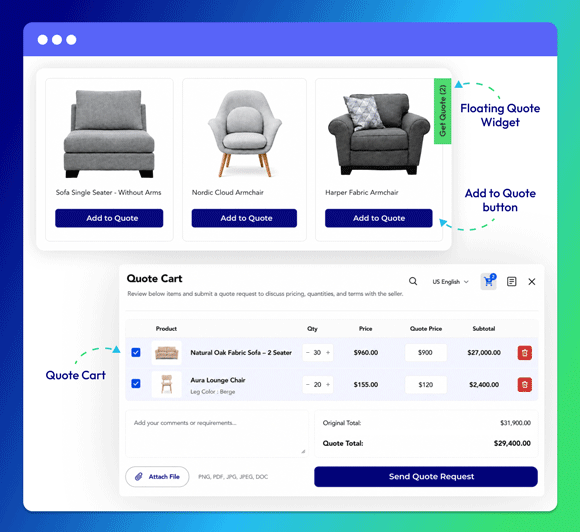
Give buyers a convenient way to request custom pricing without leaving your store. Add an Add to Quote button to product pages, collection pages, and the cart, or provide quick access through a floating Quote Widget.
Buyers can select products, adjust quantities, add notes, and submit their requirements through a customizable quote form.
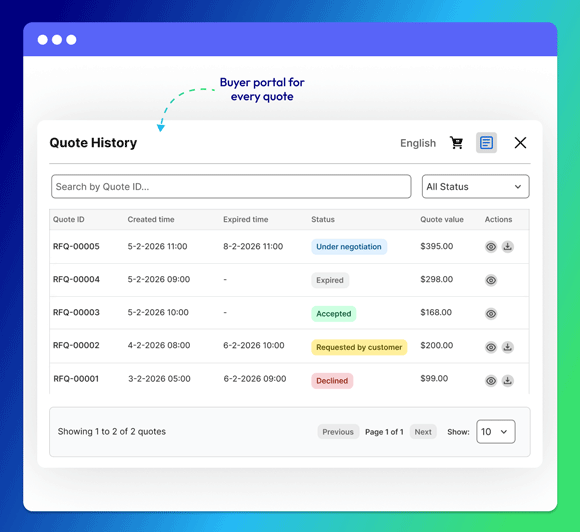
Buyers can also access their portal to review quote history, track real-time statuses such as Under Negotiation, Accepted, or Expired, and view or download their quotations.
Manage Every Quote in One Place
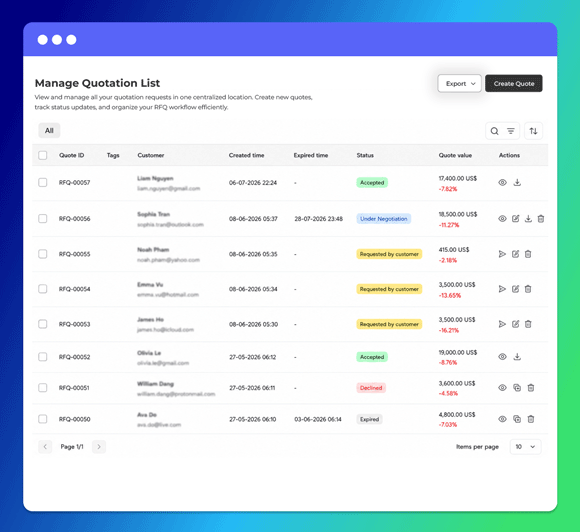
Keep quote requests, customer details, products, messages, and status updates together in one dashboard. Your team can review new requests, edit quote details, prepare custom offers, and track each deal from submission to final decision.
Clear statuses show which quotes need attention, are under negotiation, have been accepted, or are no longer active.
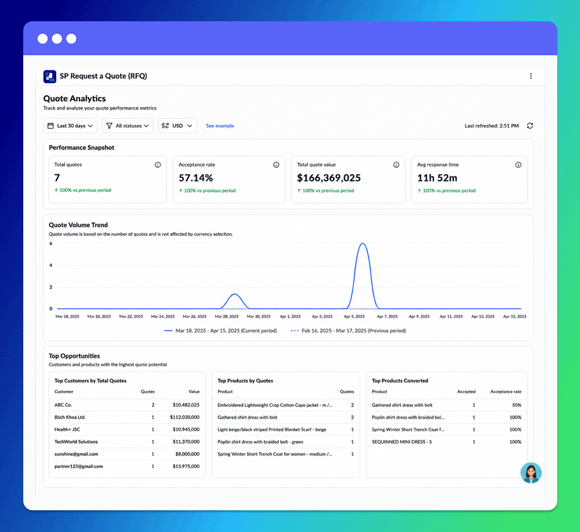
Built-in analytics let you track quote volume, acceptance rate and more. You can also spot top customers, popular products, and conversion trends to improve your quote strategy.
Negotiate Prices With Buyers
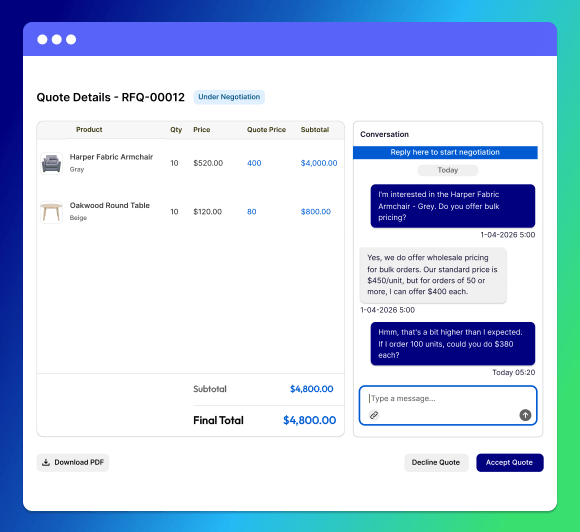
Keep every conversation connected to the relevant quotation. Buyers and your team can exchange messages, review revised offers, and negotiate prices without relying on disconnected email threads.
Attach documents, product specifications, or reference files to give both sides the information needed to reach an agreement faster.
Set Quote Rules and Limits
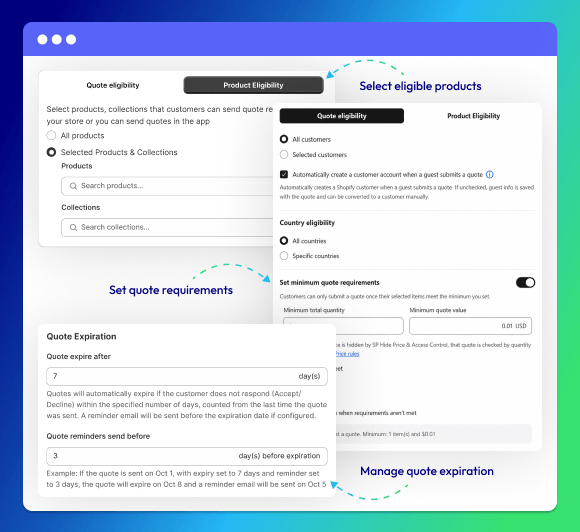
Control who can request quotes, which products are eligible, and what minimum requirements buyers must meet. You can also set expiration periods and send reminders before offers expire.
Rules you can configure:
- ✓Target specific customers and countries
- ✓Select eligible products and collections
- ✓Set minimum quantity or quote value
- ✓Configure expiration dates and reminders
Turn Approved Quotes Into Orders
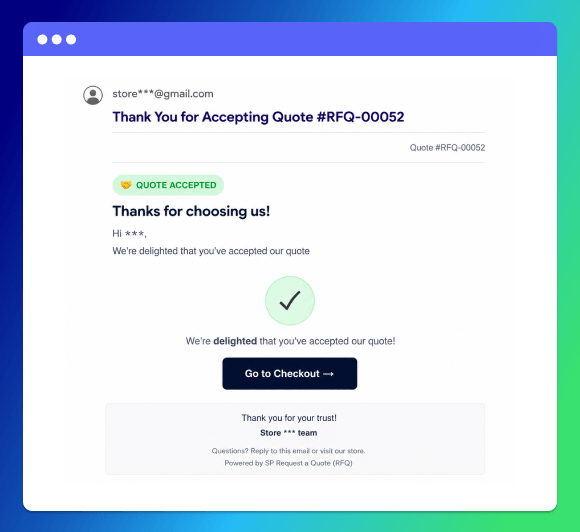
Convert agreed quotations into Shopify Draft Orders with the approved products, quantities, and prices already included. Buyers receive a checkout link and can complete payment without rebuilding their carts.
For eligible deals that do not need another buyer approval step, your team can convert the quote directly and move it toward checkout faster.
Why Choose SP Request a Quote by Shopplaza B2B?
Tired of managing quotes manually? SP Request a Quote is easy to set up, free to use, and built to help growing B2B businesses and established sales teams manage the entire quote process in one place.

Complete Quote Workflow
Manage the entire journey in one app, from quote submission and negotiation to approval and order conversion.

No-Code Setup
Configure quote buttons, forms, eligibility rules, and notifications without editing your Shopify theme code.

Free to Use
Launch a professional quote process without adding another monthly subscription to your Shopify expenses.

Built for Shopify
Use an app recognized for meeting Shopify’s standards for quality, performance, usability, and seamless integration.

Works With Hide Price Rules
Integrate with SP Hide Price & Access Control to hide prices while allowing eligible buyers to request a quote.

Available on All Shopify Plans
Add B2B quoting capabilities to any Shopify store without upgrading to Shopify Plus.
Add a Complete Quote Flow to Your Shopify Store
Manage every step from the first request to checkout in one app.
Receive Quote Requests
Buyers request custom pricing from anywhere on your Shopify store.
Review and Negotiate
Review each request, discuss pricing, and update offers through direct chat.
Finalize the Quote
Confirm the agreed products, quantities, prices, and other quote details.
Convert to an Order
Turn the agreed quote into a Shopify order and send the buyer a checkout link.
Set Up Your Shopify Quote Workflow
Follow the step-by-step video to configure the Quote Widget, add quote buttons, and start receiving requests from your storefront.
More Than a Basic Quote Request Form
Adding a quote button is only the beginning. SP Request a Quote manages the entire journey from request to order, all in one place.
| Feature | SP Request a Quote | Basic Quote Apps | Email & Sheets |
|---|---|---|---|
| Quote buttons | Product, collection, and cart pages | Limited placements | Not available |
| Quote Cart | ✓ Yes | ✓ Sometimes | No |
| Custom request form | ✓ Yes | ✓ Basic | Manual |
| Customer rules | ✓ Advanced | Limited | Manual checks |
| Product rules | ✓ Advanced | Limited | Manual checks |
| Minimum order rules | ✓ Quantity and value | ✓ Sometimes | Manual checks |
| Quote dashboard | ✓ All quotes in one place | ✓ Basic request list | No central view |
| Quote status | ✓ Real-time tracking | Limited | Manual updates |
| Buyer messaging | ✓ Built in | Usually by email | Email only |
| File attachments | ✓ Yes | ✓ Sometimes | Separate files |
| Buyer portal | ✓ Yes | Often unavailable | No |
| Quote expiry | ✓ Automatic | Sometimes | Manual |
| Reminders | ✓ Automatic | Limited | Manual |
| Order conversion | ✓ Shopify Draft Order | Often manual | Fully manual |
| Quote analytics | ✓ Detailed insights | Basic or unavailable | Manual reports |
| Setup | No code | Usually no code | Simple to start |
What Merchants Say About SP Request a Quote (RFQ)
Frequently Asked Questions (FAQs)
Ready to Simplify Your Quote Process?
Let buyers request quotes from your store and manage every step from request to order in one place.
Free to use • No code required • 24/7 support