The free wishlist that remembers the exact size and color
MP Wishlist & Favorites adds a wishlist button to your product pages, product cards and header. Shoppers save what they like without logging in, and when they come back, the right variant is one click from the cart.
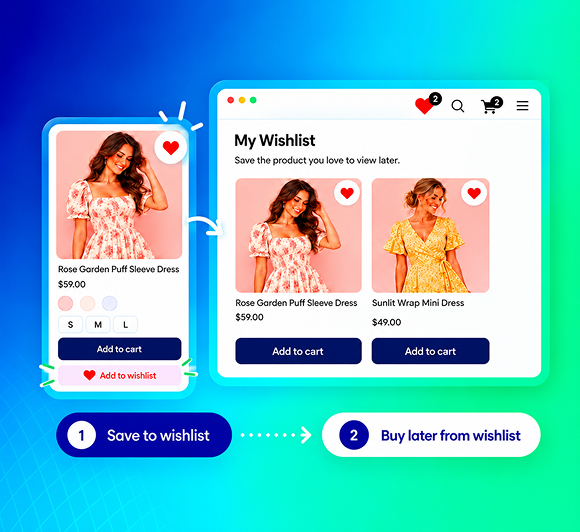
Most shoppers like something before they are ready to buy it
Without a wishlist, the only choices on your product page are "buy now" or "leave". When shoppers leave, the product they liked, in the size they picked, goes with them.
The cart becomes a parking lot
Undecided shoppers add items to the cart just to keep them, then never check out. That shows up as an abandoned cart, not as a shopper who is still deciding.
Generic wishlists forget the variant
A shopper picked the black dress in size S. A wishlist that only saves "the black dress" makes them choose all over again, or guess.
Login walls kill the save
Ask a first-time visitor to create an account before they can save an item, and most of them will close the tab instead.
You can't see what shoppers want
Without wishlist data, you plan restocks and promotions on sales alone, and miss the products people are waiting on.
Everything a Shopify wishlist app needs, free on every store
Wishlist buttons where shoppers browse, a wishlist page that sells, a live preview to style it, and analytics to learn from it.
A wishlist button on product pages, product cards and your header
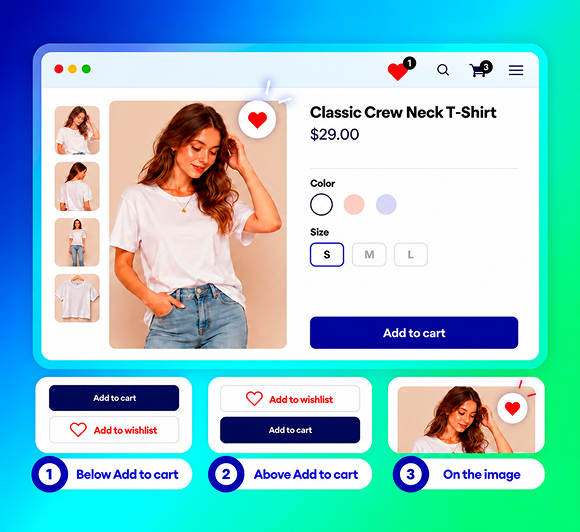
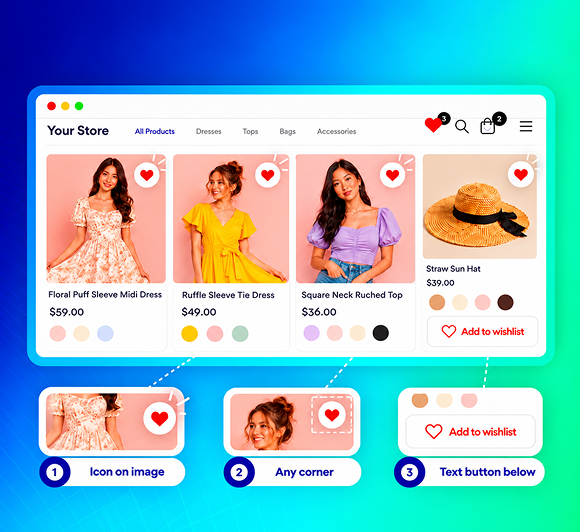
Put the button below or above Add to cart, or as an icon on the product image. Show a heart, star or bookmark on every product card in your collections. Add a shortcut to the header, the menu or a floating button, with a counter that shows how many items are saved.
- Product page button: below Add to cart, above it, or on the image
- Product cards: icon on the image or a text button at the bottom
- Header, menu or floating shortcut with a saved-item counter
Saves the exact size and color. No account needed.
Every save keeps the variant the shopper picked, so "Linen shirt, size M, sand" is what they find when they come back. Guests save without logging in. If they sign in later, their saved items move into the customer account and stay with them on every device.
- Switch to another size or color and the button shows whether that variant is saved
- Guest saves merge into the customer account at login
- The counter in the header stays in sync across tabs
A wishlist page built to finish the sale
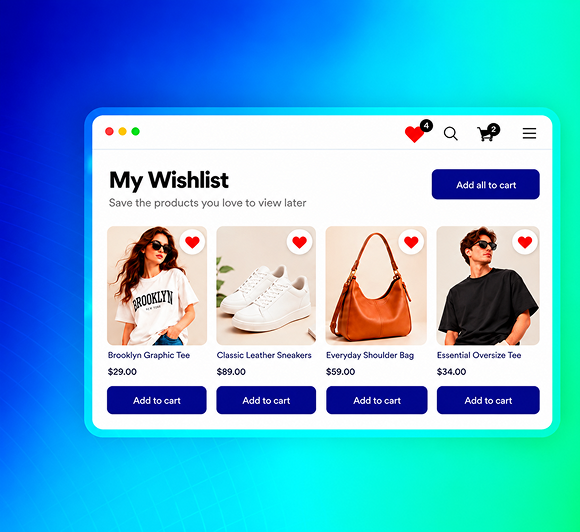
Shoppers open their wishlist from the shortcut and see every saved item with its image, variant, price and stock status. One item or the whole list goes to the cart in a click. Sale badges flag price drops, and a recommendations row keeps them browsing.
Stock badges
Sold out · Low stock
Sale badge
6 styles
Checkout
Add all to cart
Style it on your real products, before you save
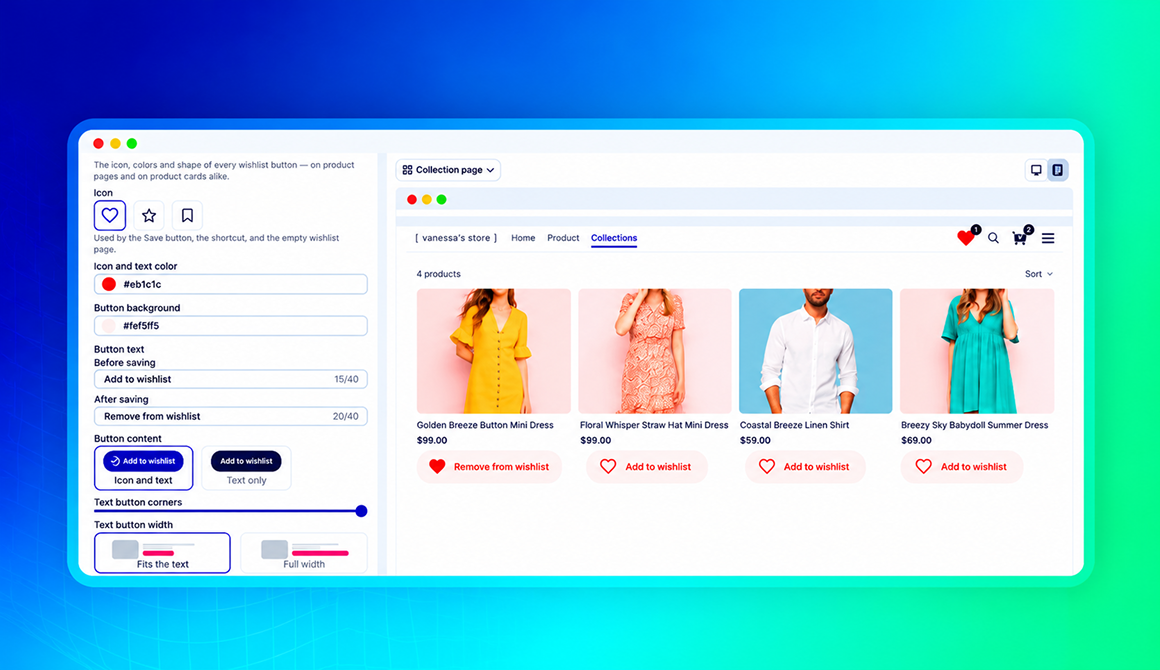
Pick the icon, colors, button text, corners and width, and watch the change on a preview of your own product page, product cards, header and wishlist page. Use Match with your theme to pull your theme's colors in, then decide which products show the button.
- Heart, star or bookmark icon, or icon only
- Display conditions: all products, selected products or collections, or all except the ones you choose
- Preview on desktop and mobile, with sample products or your own
See which products, and which variants, shoppers are waiting on
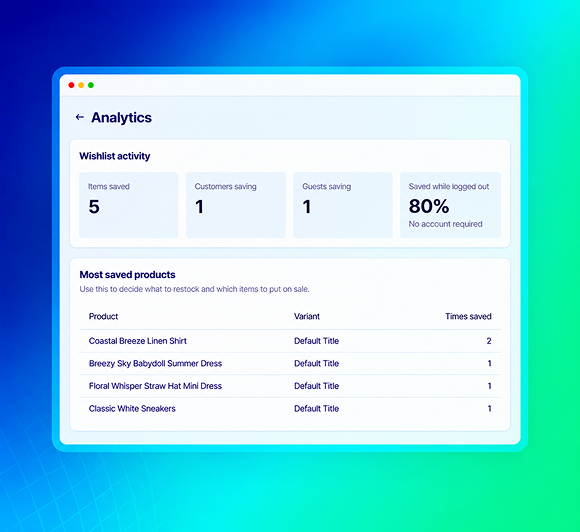
The Analytics page shows wishlist saves, how many customers and guests are saving, and your most-saved products down to the variant. If 40 shoppers saved the black dress in size S, that is a restock and a promotion decision you no longer have to guess at. The Customers page shows what each logged-in customer has saved.
- Most-saved products by variant, with times saved
- Items saved by customers and by guests, side by side
- Customers page: who saved what, and when they were last active
One switch, and the wishlist is live
The wishlist button on product pages and product cards and the header shortcut are on from the moment you install. The only required step is turning on the app embed.
 MP Wishlist & Favorites
FREE
MP Wishlist & Favorites
FREE
Install from the App Store
Free, with every feature. No payment details, no third-party account.
Turn on the app embed
Click Enable app embed, switch it on in the theme editor, save. That's the one required step.
Style it, if you want to
Change the icon, colors, text and placement with the live preview, or keep the defaults.
The size chart helps shoppers pick the right size. The wishlist keeps it.
A wishlist that saves the exact variant is only useful if the variant was right. MP Size Chart & Size Guide puts a clear size chart and AI size recommendations next to the size selector, so the size that gets saved is the size that fits. Both apps are built by Shopplaza, run as app embeds, and are tested side by side on the same product page.
- Rated 5.0 from 876 reviews, Built for Shopify
- Free plan with no watermark, AI size recommendations on every plan

A simple wishlist app that gets the details right
Saves the exact variant
Size and color are kept with the item, so the return visit lands on the right product and the right option.
No login needed
Guests save in one tap. If they create an account later, their list moves with them.
Add all to cart
Stock and sale badges, Add to cart per item, and one button for the whole list, on desktop and mobile.
Live preview on your products
Every setting shows on a preview of your own store, four pages, desktop and mobile, before you save.
Most-saved products by variant
Know what shoppers are waiting on before you plan restocks and promotions.
Free, every feature included
One free plan with the wishlist button, shortcut, wishlist page, live preview and analytics. Clean storefront, your brand only.
Frequently Asked Questions (FAQs)
Give shoppers a reason to come back
Add a wishlist button that saves the exact size and color, with no login needed, and a wishlist page that sends the whole list to the cart. Free, with every feature included.
Free · Every feature included · One switch to set up