Selling B2B or wholesale is not easy. Business buyers don’t shop like consumers. They expect custom pricing, company-based accounts, and purchasing workflows that fit how their teams actually buy.
At the same time, B2B ecommerce is growing fast. The global B2B ecommerce market is expected to grow at a 14.5% compound annual growth rate through 2026, which means more manufacturers, wholesalers, and distributors are moving their sales online.
Shopify is often known for DTC (direct-to-consumer), where brands sell directly to individual customers. But it has grown into a flexible platform for B2B as well. With the right setup, Shopify can support company-based pricing, bulk orders, and more complex purchasing workflows. The challenge is that the term “Shopify B2B” is often misunderstood, especially when comparing standard Shopify plans with Shopify Plus.
This guide explains what Shopify B2B really means, how it works, and what you should understand before building a B2B or wholesale store on Shopify.
💡 Key Takeaways
- Shopify can support B2B and wholesale selling, but it requires a different structure than DTC.
- Native Shopify B2B features are available on Shopify Plus, while non-Plus stores rely on apps and custom setups.
- B2B selling focuses on companies, pricing logic, and purchasing workflows—not just discounts.
- Choosing the right foundation early makes it easier to scale B2B operations later.
What is Shopify B2B?
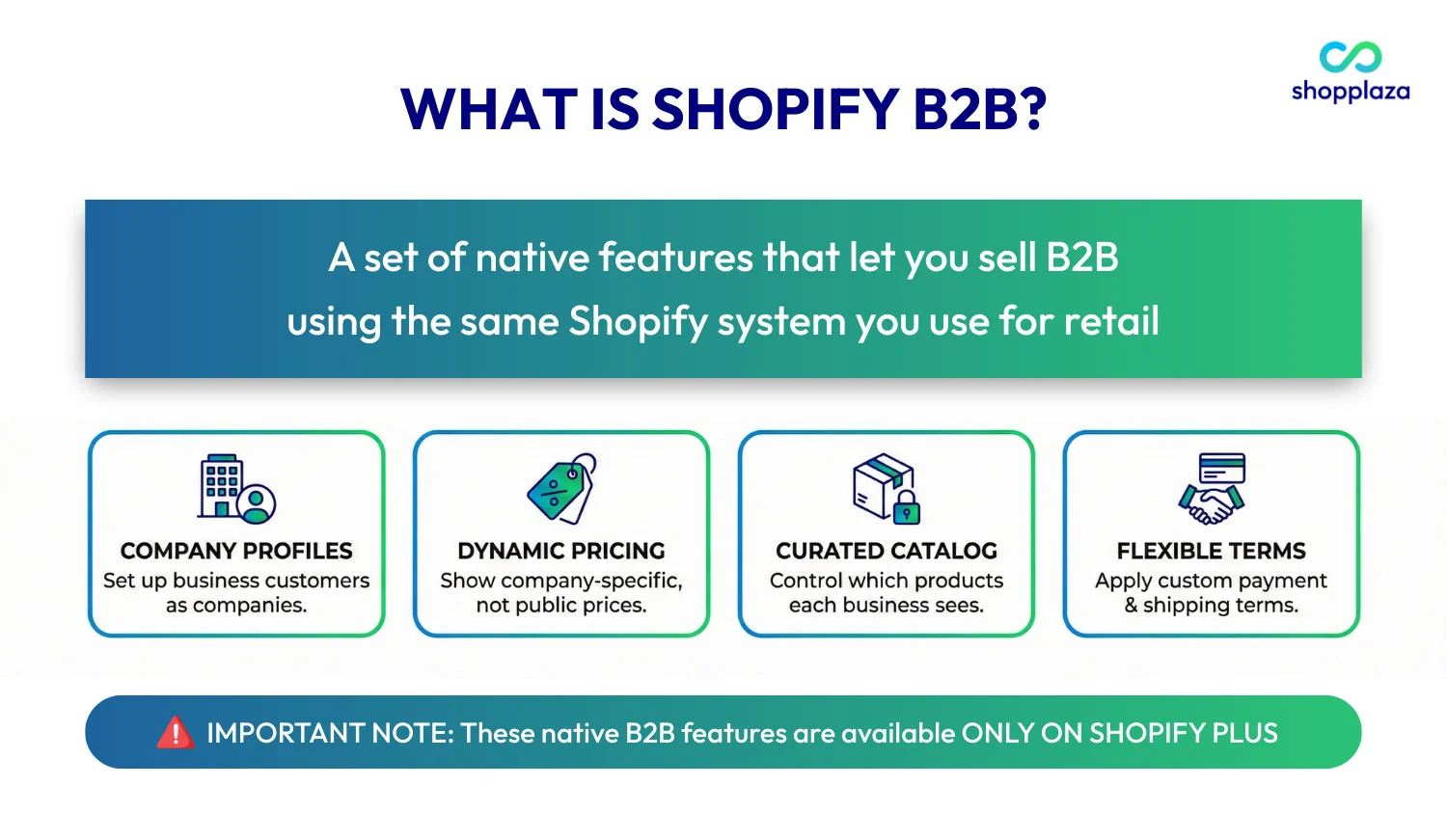
According to Shopify, Shopify B2B is a set of native features that let you sell business-to-business (B2B) using the same Shopify system you use for retail.
In simple terms, Shopify B2B turns your store into a login-based buying experience. Instead of showing the same products and prices to everyone, the store recognizes business buyers when they sign in and adjusts what they see based on their company.
With Shopify B2B, you can:
- Set up B2B customers as companies in the Shopify admin
- Show company-specific pricing instead of public prices
- Control which products each business can access
- Apply custom payment and shipping terms for wholesale buyers
- Run B2B and DTC on the same store, without mixing the two experiences
These native B2B features are available only on Shopify Plus. Because of this, pricing and platform costs can vary significantly depending on whether you use Shopify Plus or build a B2B workflow on a standard Shopify plan.
If you want a full breakdown of platform fees, setup costs, and app expenses, you can explore our detailed guide on Shopify B2B pricing.
However, that doesn’t mean Shopify can’t be used for B2B without Plus. Many merchants still sell wholesale on standard Shopify plans by using apps and custom workflows—a difference we’ll explain next.
Shopify (Non-Plus) vs. Shopify Plus for B2B
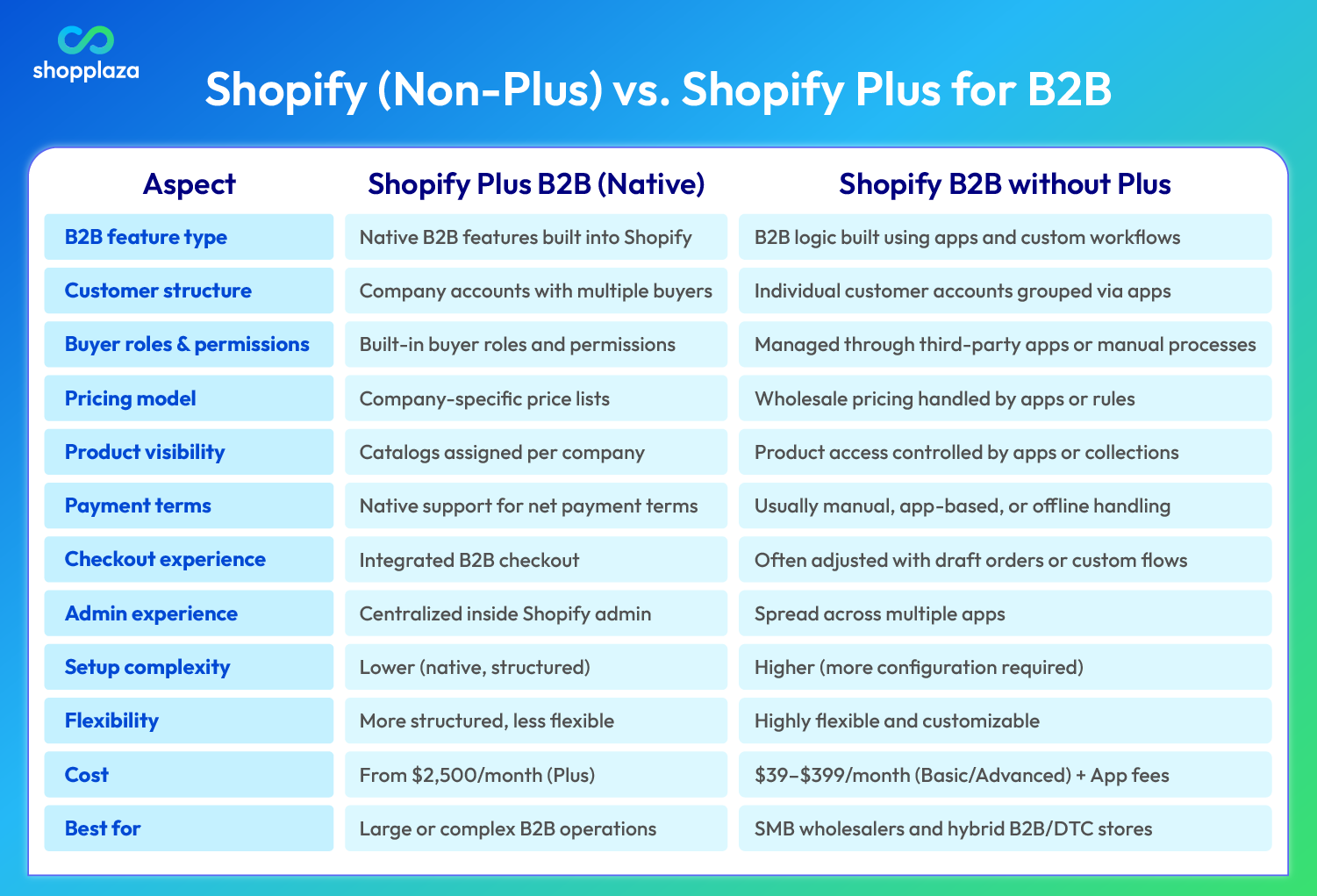
Shopify’s native B2B features—such as company accounts, buyer roles, and built-in price lists—are exclusive to Plus merchants.
That said, B2B selling isn’t limited to Plus.
Many merchants still sell wholesale and B2B using Shopify on standard plans. The difference lies in how those features are built—either natively on Shopify Plus or through apps and custom workflows on non-Plus plans.
Shopify B2B on Shopify Plus
Shopify Plus includes native B2B features built directly into the platform, so you don’t need to assemble your B2B setup from multiple apps.
Key benefits:
- All B2B functions live in the Shopify admin
- Easier to scale as order volume, buyers, and locations grow
- Faster setup with built-in tools and Shopify’s Sidekick AI
Trade-offs:
While Shopify Plus is a strong fit for large, complex B2B operations, its higher cost and rigid structure may not be ideal for smaller businesses. For those just starting or growing, the upfront cost might be a barrier.
In practice, many merchants combine Shopify’s native features with a broader Shopify B2B solution to handle pricing, access control, quotes, and wholesale workflows more smoothly.
Shopify B2B without Shopify Plus
For many merchants, Shopify B2B without Plus is the ideal starting point. While native B2B features are exclusive to Shopify Plus, many small and mid-sized businesses (SMBs) still succeed in B2B by using Shopify’s flexibility and integrating third-party apps.
What’s missing on non-Plus plans:
- Native B2B features: Shopify’s company accounts, built-in price lists, and payment terms are unavailable.
- Scalability challenges: As businesses grow, relying on third-party apps can create additional complexity.
Why SMB wholesalers still choose this route:
- Lower upfront cost
- More freedom to customize pricing, access, and flows
- Works well for early-stage wholesalers or hybrid B2B/DTC stores
Trade-offs:
- Manual workflows: Managing B2B logic through apps requires more manual setup and maintenance.
- Limited built-in integrations: Non-Plus merchants must rely on third-party tools to achieve the level of integration that Shopify Plus offers natively.
If you want to dive deeper into this approach, check out our guide on Shopify B2B without Plus, where we’ll break down how merchants build B2B systems on standard Shopify plans.
You might be interested in: Shopify vs Shopify Plus: Key Differences
Core Capabilities of Shopify B2B
B2B selling isn’t about adding a discount and calling it wholesale. As order values grow and buying teams get involved, you need a structure that supports how businesses actually buy.
No matter which plan you use, a successful Shopify B2B store is built around a few core capabilities. Shopify Plus covers these natively, while other setups recreate them with apps. Understanding these foundations helps you design the right system from the start.
B2B Company Accounts
In B2B, you sell to companies, not individuals. Orders are often placed by multiple people, reviewed internally, and tied to one ongoing business relationship rather than a single purchase.
Shopify B2B introduces company-level accounts that reflect how real businesses operate. With a proper Shopify B2B account structure, merchants can:
- Group multiple buyers under one company
- Assign roles and permissions (for example, buyer vs manager)
- Support multiple locations under the same business
- Manage B2B customers directly inside the Shopify admin
This setup makes it much easier to handle repeat orders, approval workflows, and long-term wholesale relationships as your B2B operation grows.
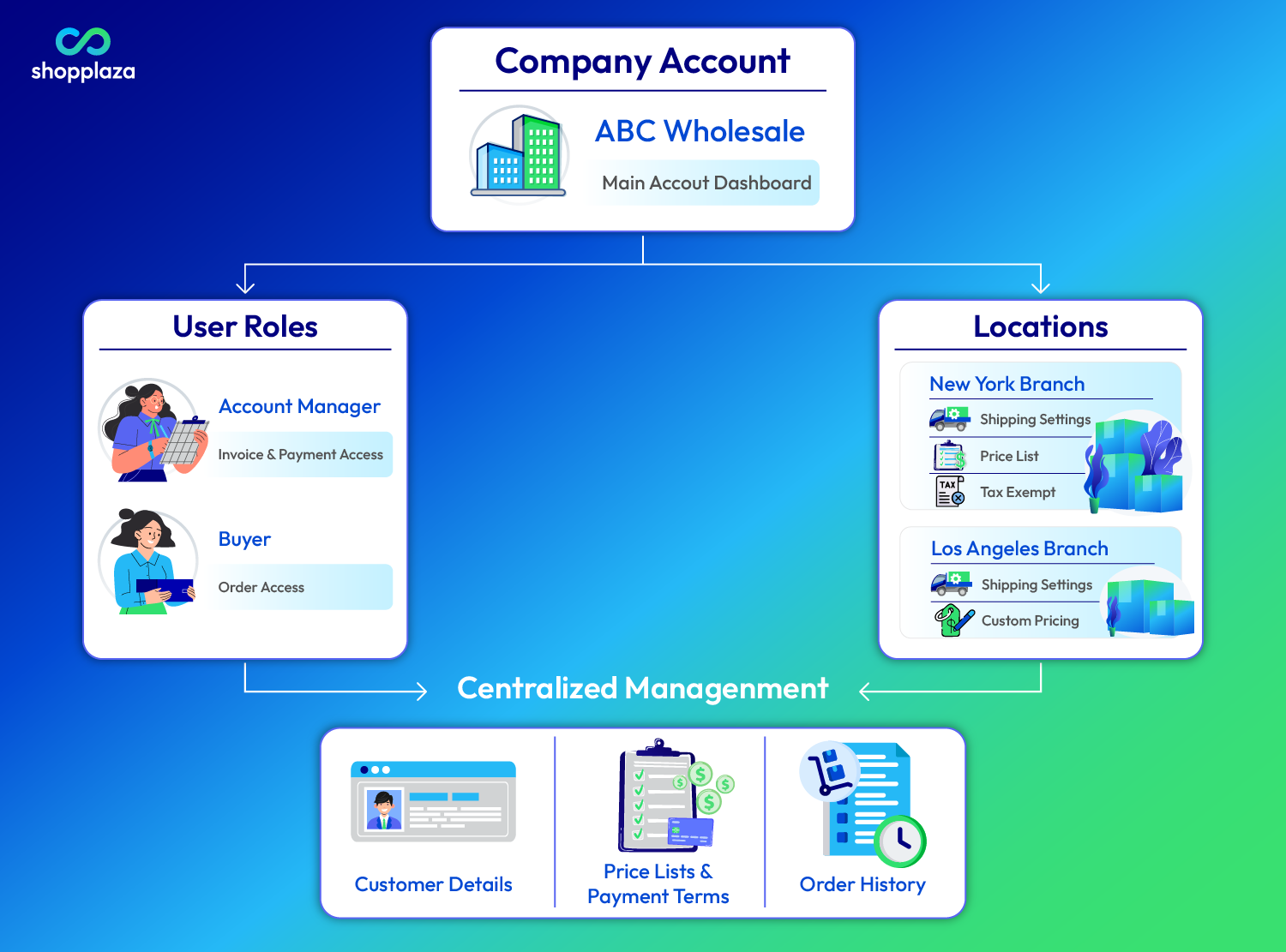
Note: Standard Shopify plans don’t support company-level accounts. Instead, you usually create individual accounts for each person and use an app to "tag" them all as part of the same group. It’s a bit more manual, but it works for smaller teams.
Wholesale Pricing and Catalogs
In B2B, pricing is rarely public. Each business customer usually has negotiated prices, a specific product range, and agreed purchasing terms. That’s why a B2B store needs a clear way to control who sees which products and which prices apply.
Shopify B2B approaches this through catalogs and pricing at the company level. Here’s how the native features handle flexible Shopify B2B pricing models:
- Separate B2B and DTC experiences without running two systems
- Make sure buyers only see approved products and agreed pricing
- Support common wholesale models like volume pricing and repeat orders
Some merchants also use Shopify Forms to collect B2B account requests, allowing businesses to apply for access before wholesale pricing is unlocked.
This layer of access control is critical in B2B. It protects margins, prevents wholesale price leakage, and ensures B2B and DTC experiences don’t overlap.
Note: On non-Plus plans, merchants often rely on third-party apps to hide wholesale prices and restrict access to B2B catalogs until customers are approved.
B2B Order Flow and Checkout
B2B buying is a process, not a single click.
Unlike DTC, business orders often require review, internal approval, or coordination between teams before payment is completed. Buyers may place orders on behalf of a company, request invoices, or pay later using agreed terms.
Shopify Plus supports this with native B2B checkout capabilities that are designed for real B2B workflows. A properly structured Shopify B2B checkout allows merchants to go beyond standard consumer checkout and support how businesses actually purchase.
In practice, this means B2B checkout can support:
- Payment terms instead of immediate payment
- Draft orders for review and approval
- Flexible payment methods
- Order rules like minimum or maximum quantities
These features give merchants more control while giving buyers the flexibility they expect. Without this, DTC-style checkout often becomes a bottleneck—forcing manual follow-ups, offline invoices, or custom workarounds.
A B2B-ready checkout reduces friction for buyers without sacrificing accuracy, control, or margin protection.
Note: On Shopify Basic or Advanced plans, many merchants use a Shopify quote app to let buyers request custom pricing and convert it into a draft order for review and negotiation. SP Request a Quote (RFQ) is one of the most complete options available for this workflow.
Inventory, Shipping, and Fulfillment
B2B orders are usually larger, less predictable, and more operationally complex than DTC orders.
Instead of single-item shipments, Shopify B2B orders often involve bulk quantities, mixed SKUs, or recurring reorders. This directly impacts how inventory needs to be planned and allocated across locations.
Shipping in B2B also works differently. Many orders ship via freight instead of standard parcel delivery, require delivery coordination, or need specific shipping rules based on order size, weight, or destination.
As B2B volume grows, merchants often need to:
- Manage inventory for bulk and mixed orders
- Coordinate freight shipping instead of flat-rate delivery
- Schedule deliveries or align shipments with buyer timelines
- Batch orders to reduce shipping and fulfillment costs
Without the right structure, these challenges quickly create delays, errors, and higher operating costs. A B2B-ready fulfillment setup helps merchants stay efficient as order sizes and customer expectations increase.
Note: On standard Shopify plans, B2B merchants rely on apps like SP Smart Shipping & Batching to set custom B2B shipping rules, batch large orders, and manage bulk or freight-based deliveries—especially when standard flat-rate or carrier shipping isn’t flexible enough for wholesale scenarios.
Taxes and Compliance in B2B
B2B selling often comes with extra tax and compliance requirements—especially around tax-exempt sales, VAT IDs, and resale documentation. These are things DTC stores rarely need to worry about.
Shopify B2B includes native tools to support this:
- Tax-exempt customers: B2B companies or locations can be marked as tax-exempt, so tax isn’t charged at checkout once documentation is provided.
- VAT ID handling for EU B2B: Shopify Plus supports VAT ID collection and validation at checkout for eligible B2B transactions, helping merchants apply zero-rated VAT where appropriate.
- Company-level tax settings: Tax rules can be applied at the company or location level, which is important for multi-region wholesale buyers.
That said, Shopify doesn’t automatically collect or validate resale certificates or regulatory documents. Most merchants handle this during B2B account approval or use tax and compliance tools like Avalara as their business grows.
Related topic: Shopify wholesale and everything to know about!
How Businesses Typically Start with Shopify B2B
After understanding the core capabilities of Shopify B2B, most businesses follow a similar path when setting up their store. This isn’t about advanced optimization yet—it’s about choosing the right structure and getting the fundamentals in place so B2B can run smoothly.
1. Choose a B2B store model
The first decision is how B2B fits into your existing business.
Most Shopify B2B stores use one of two models:
-
Blended store: One Shopify store serves both B2B and DTC customers. Products and storefront are shared, while pricing, catalogs, and checkout rules change based on who’s logged in. This works well if B2B and DTC sell similar products and share inventory.
-
Dedicated B2B store: A separate Shopify store built only for wholesale buyers, with its own pricing, checkout rules, and access control. This is common when B2B operations, pricing, or teams need to stay fully separated from retail.
Pro Tip: If you don’t want to manage two separate stores, a blended B2B + DTC Shopify store is often the simplest option. Inventory, staff, and store management all stay under one roof, which helps reduce complexity and keep operating costs down.
2. Build the right B2B storefront experience
At this stage, the goal is to make sure the storefront supports how B2B buyers actually shop.
Choose a Shopify B2B theme that supports wholesale workflows, including fast navigation, clear product information, and features like product filtering, bulk ordering, and login-based browsing.
A well-structured storefront helps business buyers find products quickly and place repeat orders with less friction.
3. Set up customer accounts for B2B buyers
Once the store model is chosen, businesses move on to customer structure.
Next, merchants set up B2B buyers using Shopify’s new customer accounts and company records, so pricing and catalogs can be applied correctly.
4. Manage B2B catalogs and pricing logic
Next comes pricing and product visibility.
- Create catalogs or collections that control both product visibility and pricing
- Assign catalogs or collections to companies or locations
- Use company-specific pricing
- Set quantity rules and volume pricing
Related topic: How to Create a Catalog in Shopify for Your Store in 2025
5. Restrict access to B2B content
Before going live, most merchants put access control in place to avoid pricing leaks.
This usually includes:
- Requiring login to see B2B pricing
- Hiding wholesale catalogs from retail visitors
- Adding an account request or approval step for new B2B buyers
Access control is critical for protecting margins and keeping B2B and DTC experiences from overlapping.
6. Refine checkout, shipping, and operations over time
Very few businesses launch with a perfect B2B setup on day one.
Most start simple, then adjust:
- Checkout flows (quotes, draft orders, payment terms)
- Shipping rules for bulk or freight orders
- Automation as order volume grows
This phased approach lets businesses validate demand first, then scale without rebuilding their entire store.
For a complete, step-by-step walkthrough, see our full guide on how to set up B2B on Shopify, where we cover store setup in detail.
Common Challenges of Selling B2B On Shopify
Selling B2B on Shopify introduces challenges that don’t exist in DTC. As order volume and complexity grow, these issues become more visible.
Below are the most common challenges and how merchants typically deal with them.
- Complex pricing logic: B2B pricing often goes beyond simple price lists. Businesses may need contract pricing, volume tiers, regional prices, or time-based agreements. Use structured pricing rules and, when needed, extend native pricing with apps or integrations to maintain consistency.
- Multi-region and multi-market complexity: Selling across regions introduces different currencies, taxes, shipping rules, and compliance requirements. Segment pricing, catalogs, and shipping logic by region or market, often combined with localized settings and integrations.
- Checkout that doesn’t fit B2B buying behavior: Standard checkout is built for consumers, not businesses that need approvals, invoices, or payment terms. Use B2B-friendly checkout flows that support draft orders, order review, and flexible payment terms.
- Running B2B and DTC together without conflict: Wholesale pricing, products, or promotions can accidentally leak into the retail experience. Separate visibility using login-based access, catalogs, and clear rules for B2B vs DTC customers.
- Integrating with other business systems: As B2B grows, Shopify needs to stay in sync with ERP, CRM, accounting, and fulfillment systems. Plan integrations early and automate data sync to reduce manual work and errors.
Real-World Shopify B2B Examples
There’s no single “right” way to sell B2B on Shopify. Some businesses lean toward self-serve wholesale, others run B2B and DTC side by side, and some focus on volume pricing and repeat orders.
Below are real Shopify B2B examples showing how different brands handle wholesale—without overcomplicating the buying experience.
Microfiber Wholesale
Microfiber Wholesale sells cleaning supplies to professional buyers, but their Shopify store looks and feels very close to a consumer storefront.
What stands out
- Clear quantity-based pricing shown directly on the product page
- Large order thresholds (500+, 1000+) that encourage bulk buying
- Standard Add to Cart flow instead of forcing quotes or emails
- Familiar trust signals like reviews, free shipping messages, and simple navigation
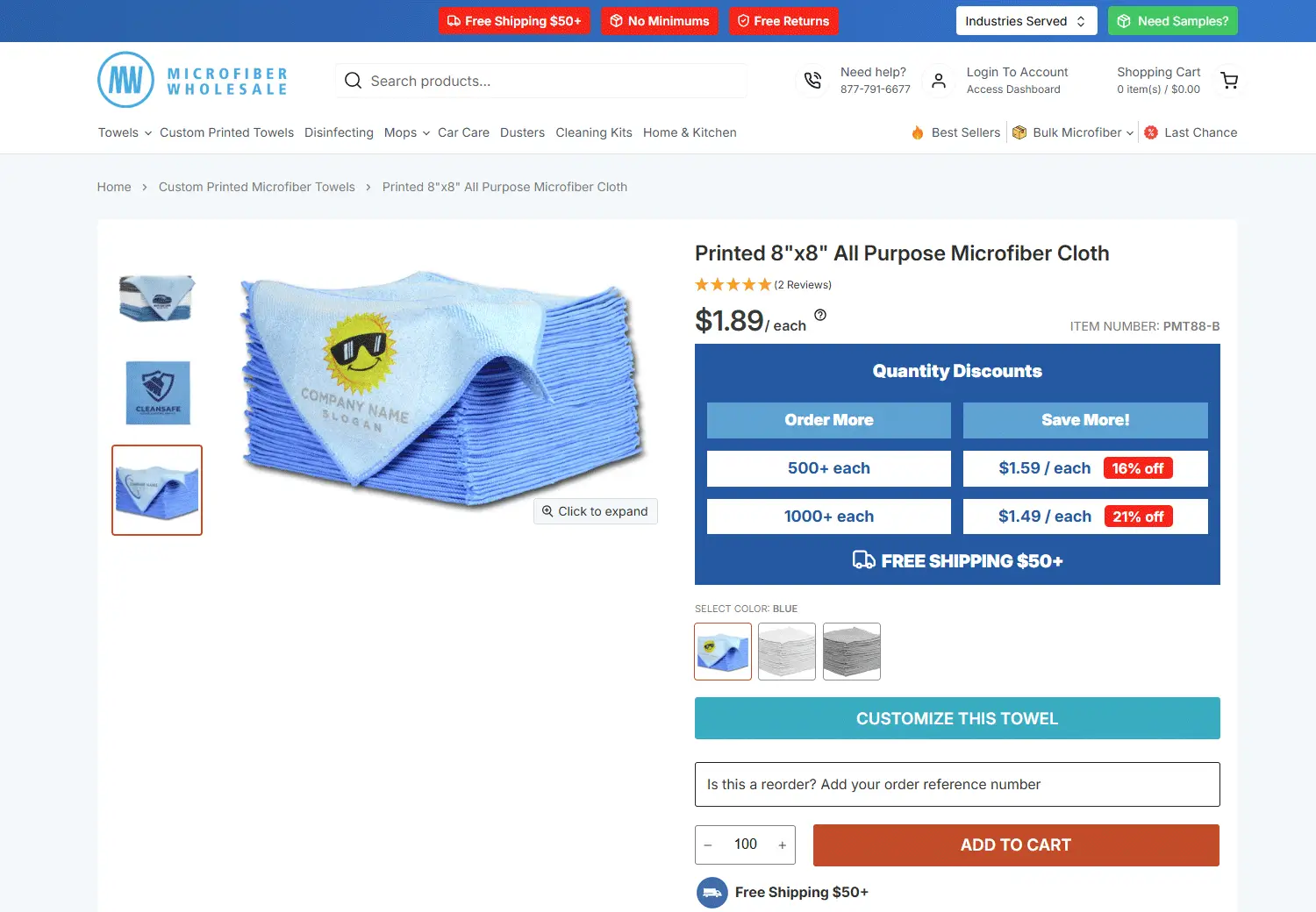
Why this works for B2B
- Buyers can self-serve without talking to sales
- Pricing logic is transparent and easy to compare
- Bulk discounts are visible before checkout, reducing friction
What we can learn
- B2B doesn’t have to look “corporate” to be effective
- Showing pricing clearly (with volume breaks) speeds up decisions
- A DTC-style UX can work well for repeat wholesale buyers
This is a strong example of using Shopify to support high-volume B2B orders while keeping the buying experience fast and familiar.
Industry West
Industry West is a modern furniture brand that uses Shopify Plus to serve both retail customers and trade buyers from the same storefront.
What stands out
- Standard retail layout with a familiar Add to Bag flow
- Clear trade messaging embedded into the page (“Trade partners enjoy up to 30% off”)
- Login prompt for trade customers without disrupting the DTC experience
- Detailed product visuals and specs that support professional buying decisions
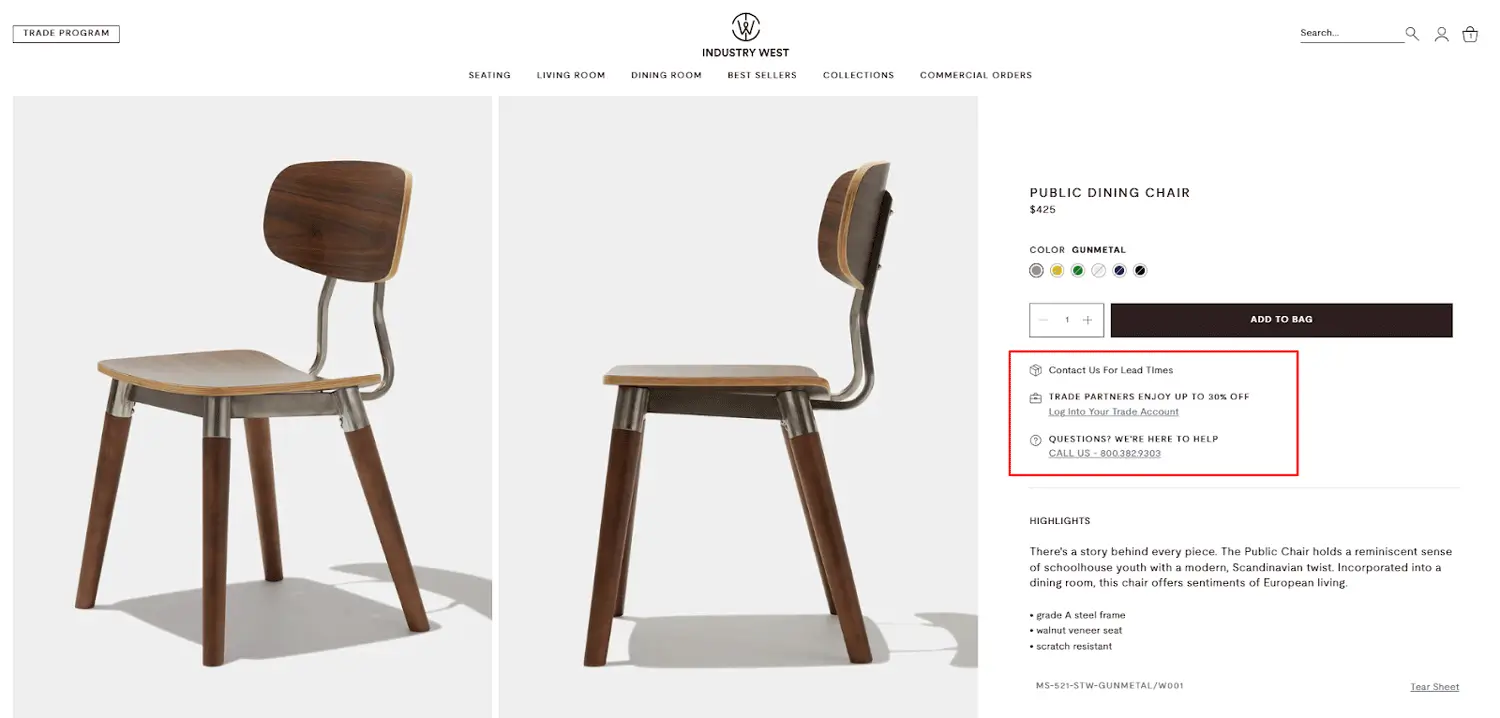
Why this works for B2B
- Trade pricing is hidden until buyers log in
- B2B and DTC customers share the same catalog, but see different pricing and benefits
- Repeat trade buyers can reorder easily without switching platforms
What we can learn
- You don’t need a separate wholesale site to support B2B
- Shopify Plus allows B2B benefits to live inside a polished DTC experience
- Strong visuals and clean UX matter just as much for business buyers
Industry West is a strong example of a blended B2B + DTC model, where Shopify B2B features support trade buyers without complicating the storefront.
Artisaire
Artisaire is a Canadian brand specializing in custom wax seals and sealing tools, serving both individual customers and business buyers such as wedding planners, luxury brands, and stationery studios.
What stands out
- Clear volume-based pricing table directly on the product page
- Unit price decreases automatically as quantity increases
- No coupon codes or manual negotiation required
- Custom options (size, shape, color, uploads) work smoothly at scale
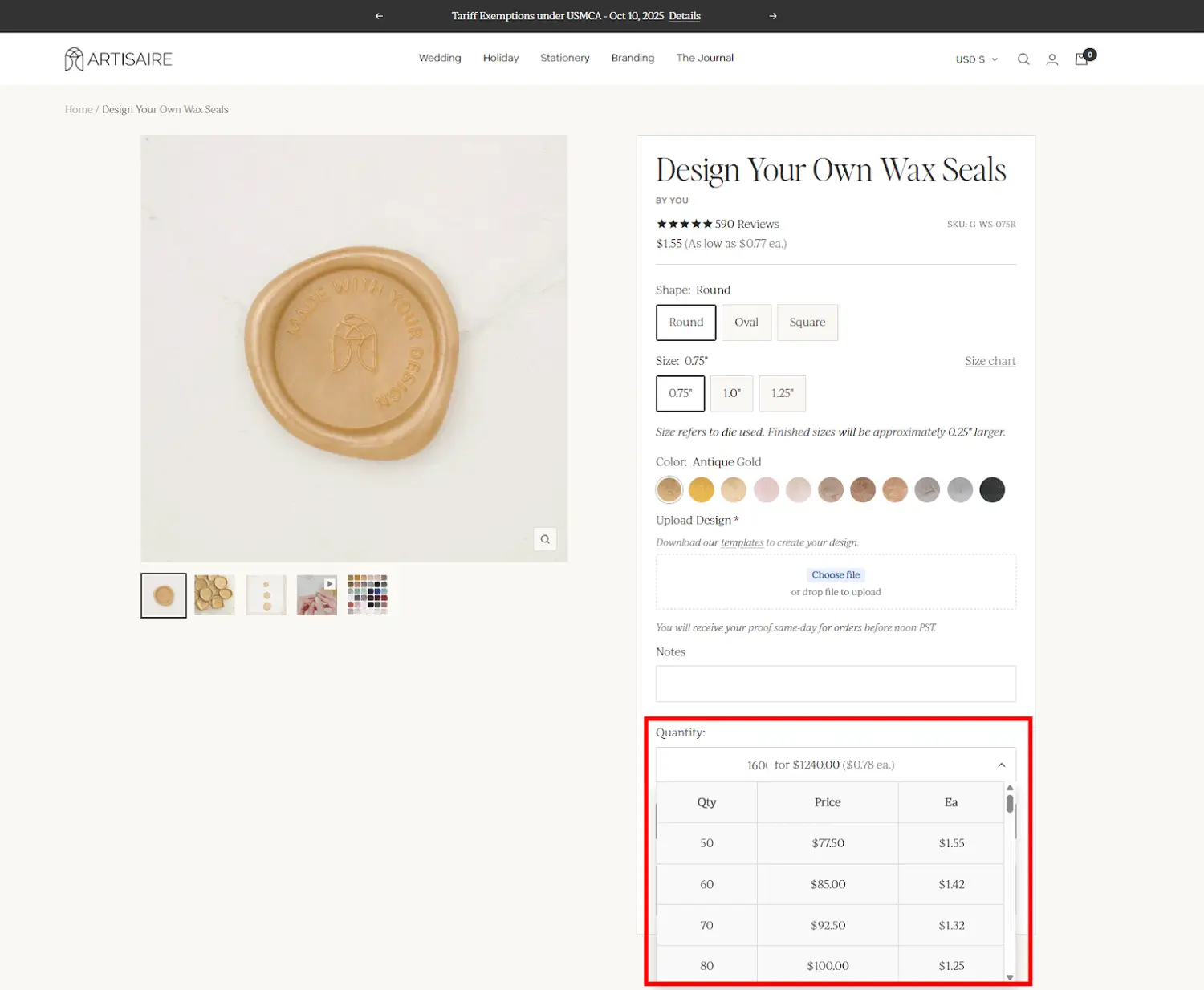
Why this works for B2B
- Business buyers can instantly see price breaks for larger orders
- Pricing logic encourages bulk purchasing without hiding prices behind quotes
- The buying experience feels self-serve, fast, and transparent
What we can learn
- B2B doesn’t always need gated pricing or account approval
- Tiered pricing on the product page can handle many wholesale use cases
- Shopify can support high-volume, customized products without complex workflows
Artisaire is a strong example of product-level B2B pricing done right, where volume discounts and customization are built directly into the buying flow.
Essential Shopify Apps for B2B Functionality
If you’re on Shopify Plus, you already have most of what you need for B2B out of the box. But in real life, merchants still use apps to handle things like pricing logic, access control, shipping rules, automation, and more.
That’s the nice thing about Shopify: there’s usually an app for whatever you’re trying to do. Below are some popular apps used for selling B2B and wholesale on Shopify.
| Category | App name | Developer | Price | What it does |
|---|---|---|---|---|
| Pricing & quote management | SP Request a Quote (RFQ) | Shopplaza B2B | Free | Let B2B buyers request quotes, negotiate, and convert approved quotes into draft orders |
| B2B Wholesale Hub | Orbit | From $39/month | Tiered pricing, wholesale discounts, and customer group rules | |
| Wholesale Pricing Discount B2B | Wholesale Helper | From $24.99/month | Volume-based discounts and customer-specific pricing rules | |
| B2B accounts, login & access control | SP Hide Price & Access Control | Shopplaza B2B | Free | Hide prices/content, restrict access based on login, location, IP, or custom rules |
| Locksmith | Lightward | From $12/month | Lock/hide pages, collections, or products with customer-specific rules | |
| Helium Customer Fields | Helium | From $12/month | Custom B2B registration forms, metafields, and approval workflows | |
| Shipping rates | SP Smart Shipping & Batching | Shopplaza B2B | Free plan available | Custom B2B shipping rules, DIM weight, surcharges, batching for bulk orders & tracking |
| Advanced Shipping Rules | Bambri | From $9/month | Complex conditional shipping logic, rates based on rules & destinations | |
| ShipMagic | Speedy Squirrel | Free plan available | Freight-style rates, rule-based calculations, and advanced shipping options | |
| Order management & automation | Shopify Flow | Shopify | Free | Automate B2B workflows, tagging, notifications, and conditional actions |
| Order Automator | Automator Apps | Free plan available | Automate order tagging, routing, fulfillment, and custom B2B actions |
Final Words
Selling B2B on Shopify isn’t just DTC with discounts. It requires a different structure, different pricing logic, and workflows that match how businesses actually buy.
Shopify Plus makes this easier with native B2B features, but many merchants successfully start and scale B2B using apps and custom setups on standard Shopify plans. What matters most is understanding your B2B model early and choosing tools that fit your current stage.
Whether you’re just exploring wholesale or actively building a Shopify B2B store, investing time in the right setup now will save you a lot of rework later. With the right structure in place, Shopify can be a powerful platform for growing a sustainable B2B business.