Many people assume that running B2B on Shopify requires Shopify Plus. With native company accounts, price lists, and payment terms all tied to Plus, it’s easy to see why that assumption exists.
In reality, you can run B2B on Shopify without Plus.
Many merchants operate wholesale and B2B stores on standard Shopify plans by using apps and flexible workflows to manage access control, pricing visibility, and order approvals. While this approach does not provide a fully automated, enterprise-level setup, it often fits how early-stage B2B businesses actually work.
This guide explains what’s realistically possible and how to set up Shopify B2B without Plus, keeping the process simple and practical.
Do I Really Need Shopify Plus for B2B?
The answer is not always.
While Shopify’s native B2B features are available only on Shopify Plus, many merchants successfully sell B2B on standard Shopify plans.
But how? In practice, non-Plus merchants run wholesale stores using Shopify B2B apps to handle access control, hidden pricing, request-a-quote workflows, and assisted ordering. This keeps costs lower while still supporting real-world B2B selling.
Let’s break down how this works in the next part!
How To Set Up Your Shopify B2B Without Shopify Plus
On non-Plus plans, Shopify does not offer native B2B features. That means apps are required to handle access control, pricing visibility, and B2B order workflows. Once those tools are in place, the rest of the setup becomes straightforward.
1. Choose the right B2B apps for your setup
Before changing anything on your storefront, decide how you want your B2B workflow to work. On non-Plus plans, most Shopify B2B setups rely on apps to handle core needs such as access control, hidden pricing, and quote-based ordering.
Shopplaza provides the essential tools to run to set up wholesale on Shopify:
- SP Hide Price & Access Control: Hide prices, lock store content, and control access for B2B, wholesale, or VIP customers.
- SP Request a Quote (RFQ): Let customers request quotes, negotiate pricing, and convert approved deals into orders.
- SP Login As Customer: Log in as customers to troubleshoot issues and provide hands-on support.
- SP Smart Shipping & Batching: Set smart shipping rules, batch orders, and manage delivery scheduling for bulk orders.
Once these apps are in place, you have the foundation needed to run B2B on standard Shopify plans — without Shopify Plus.
2. Control who can access B2B products
The first thing to solve is access. Not every visitor should see or buy B2B products.
You can protect B2B and wholesale content without upgrading to Shopify Plus with SP Hide Price & Access Control - completely free to use.
A typical access control setup includes:
- Choosing what to protect: Apply access rules to specific products, collections, or the entire store.
- Deciding who is allowed in: Restrict access to logged-in or approved customers only, or apply rules based on region, IP address, password, or age verification.
- Defining what blocked visitors see: Show a custom message or redirect users to another page when access is restricted.
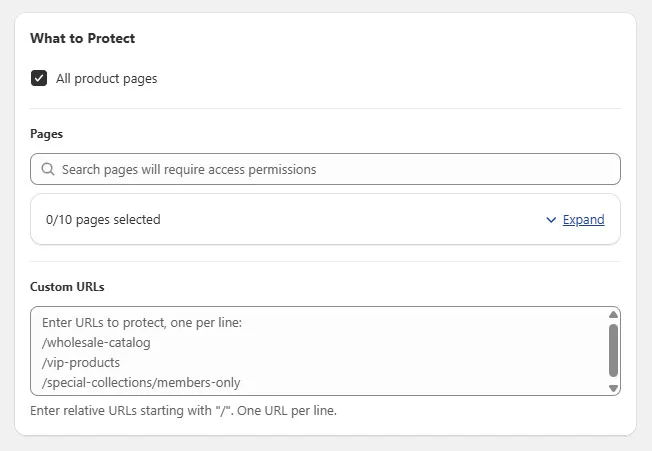
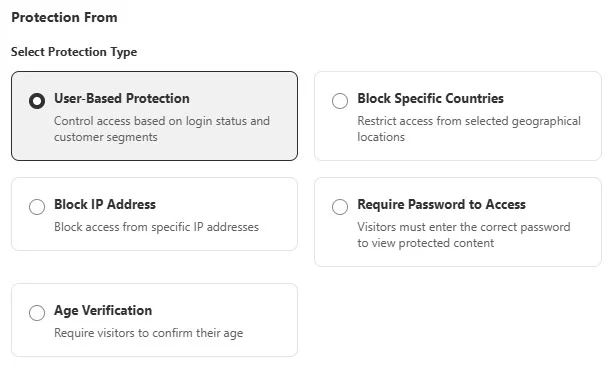
Once the rule is enabled, protected B2B products are hidden from the public and only visible to the right customers.
Using our free access control app makes it easy to get started with B2B, keep pricing private, and stay in full control, all without the cost or complexity of Shopify Plus.
3. Hide prices and customize checkout flow
For B2B businesses, fixed pricing and standard checkout do not reflect how orders actually work. Prices often depend on quantity, customer history, or custom terms.
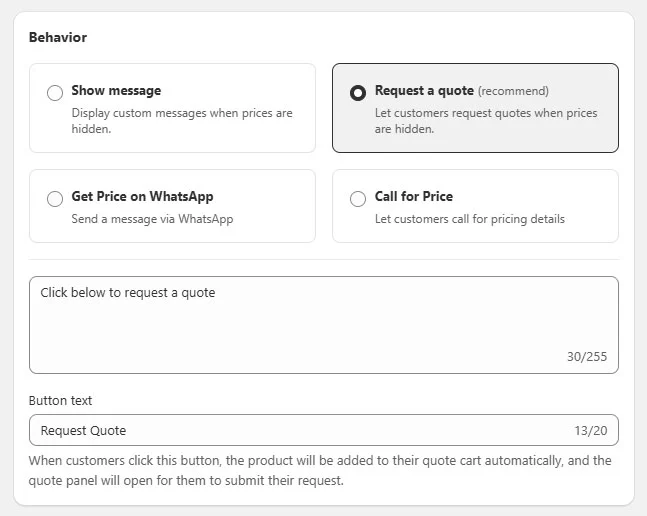
Instead of sending buyers straight to checkout, many merchants combine hidden pricing with a request-a-quote workflow using SP Request a Quote (RFQ). When used together with SP Hide Price & Access Control, this approach allows stores to hide prices and replace checkout actions consistently across B2B products.
A common setup includes:
- Hiding prices on B2B products: Keep pricing private and visible only after review or approval.
- Replacing Add to Cart with Request a Quote: Let buyers submit quote requests instead of placing orders immediately.
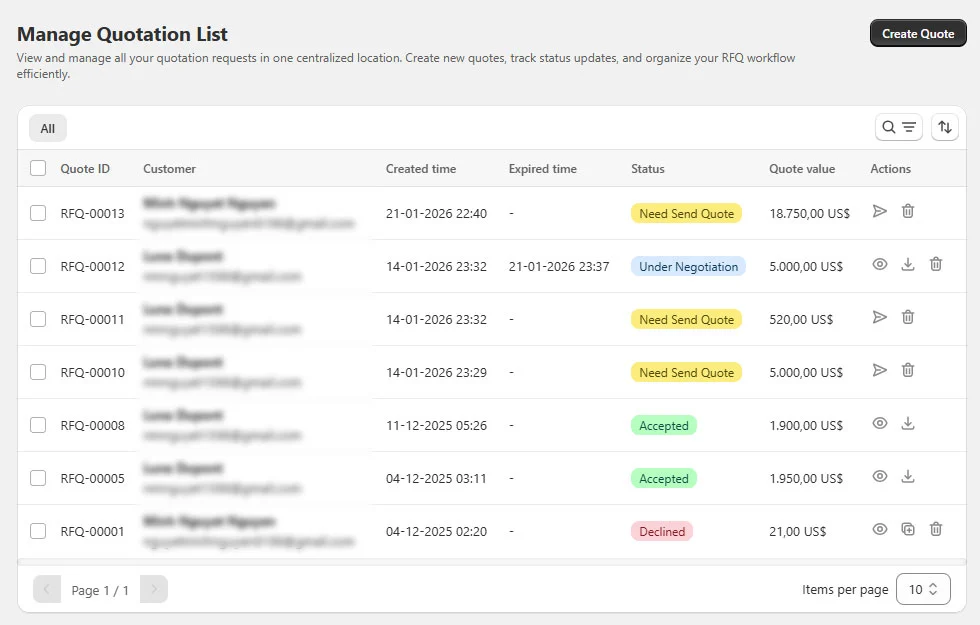
- Creating and managing quotes in one place: Generate new quotes for B2B buyers and manage all requests from a single dashboard.
- Reviewing and adjusting quotes before approval: Check quantities, update pricing, and negotiate terms before confirming the order.
- Turning approved quotes into orders: Convert accepted quotes into draft orders and complete the sale inside Shopify.
This workflow gives you full control over pricing and approvals while keeping the buying process simple for B2B customers.
4. Support assisted B2B ordering
In B2B, orders are often complex, and buyers may need help completing purchases or making changes. It is common for sales or support teams to step in during the ordering process.
Instead of relying on emails or screen sharing, many merchants support assisted ordering using SP Login As Customer, which allows staff to access the storefront as a specific customer.
A typical assisted B2B workflow includes:
- Accessing customer accounts directly: View the store as the customer to check pricing, available products, and cart status.
- Helping with order and checkout issues: Assist customers in completing orders or verifying details when issues occur during checkout.
- Providing real-time support: Resolve problems more efficiently without asking customers to send screenshots or repeat steps.
This step is optional, but it is commonly used by B2B teams that manage orders manually or provide hands-on customer support.
5. Optimize fulfillment and shipping for bulk orders
As B2B order volume grows, fulfillment and shipping can quickly become more complex. Bulk orders often require different shipping rules, delivery schedules, or batching logic compared to standard retail orders.
To handle this, you can add tools like SP Smart Shipping & Batching to manage shipping and fulfillment more efficiently.
Common use cases include:
- Applying custom shipping rules for B2B orders: Set shipping conditions based on order value, weight, destination, or customer type.
- Batching orders for easier fulfillment: Group multiple orders together to reduce handling time and operational overhead.
- Managing delivery schedules: Support scheduled or conditional deliveries for wholesale and bulk shipments.
Shopify B2B Without Plus: Limitations You Should Know
Running B2B on standard Shopify plans is practical, but it does come with limitations. Understanding these early helps you avoid frustration as your business grows.
Common limitations include:
- No native company accounts: B2B customers are managed at the individual account level, not under a single company with multiple buyers.
- No built-in price lists or catalogs: Customer-specific pricing must be handled through apps, discounts, or quote-based workflows.
- No native payment terms: Payment terms such as Net 30 or Net 60 are not available out of the box and often require manual handling.
- More manual processes as you scale: Managing pricing, approvals, and orders through apps or custom workflows may require more hands-on work as order volume increases.
Apps can help fill these gaps, but they do not fully replace Shopify Plus. This setup works best for early-stage B2B, wholesale businesses, or merchants who prefer flexibility over automation.
If you’re considering upgrading, you can also check our practical walkthrough on how to set up B2B on Shopify using native Shopify Plus features.
Wrap Up
Running Shopify B2B without Plus is not only possible, it’s a practical starting point for many wholesale and B2B merchants.
By using third-party apps, merchants can build a functional B2B workflow on standard Shopify plans without committing to Shopify Plus upfront.
This approach works best for early-stage B2B, wholesale businesses, or teams that prefer flexibility over full automation. As your operation grows and requires native company accounts, automated pricing, or payment terms, Shopify Plus becomes a logical next step rather than a requirement from day one.
Start simple, validate your B2B model, and scale when the business truly needs it!