There are dozens of size chart apps in the Shopify App Store. At first glance, many of them look almost the same: a size chart popup, a table, a few templates, and a promise to reduce returns.
The real differences usually show up after you install.
Maybe the templates do not match your products. Maybe the display rules do not scale when your catalog grows. Maybe the chart looks fine on desktop, but breaks on mobile. Maybe the upgrade path costs more than expected. Or maybe support takes too long to respond when something goes wrong.
A good Shopify size chart app should help shoppers choose the right size quickly, while helping merchants manage size charts across products, collections, tags, languages, devices, and store growth. At minimum, look for strong templates, flexible display rules, mobile-friendly rendering, unit conversion, and transparent pricing.
This guide is the buyer’s checklist version. We’ll cover the 10 features that actually matter when choosing a Shopify size chart app, the features that sound useful but may not matter for every store, the red flags to avoid, and a simple framework to match the right app to your store stage.
📌 Key takeaways before you dive in:
- The most important features to check are industry templates, product display rules, import options, display formats, mobile rendering, unit conversion, multi-language support, AI size recommendations, theme compatibility, and scalable pricing.
- Many size-related returns come from avoidable fit uncertainty, so the right app should make it easy to improve sizing guidance across dozens or hundreds of products.
- Red flags include no free plan or trial, no mobile demo, recent negative support reviews, repeated theme-conflict complaints, unclear pricing, and no recent updates.
- Small stores can often start with a free tier. Growing multi-category catalogs usually need rules, imports, and multiple display formats. International or AI-driven stores may need higher-tier features.
Why the right Shopify size chart app matters
A size chart app touches one of the most sensitive moments in the buyer journey: the size selector.
When it works well, shoppers can check measurements, understand the fit, and click Add to cart with more confidence. When it works poorly, it creates friction at the exact moment the shopper is already unsure.
Common problems include:
- The wrong chart appears on the wrong product
- The chart is buried too far from the size selector
- The popup is hard to open or close on mobile
- The chart is too small to read
- Unit conversion is missing
- The app conflicts with the theme
- The free plan is too limited for your actual catalog
The cost of the wrong app is not just the monthly fee. It can also mean hours of manual setup, per-product chart assignment, theme debugging, support delays, and switching pain later when you outgrow the app.
That is why a 10-minute evaluation with a clear checklist can save a lot of work.
Learn more: How To Add Sizes On Shopify: A Complete Guide
10 features to look for in a Shopify size chart app
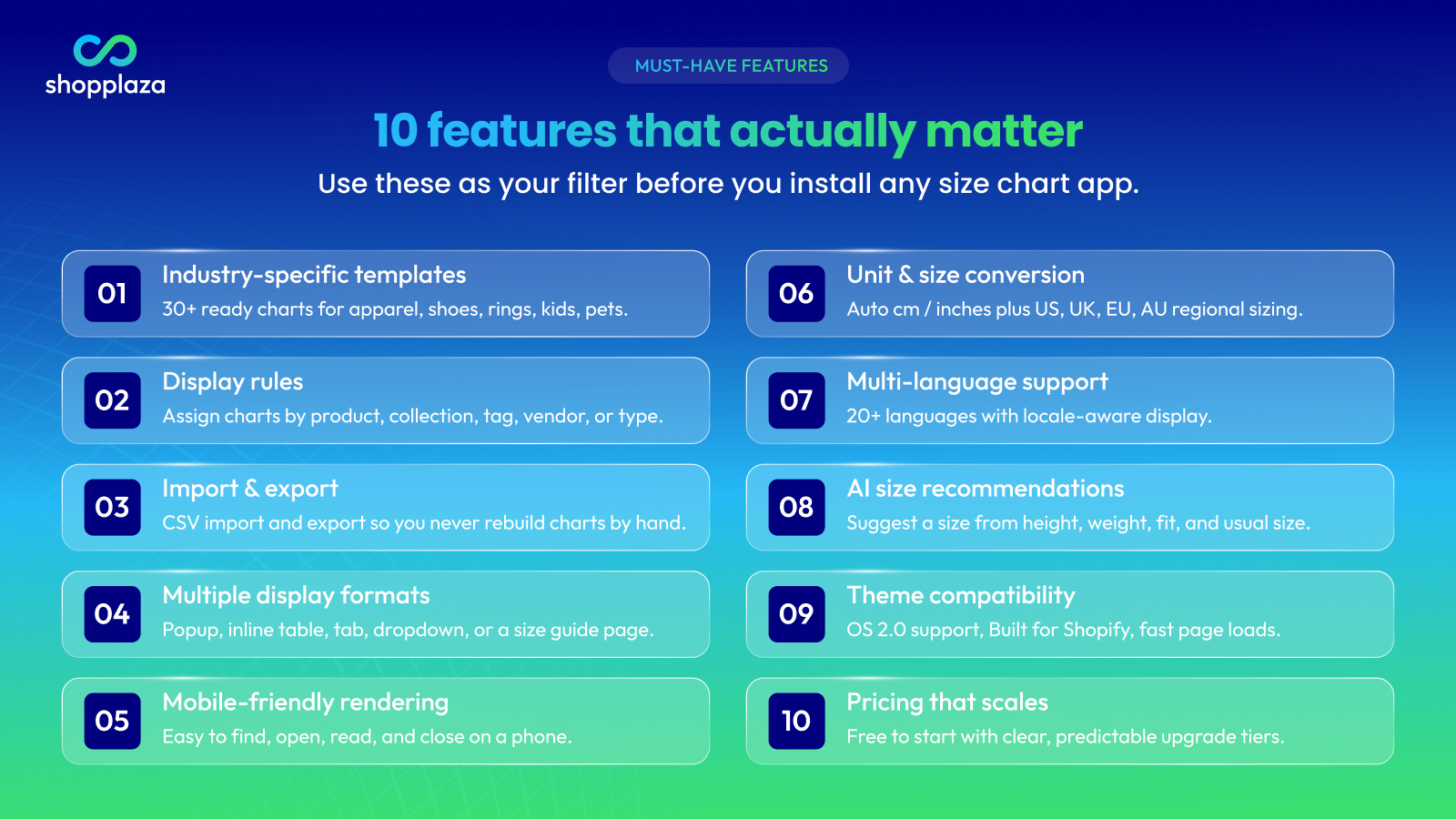
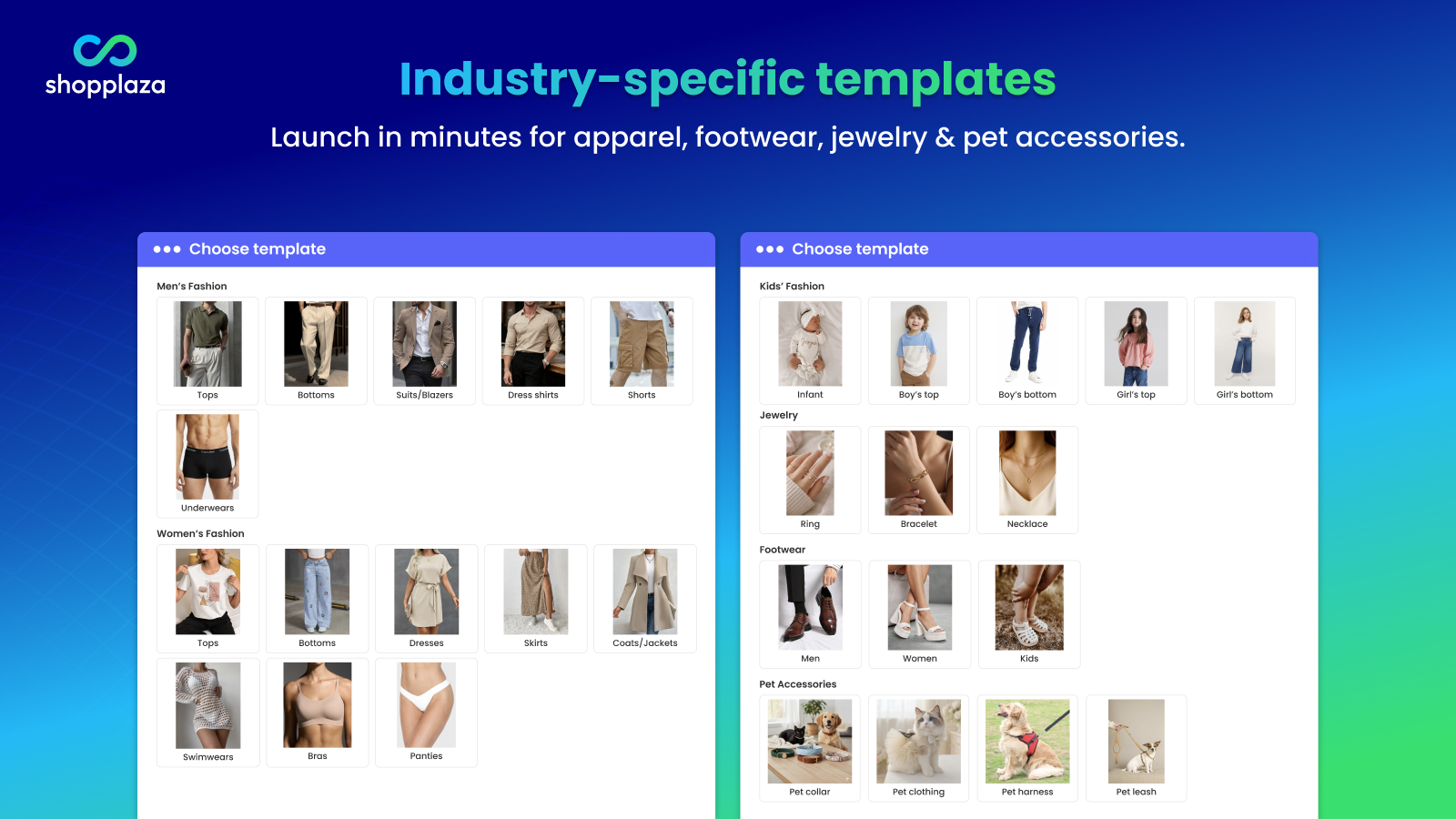
1. Industry-specific templates
Building one size chart from scratch is manageable. Building dozens of charts for apparel, footwear, jewelry, kidswear, pet accessories, and accessories is not.
Templates save time because they give you a starting structure for common product types.
Look for:
- Templates by industry, not just one generic size table
- Common categories such as tops, bottoms, dresses, shoes, rings, bracelets, pet collars, hats, and gloves
- Editable templates that let you change labels, measurements, notes, and layout
- Templates that support both body measurements and garment measurements when relevant
A template should speed up setup, not lock you into a format that does not fit your products.
2. Product, collection, tag, and vendor display rules
If your store sells across categories, you will need different charts for different products.
A t-shirt chart should not appear on a ring page. A shoe size chart should not show on a pet collar product. A slim-fit shirt may need different guidance from an oversized hoodie.
Without display rules, you either assign charts manually one by one or show the same chart everywhere. Both options create problems as your catalog grows.
Look for the ability to assign charts by:
- Product
- Collection
- Product tag
- Vendor
- Product type
- Metafield value, if supported
The ideal setup is simple: create one rule, assign the right chart to a group of products, and let new products inherit the chart when they match the rule.
This matters most for stores with frequent new arrivals, multiple suppliers, or more than one product category.
3. Import and export options
Manual chart entry becomes slow once your catalog grows.
If you have more than 50 products, or if suppliers already give you size data in spreadsheets, import options can save hours of work.
Look for:
- CSV import for size charts
- Bulk chart creation
- Import from product descriptions, images, or other sources if available
- Clear documentation for the import format
- Import preview before changes go live
- Export options if you want to edit at scale or migrate later
Export support is especially useful if you ever switch apps, update many charts at once, or want to keep backups of your sizing data.
At minimum, the app should make it easy to move sizing information in and out without rebuilding every chart manually.
4. Multiple display formats
A size chart popup near the size selector is the most common format. But it is not always the best format for every store or product type.
The right app should give you several display options so you can match the chart experience to your theme and product page layout.
Common display formats include:
- Popup or modal
- Inline table below the variant picker
- Tab inside the product information area
- Dropdown or accordion
- Floating button
- Dedicated size guide page
For example, apparel often works well with a popup near the size selector. Jewelry may work better with an inline ring size guide. A large global store may also want a dedicated sizing page that collects all guides in one place.
Choose an app that lets you test different formats instead of forcing every product into the same layout.
5. Mobile-friendly rendering
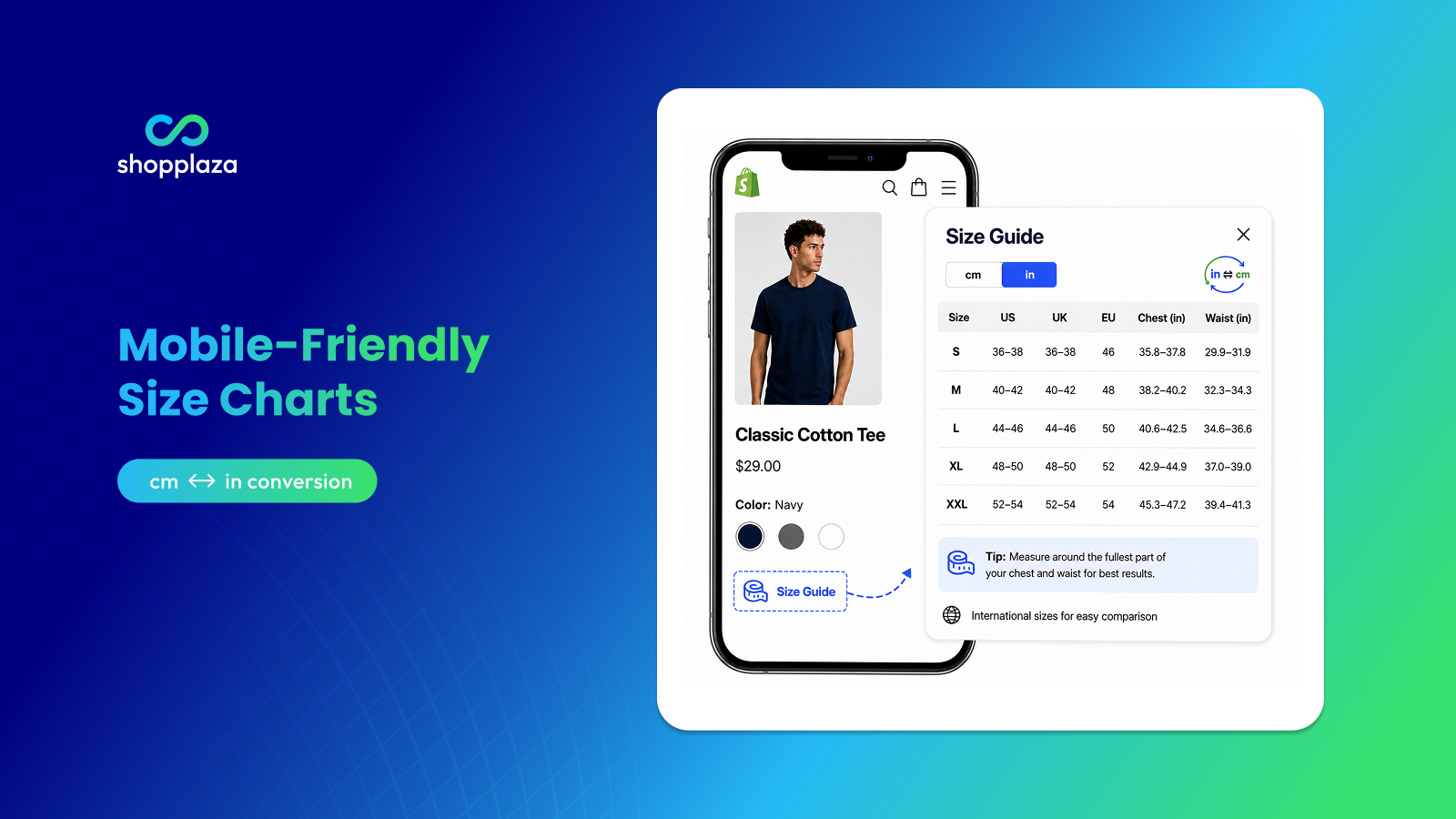
Most Shopify shoppers browse on mobile. If your size chart is hard to use on a phone, it will not do its job.
A mobile-friendly size chart should be easy to find, open, read, scroll, and close.
Before installing an app, test the demo on a real phone and check:
- Is the Size Guide trigger visible near the size selector?
- Is the tap target large enough to use comfortably?
- Does the popup open cleanly?
- Is the close button easy to tap?
- Does the table scroll horizontally or stack properly?
- Is the text readable without pinching and zooming?
- Does the chart work well with sticky Add to cart bars or mobile drawers?
A size chart that looks clean on a desktop but breaks on mobile can create the same friction it is supposed to remove.
6. Unit conversion and international size conversion
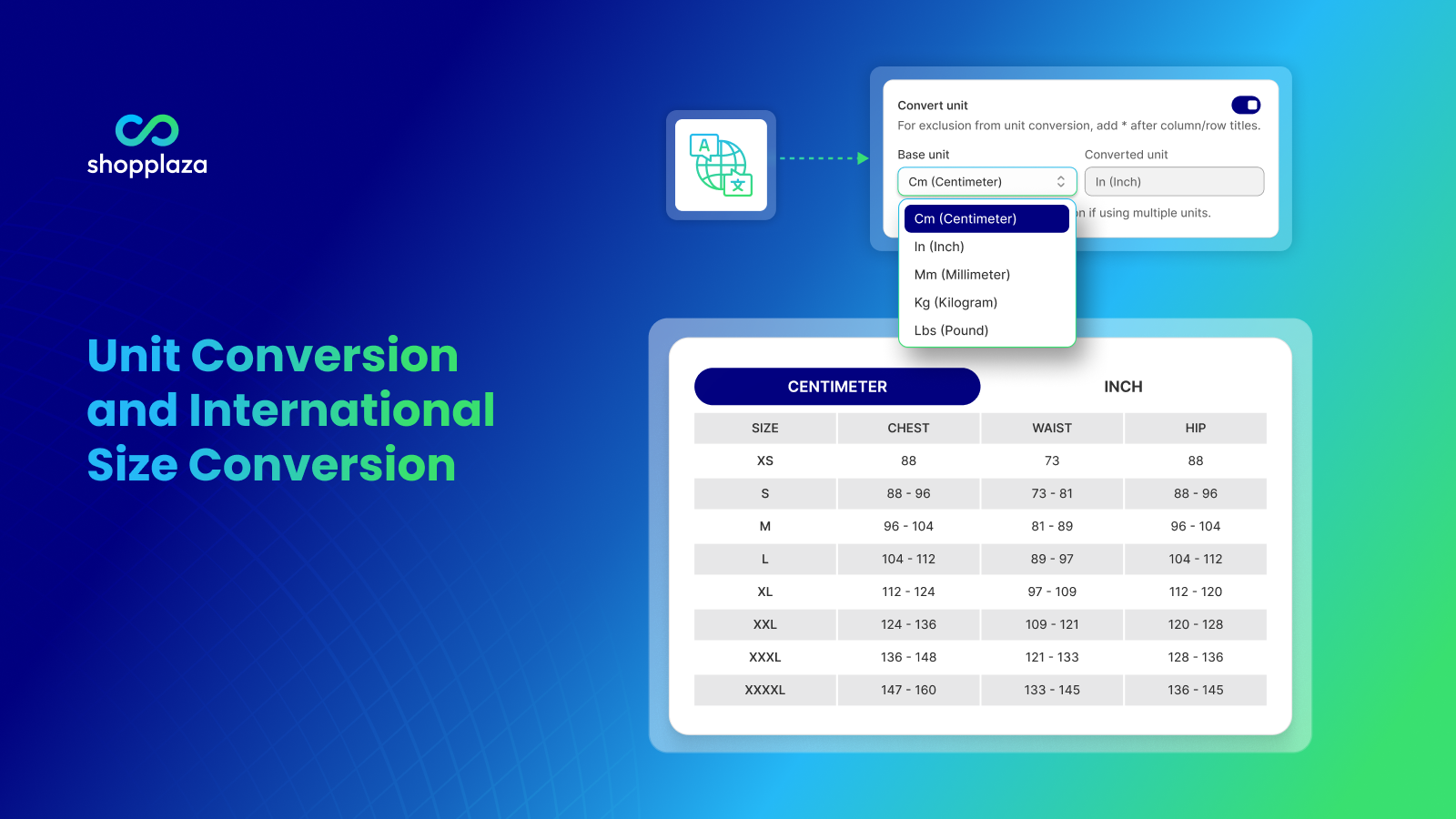
If you sell outside one country, unit conversion is not optional.
Shoppers should not have to manually convert inches to centimeters, or guess the difference between US, UK, EU, and AU sizing.
Look for:
- Automatic inches ↔ centimeters conversion
- US, UK, EU, AU, JP, KR, or other relevant size labels
- Region-specific size guidance
- Clear conversion notes
- Optional auto-detection by shopper location or store locale
Manual maintenance of separate regional charts can become a hidden operational cost. A good app should reduce that work, not add to it.
This is especially important for apparel, footwear, rings, kidswear, and international stores using Shopify Markets.
7. Multi-language support
For international stores, size charts should be understandable in the shopper’s language.
This is not only about translating the title “Size Guide.” The chart labels, notes, measuring instructions, and fit guidance should also make sense in the customer’s locale.
Look for:
- Shopify Markets compatibility
- Translation support by chart
- Editable translations
- Auto-language display based on store locale
- Support for multiple storefront languages
If a shopper can read the product page but not the size guide, the sizing experience is still incomplete.
As a benchmark, MP Size Chart supports 20+ languages, which is useful for stores selling across multiple markets.
8. AI-powered size recommendations
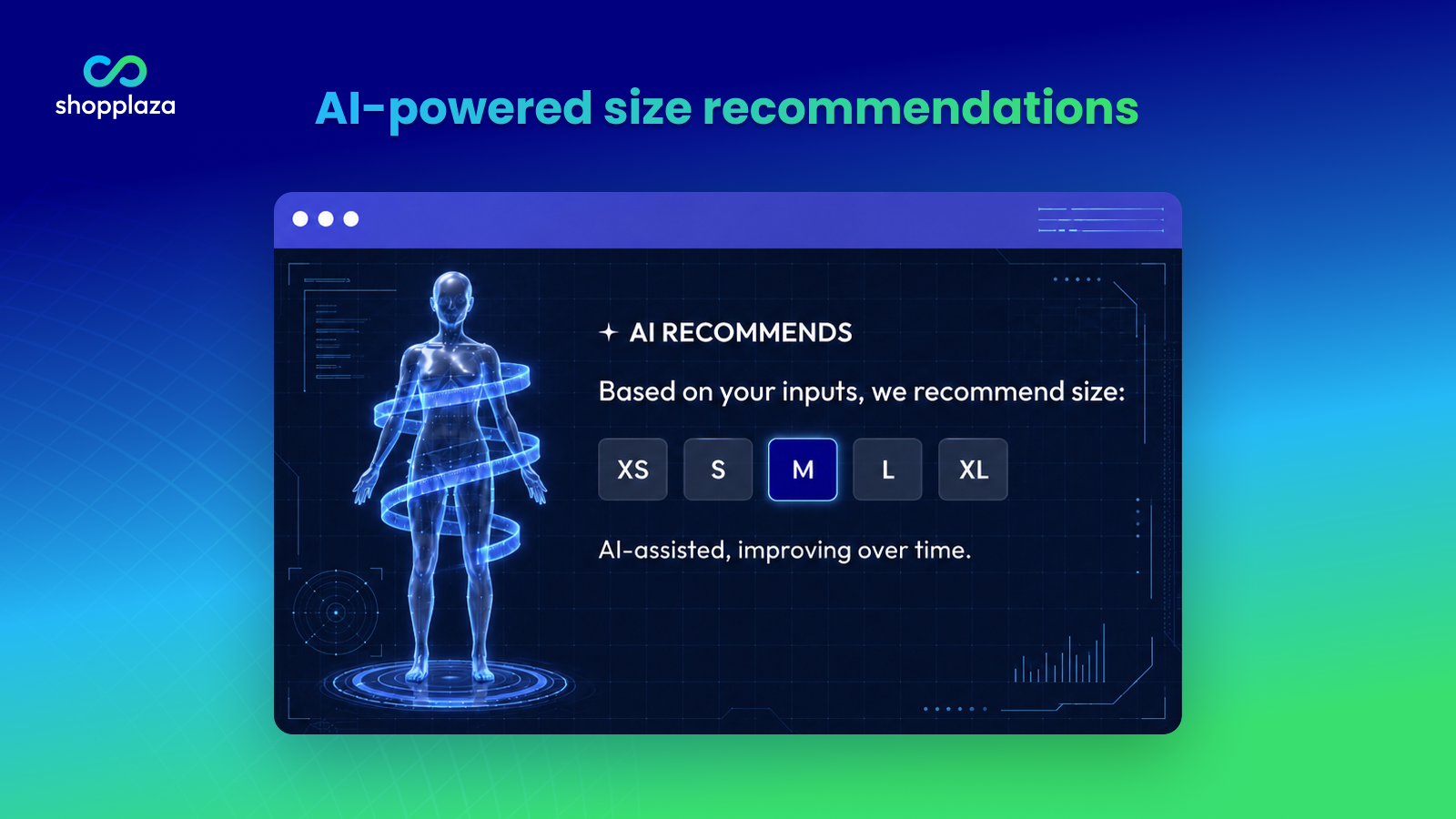
A static size chart shows measurements. A smart size recommendation helps the shopper choose.
AI-powered size recommendations can suggest a size based on inputs such as height, weight, body measurements, usual size, product fit, or fit preference.
This is especially useful when:
- Shoppers frequently ask “What size should I get?”
- Products have fit-sensitive cuts
- Your catalog includes apparel, footwear, denim, swimwear, formalwear, or uniforms
- You sell internationally
- Shoppers often buy multiple sizes and return the extras
- Your average order value makes fit accuracy especially important
Look for:
- A clear input flow
- Product-specific sizing logic
- Fit preference options
- Recommendation confidence or explanation
- Usage-based pricing that is easy to understand
- A recommendation experience that works well on mobile
AI size recommendations should not replace a size chart. They should work alongside it.
The chart gives transparency. The recommendation gives direction.
9. Theme compatibility and page-load performance
A size chart app appears on product pages, so theme compatibility matters.
If the app injects heavy JavaScript, conflicts with your theme, or breaks product-page layout, it can hurt conversion instead of helping it.
Before installing, check:
- Does the app support Online Store 2.0 themes?
- Does it work with common themes like Dawn and modern Shopify themes?
- Does it have a Built for Shopify badge?
- Do recent reviews mention theme conflicts?
- Does the chart load only when needed?
- Can you test on a duplicated theme before going live?
- Does support help with theme placement if needed?
A Built for Shopify badge is a strong quality signal, but it is not the only thing that matters. Also check recent reviews, update history, support quality, and developer credibility.
10. A pricing model that scales with your store
Most size chart apps offer a free plan or trial. That is a good place to start.
The bigger question is what happens when your store grows.
Ask:
- What does the free plan actually include?
- How many published charts are allowed?
- Are imports, translations, and display rules included?
- Are AI recommendations limited by request volume?
- Does the next plan unlock features you actually need?
- Is pricing transparent?
- Is there a clear top-tier ceiling?
- Are there surprise usage fees?
A practical pricing pattern looks like this:
- Free plan for testing or small stores
- Around $5–10/month for small stores
- Around $10–15/month for growing stores
- Around $20–25/month for multi-category or AI-heavy stores
Pricing does not need to be the cheapest. It needs to be predictable and aligned with your catalog size, feature needs, and expected return-reduction value.
Quick feature scorecard
Use this scorecard to evaluate any size chart app before installing.
| Feature | Bare minimum | Good | Ideal |
|---|---|---|---|
| Industry templates | A few generic charts | 10+ templates | 30+ industry-specific templates |
| Display rules | Per-product only | Product + collection | Product, collection, tag, vendor, type |
| Import/export | Manual entry only | Import support | Import + export + preview |
| Display formats | Popup only | Popup + tab | Popup, tab, inline, dropdown, page |
| Mobile rendering | Loads on mobile | Easy to use | Demo passes a mobile UX check |
| Unit conversion | Manual conversion | Toggle cm/inches | Auto cm/inches + regional sizing |
| Multi-language | English only | Several languages | 20+ languages + locale support |
| AI recommendations | Not available | Available | Product-aware recommendations |
| Theme compatibility | Works on one theme | OS 2.0 support | Built for Shopify + strong reviews |
| Pricing | Free or one paid tier | Clear tiers | Free → scalable tiers with clear limits |
Features that sound useful but may not matter for every store
Some features look impressive in app listings, but they are not always the first thing a merchant needs.
That does not mean they are bad. It means you should pay for them only when they match your store’s actual problem.
3D body scan and virtual try-on
3D body scan / virtual try-on. Powerful for premium denim, formalwear, or bras — overkill for most apparel stores. Layers 1–6 of the fit-confidence stack do 95% of the work first.
But many stores should start with the basics first:
- Accurate size charts
- Fit notes
- Garment measurements
- Model height and size worn
- Real-fit reviews
- Smart size recommendations
If your store still lacks these basics, virtual try-on may be too early.
Heavy design customization
A size chart should match your brand and look clean on the product page.
But spending too much time on decorative styling rarely matters more than accuracy, visibility, mobile UX, and product-specific guidance.
Look for clean default styling first. Advanced design control is useful, but it should not be the main reason to choose an app.
Built-in analytics
Built-in analytics can be useful if you actively track chart views, recommendation usage, and sizing engagement.
But do not upgrade only for analytics unless you know how you will use the data. For smaller stores, Shopify reports, GA4, and return-reason data may be enough at the start.
Analytics become more valuable when you are testing:
- Size chart placement
- AI recommendation usage
- Chart views by product
- Return-rate changes by SKU
- Sizing-related support tickets
AI “everything”
AI size recommendations can be valuable. But not every AI-labeled feature is the same.
Before paying for AI features, check what the AI actually does.
A useful AI size recommendation should have:
- Shopper input
- Product-specific logic
- Fit preference or measurement handling
- A recommendation output
- Clear usage or request limits
If the AI is only rephrasing static chart content or labeling a basic table as “AI-powered,” it may not add much value.
Red flags to avoid when choosing a Shopify size chart app
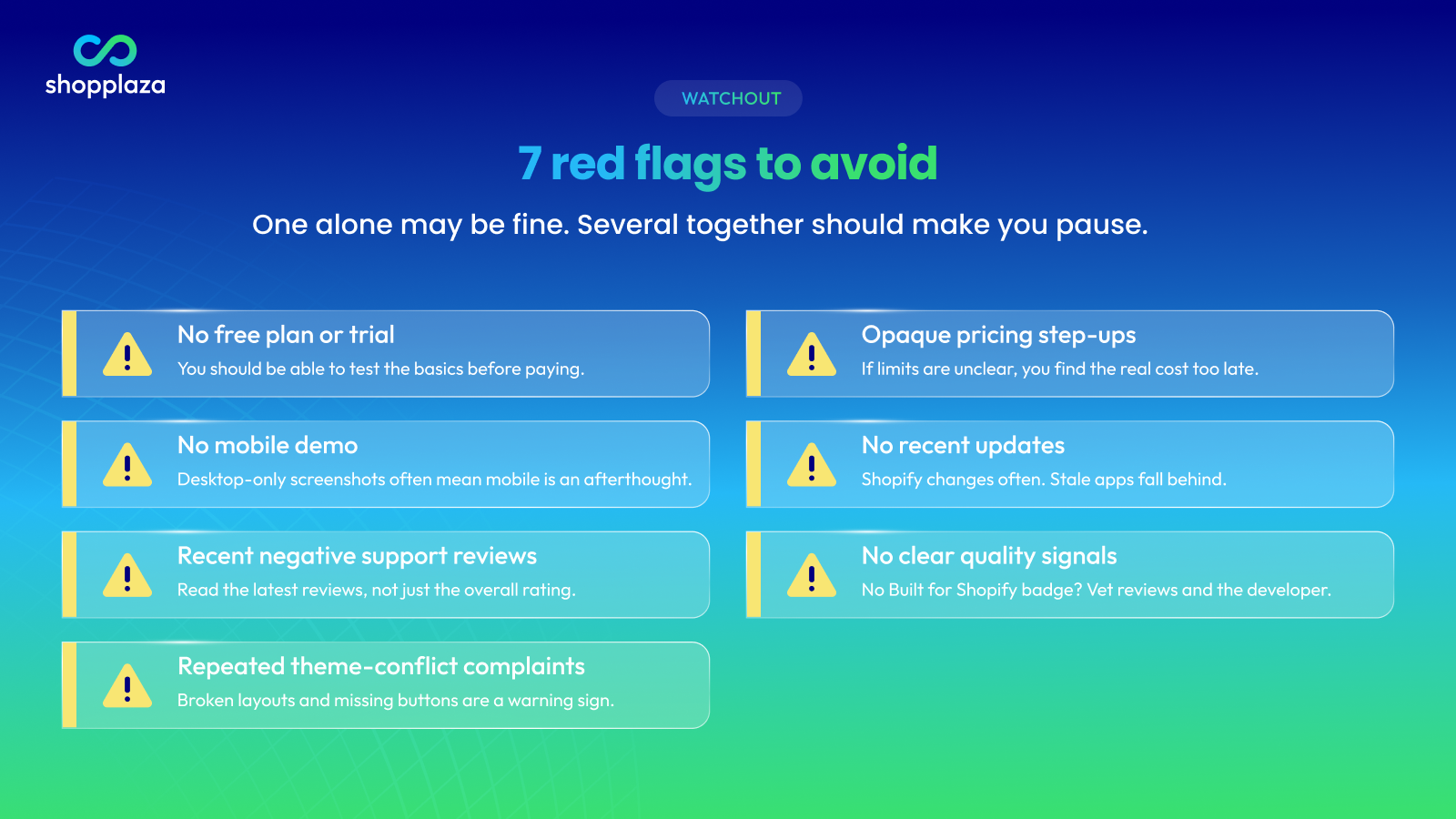
Walk away or investigate carefully if you see these:
- No free plan or trial: A size chart app should let you test the basics before paying.
- No mobile demo: If the listing only shows desktop screenshots, mobile UX may be an afterthought.
- Recent negative support reviews: Check recent reviews, not only the overall rating.
- Repeated theme-conflict complaints: If multiple merchants mention broken layouts, missing buttons, or theme issues, be careful.
- Opaque pricing step-ups: If you cannot understand the plan limits before installing, you may discover the real cost too late.
- No recent updates: Shopify themes and admin flows change. An app with no visible updates may fall behind.
- No clear quality signals: A Built for Shopify badge is a strong trust signal. If an app does not have it, check reviews, support quality, update history, and developer credibility more carefully.
How to choose a size chart app based on your store stage
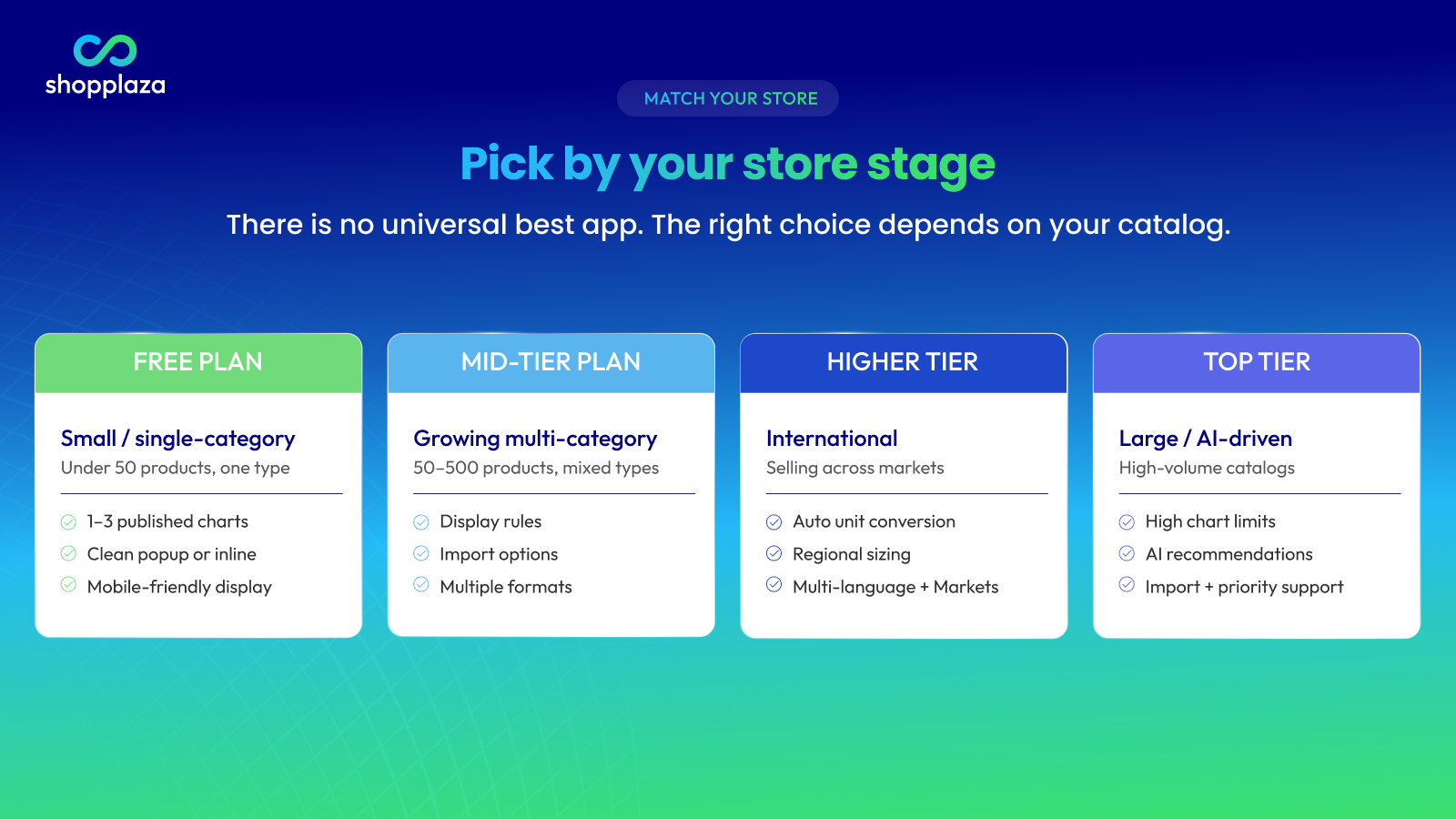
There is no universal best size chart app for every Shopify store.
The right choice depends on your catalog size, product type, international needs, return reasons, and whether you need AI recommendations.
Small or single-category store
This usually means fewer than 50 products and one main product type.
A free plan is often enough.
You need:
- 1–3 published charts
- A clean popup or inline display
- A usable template
- Basic customization
- Mobile-friendly display
You can usually skip:
- Bulk imports
- Advanced analytics
- AI recommendations
- Multi-language setup
- Complex display rules
Choose an app that lets you start free, test quickly, and upgrade only when you need more charts or features.
Growing multi-category store
This usually means 50–500 products and more than one product type.
A mid-tier plan is usually the right zone.
You need:
- Product, collection, tag, or vendor display rules
- Import options
- Multiple display formats
- Mobile-tested rendering
- Unit conversion
- More published charts
- Better support
AI recommendations may be useful if sizing questions or size-related returns are already measurable.
This is the stage where a simple free app often starts to feel limiting.
International store
International stores need more than a basic size table.
You need:
- Automatic unit conversion
- US, UK, EU, AU, or other regional sizing
- Multi-language support
- Shopify Markets compatibility
- Clear measurement instructions
- Product-specific charts for different regions or product types
If shoppers cannot understand the chart in their language or measurement system, the app is not solving the full sizing problem.
Large or AI-driven store
Large catalogs and high-volume stores need a more scalable setup.
You may need:
- Unlimited or high chart limits
- AI size recommendations
- Clear recommendation usage limits
- Product, collection, tag, vendor, or type rules
- Import and export support
- Priority support
- Analytics
- Theme support or migration help
At this stage, price matters less than operational efficiency and fit-confidence impact.
For a real example of using size guides to improve customer confidence, see how Loveable boosted conversions and reduced returns with MP Size Chart.
Looking for an app that hits all 10 criteria?
MP Size Chart & Size Guide checks every box — without code.
- 30+ industry-specific templates + per-product, collection, and tag display rules
- 20+ languages with auto unit and size conversion
- AI-powered size recommendations with per-product calibration
- Rated 5.0★ on the Shopify App Store with a Built for Shopify badge
Conclusion
A size chart app sits close to one of the most important conversion moments on your product page: the size decision.
Choosing the right app is not about finding the longest feature list. It is about matching the app to your catalog, your customers, and your store stage.
Use the 10-feature checklist as your filter:
- Industry-specific templates
- Product and collection display rules
- Import and export options
- Multiple display formats
- Mobile-friendly rendering
- Unit and international size conversion
- Multi-language support
- AI size recommendations
- Theme compatibility and performance
- Transparent pricing
If an app fails several of these criteria or triggers multiple red flags, keep looking.
For the broader sizing playbook, start with the Shopify size chart guide. If you want a head-to-head comparison, read Kiwi Sizing vs MP Size Chart.
When you are ready to install, MP Size Chart & Size Guide is free to start and built to scale with your catalog.
Frequently asked questions
What features matter most in a Shopify size chart app?
The most important features are industry-specific templates, product and collection display rules, import options, multiple display formats, mobile-friendly rendering, unit conversion, multi-language support, AI size recommendations, theme compatibility, and transparent pricing.
These features help merchants manage size charts at scale and help shoppers choose the right size with less guesswork.
Is the free plan of a Shopify size chart app enough?
A free plan is often enough for small stores with one or two product types and a limited catalog.
You may outgrow the free plan when you need more published charts, import options, product-specific display rules, multi-language support, or AI size recommendations.
Do I need AI size recommendations, or is a static size chart enough?
A static size chart is enough for many stores starting out.
AI size recommendations become more useful when you sell fit-sensitive products, receive many sizing questions, serve international shoppers, or see frequent size-related returns.
A good recommendation tool should work alongside your chart, not replace it.
What is the best Shopify size chart app for apparel stores?
For apparel stores, choose a size chart app that supports product-specific charts, fit notes, garment measurements, mobile-friendly display, unit conversion, and AI size recommendations.
MP Size Chart, Kiwi, SmartSize, and CSC are all relevant options depending on your budget, catalog size, and feature needs.
Should a size chart app support different charts for different products?
Yes. If your store sells multiple product types or fit styles, you should use different charts for different products, collections, tags, or vendors.
A single generic chart can confuse shoppers when slim-fit products, relaxed-fit products, shoes, rings, and accessories all need different measurement logic.
What is the difference between a size chart app and a popup app?
A size chart app is built specifically for sizing. It usually includes templates, product-specific display rules, unit conversion, sizing content, and sometimes AI size recommendations.
A general popup app only displays popup content. It does not usually include sizing-specific logic, chart assignment rules, or measurement tools.
For sizing, a purpose-built size chart app is usually the better choice.
Will a size chart app slow down my Shopify product pages?
A well-built size chart app should have minimal performance impact.
Before installing, check whether the app supports modern Shopify themes, look for the Built for Shopify badge, test the app on a duplicated theme, and scan recent reviews for performance or theme-conflict complaints.
How much should I expect to pay for a Shopify size chart app?
Many size chart apps offer a free plan. Paid plans often start around $5–10/month for small stores, $10–15/month for growing stores, and $20–25/month for larger catalogs or AI-driven features.
The best pricing model is transparent and easy to scale. Be careful with apps where the first paid tier is unclear or much more expensive than expected.
What are red flags when evaluating a Shopify size chart app?
Common red flags include no free plan or trial, no mobile demo, recent support complaints, repeated theme-conflict reviews, unclear pricing, no recent updates, and weak developer credibility.
One red flag may not be a deal-breaker. Several together should make you pause.
How do I switch from one size chart app to another?
Start by exporting your existing charts if your current app supports export. Then install the new app, import or recreate your charts, set up display rules, and test on a duplicated theme or a small group of products.
Keep both apps installed briefly during testing, then uninstall the old app once the new charts display correctly.
Does Shopify have a native size chart feature I can use instead?
Shopify does not have a one-click native size chart feature, but you can build a simple setup with metafields, theme blocks, custom pages, or theme code.
This can work for small catalogs. However, a dedicated size chart app is usually easier to manage when you need multiple charts, product-specific rules, imports, translations, unit conversion, or AI recommendations.