Sizing uncertainty is one of the most expensive friction points in e-commerce — especially in fashion, apparel, and footwear. When shoppers aren’t sure which size fits, they hesitate, bracket-buy two sizes, or abandon the cart. That uncertainty drives the single largest cause of apparel returns: Coresight Research and Alvanon estimate that around 70% of online apparel returns are size and fit related.
A good size chart app fixes that at the source. Two of the most popular choices on Shopify are Kiwi Size Chart & Recommender (commonly called Kiwi Sizing) and MP Size Chart & Size Guide by Shopplaza. Both offer AI size recommendations, and both have free plans.
But in 2026 the two apps no longer charge the same way, and that has become the most important difference between them. Kiwi’s Plus and Ultimate plans — the two that include its size recommender — add usage charges based on your order volume, reaching $350 and $700 a month at the top band. MP Size Chart is flat rate at every volume, and costs less than Kiwi at every tier before those charges are counted.
This guide compares the two on the things that change the decision: how each one bills you, ease of use, templates, AI recommendations, the standalone Sizing Page, performance, and ratings. All figures below were verified live on the Shopify App Store on 5 August 2026.
⚡ Key takeaways:
- Kiwi's Plus and Ultimate plans bill on order volume. Usage charges run from $0 under 100 orders to $350/month (Plus) and $700/month (Ultimate) above 20,000. Kiwi's Premium plan at $7.99 has none.
- MP Size Chart & Size Guide is flat rate — $6.95, $12.95 or $24.95 a month, no order-based surcharge, and cheaper than the equivalent Kiwi plan at every tier.
- Choose MP Size Chart if you want predictable billing, the fastest setup, 30+ templates, a dedicated store-wide Sizing Page, and the highest rating in the category (5.0★).
- Choose Kiwi Sizing if you need webpage-to-chart extraction, custom HTML/CSS layouts, and deeper recommender analytics — and your order volume is low enough that the surcharge stays small.
- Switching is the usual blocker, so we removed it: Shopplaza rebuilds your existing size charts in MP Size Chart free of charge, on any plan including the free one.
- Only MP Size Chart carries the Built for Shopify badge. Kiwi Sizing does not.
Comparison Table: Kiwi Sizing vs MP Size Chart & Size Guide
Here is the side-by-side, with live App Store data (5 August 2026):
| Feature / Criteria | Kiwi Size Chart & Recommender | MP Size Chart & Size Guide |
|---|---|---|
| Billing model | Flat on Free & Premium; Plus and Ultimate add usage charges by order volume | Flat fee only, every plan |
| Rating | 4.8★ (1,091 reviews) | 5.0★ (867 reviews) |
| Built for Shopify | No | Yes |
| Free plan | 3 charts, with Kiwi watermark | 3 charts, no watermark + 10 AI requests |
| Entry paid | $7.99/mo | $6.95/mo |
| Mid tier | $14.99/mo | $12.95/mo |
| Top tier | $26.99/mo | $24.95/mo |
| Annual billing | Yes (save 20%) | Yes (save ~17%) |
| Ease of use | Powerful, steeper setup | Beginner-friendly, no-code |
| Templates | 22 | 30+ |
| AI size recommendations | Yes, from $14.99 (+ recommender analytics) | Yes, on every plan including free |
| Dedicated Sizing Page | No | Yes |
| Bulk CSV import | Yes, unlimited (import credits sold separately) | Yes (unlimited from $12.95) |
| Webpage / HTML chart extraction | Yes | No |
| Display rules by country/locale | Auto unit conversion by location | Display for selected countries |
| Languages | Auto-translation, 2 to 22 depending on tier | 20+ languages on every plan |
| Performance | Heavier, depends on setup | Lightweight scripts |
| Analytics | Advanced (recommender analytics) | Basic + Google Analytics (Growth+) |
| Free chart migration when switching | Not offered | Yes, free on any plan |
The short version: Kiwi is the more configurable tool with a larger, more mature review base. MP Size Chart is the faster, cleaner tool with a higher rating, the Built for Shopify badge, a standalone Sizing Page — and, since Kiwi’s 2026 pricing change, the more predictable bill. The rest of this guide explains where each difference actually matters.
How Kiwi Sizing Pricing Works in 2026
This is the part most merchants miss, because it isn’t in the headline price.
Kiwi Sizing’s plan cards read $7.99, $14.99 and $26.99 a month. Under the Plus and Ultimate cards, the listing adds one line:
“Additional charges apply based on order volume. Import credits are optional add-ons when needed.”
The Premium plan at $7.99 is exempt — it states “no additional monthly charges,” as does the free plan. So the split runs through the middle of Kiwi’s range: the two cheapest plans are flat, and the two that include the size recommender are not.
On Plus and Ultimate, usage is banded by the orders your store processed in the previous 30 days. Kiwi publishes the full table on its own pricing page — here are the monthly-billed totals:
| Monthly orders | Plus total | Ultimate total |
|---|---|---|
| Under 100 | $14.99 | $26.99 |
| 100 – 500 | $19.99 | $36.99 |
| 500 – 2,000 | $34.99 | $66.99 |
| 2,000 – 6,000 | $74.99 | $146.99 |
| 6,000 – 10,000 | $134.99 | $266.99 |
| 10,000 – 20,000 | $214.99 | $426.99 |
| Over 20,000 | $364.99 | $726.99 |
Two things follow, and both matter more for growing stores than for small ones:
- The plan price only holds under 100 orders a month. A store doing 3,000 orders pays $74.99 on Plus, not $14.99 — the usage fee is four times the plan fee.
- The bands are wide, so the steps are steep. Moving from 1,900 to 2,100 orders takes an Ultimate bill from $66.99 to $146.99. Nothing about your setup changed.
Your first billing month is free of usage charges, so the real number appears in month two. Kiwi also sells import credits as a separate add-on.
What merchants are saying about it
In a 2-star review left on the Kiwi Sizing App Store listing on 4 August 2026, a merchant who had used the app for around four years described being moved onto the order-based model after a plan upgrade:
“The pricing is not transparent, and we were never clearly informed that a simple plan upgrade would permanently move us to this expensive order based model.”
They reported their bill going from roughly $5–7 a month to around $150 a month, and added:
“Once you have created 100+ size charts, switching to another app is extremely time consuming and difficult. It feels like customers are locked in and forced to accept the new pricing.”
Against the table above, that figure is exactly what the rate card predicts: Ultimate at 2,000–6,000 orders a month is $146.99. They upgraded from a plan with no usage charges to one with them, at a volume where the usage fee dominates the bill.
To be fair to Kiwi: their team replied publicly to that review and said they had reached out to work toward a fair resolution. Kiwi publishes the full rate card, including annual-billing rates, on its own pricing page — worth checking against your own order volume before you commit.
What MP Size Chart costs
| Plan | Price | Charts | AI requests | CSV imports |
|---|---|---|---|---|
| Starter | Free | 3 | 10 | 20 |
| Growth | $6.95/mo | 10 | 800 | 100 |
| Pro | $12.95/mo | Unlimited | 2,000 | Unlimited |
| Advanced | $24.95/mo | Unlimited | 5,000 | Unlimited |
That’s the whole invoice. No order-volume component, no import credits, no usage tier that changes when your store has a good month. Annual billing is available on every paid plan.
MP Size Chart is also the cheaper of the two before any surcharge is applied — $1.04 less at the entry tier, and $2.04 less at both the mid and top tiers.
Who wins:
- MP Size Chart & Size Guide on billing predictability and on headline price at every tier
- Kiwi Sizing still works out fine for stores under a few hundred orders a month, or on its flat $7.99 Premium plan if you don’t need the size recommender
Overview of Both Apps
What is Kiwi Sizing?

Kiwi Size Chart & Recommender is one of the most established size chart apps on Shopify, known for flexibility and deep customization. Its strengths:
- AI-powered size recommender with recommender analytics (from the $14.99 Plus plan)
- Highly customizable charts — multi-tab layouts, images, videos, custom HTML
- Chart import from CSV, images, and existing webpages (HTML extraction)
- Auto unit conversion based on shopper location
Kiwi suits merchants who want full control over chart structure and fit logic, and who are comfortable with a longer setup. With 1,091 reviews at 4.8★, it has the larger and more battle-tested install base of the two.
What is MP Size Chart & Size Guide?
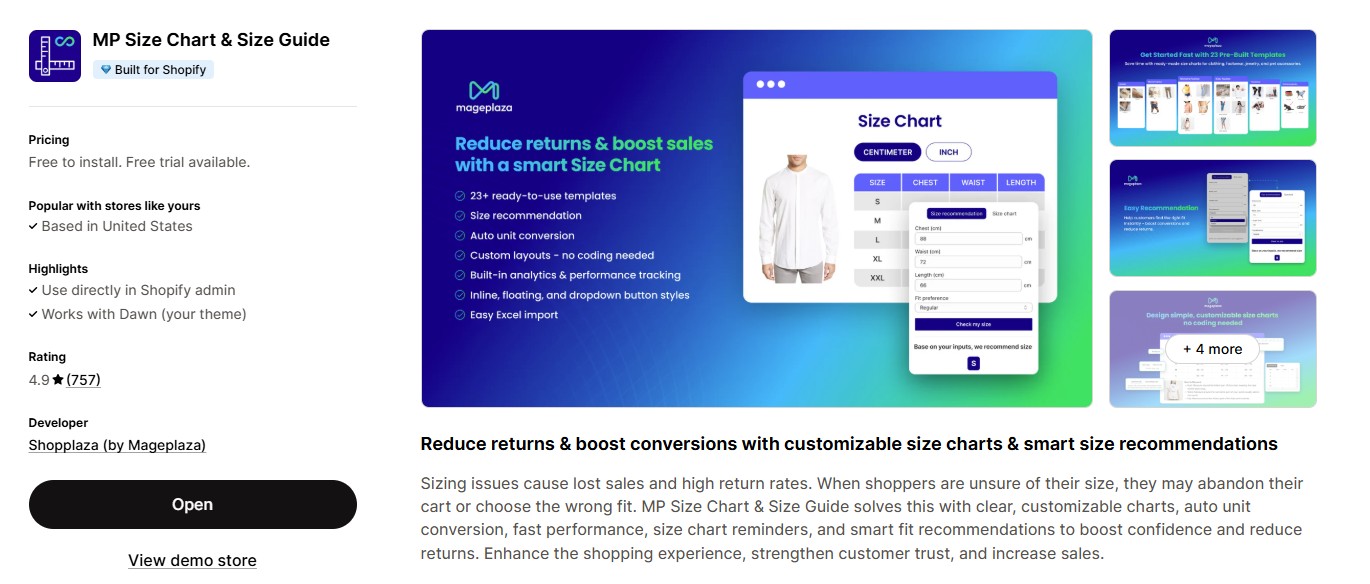
MP Size Chart & Size Guide (by Shopplaza) is built around simplicity, performance, and conversion. The goal is charts that are fast to build, easy to read, and cleanly integrated into the buying journey. Highlights:
- 30+ ready-to-use templates (apparel, footwear, pet accessories, and more)
- No-code visual editor
- AI size recommendations on every plan, including the free one
- A dedicated, store-wide Sizing Page
- Auto unit conversion (cm ↔ inches) and size conversion (US ↔ UK ↔ EU ↔ AU)
- Lightweight scripts for faster loading
- Flexible assignment rules (product, collection, tag, vendor, global)
- Size chart reminders to lift visibility
- 20+ languages with in-app translation, on every plan
At 5.0★ across 867 reviews — the highest rating in the category — and a Built for Shopify badge, MP is aimed at fast-moving teams that want an intuitive, scalable, performance-focused app. You can read the full feature breakdown on the MP Size Chart page.
Deep Feature Comparison
Below is a more detailed breakdown based on your feature matrix.
Ease of use
Kiwi Sizing is powerful but takes longer to configure. The trade-off for its flexibility is more options to learn, which is fine for merchants who want granular control but slower for a small team that just needs charts live.
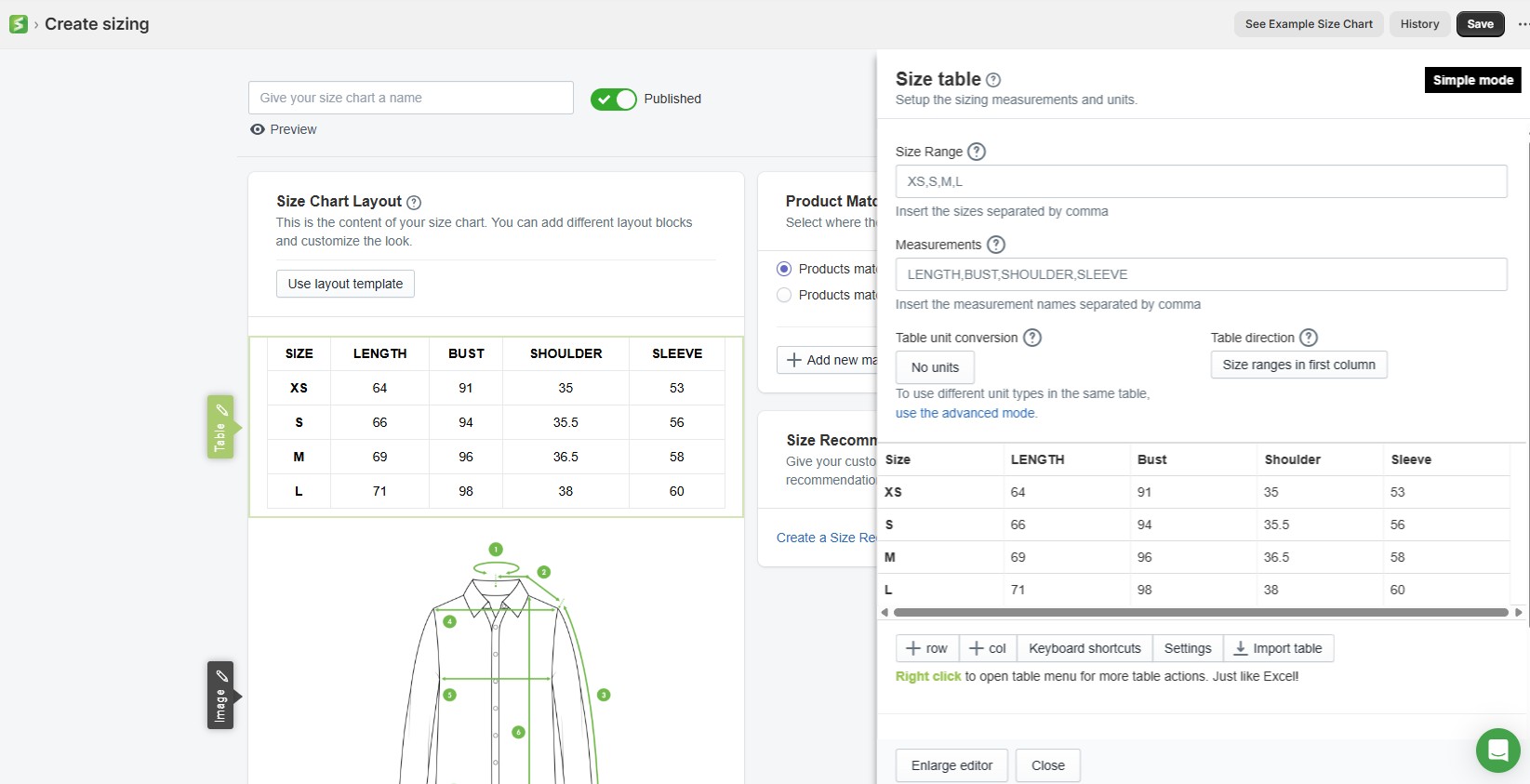
MP Size Chart & Size Guide sets up in minutes with a drag-and-drop editor and ready templates. It’s the more beginner-friendly of the two — most stores get a chart live without touching code.

Who wins:
- MP Size Chart & Size Guide for simplicity and speed
- Kiwi Sizing for deep customization
Templates & design flexibility
Kiwi Sizing offers 22 templates plus heavy customization — multi-tab designs, multiple tables per chart, images, videos, and CSS styling. It’s the better fit when you need complex, brand-specific layouts and have someone comfortable in HTML/CSS.
MP Size Chart & Size Guide ships 30+ templates with drag-and-drop editing, two-column and multi-tab chart options, and support for text, images, and video — all no-code, with a consistent modern UI. The larger template library means most stores start from something close to finished rather than a blank chart.
One detail worth checking if you’re comparing free plans: Kiwi’s free plan puts a Kiwi watermark on your charts. MP Size Chart’s free plan does not.
Who wins:
- Kiwi for bespoke, code-level layouts
- MP Size Chart for the breadth of ready templates, fast execution, and an unbranded free plan.
AI size recommendations
Both apps now lead with AI — this is a category-wide shift, and the old “Kiwi has AI, MP doesn’t” framing is out of date. What differs now is where the feature sits in each price list.
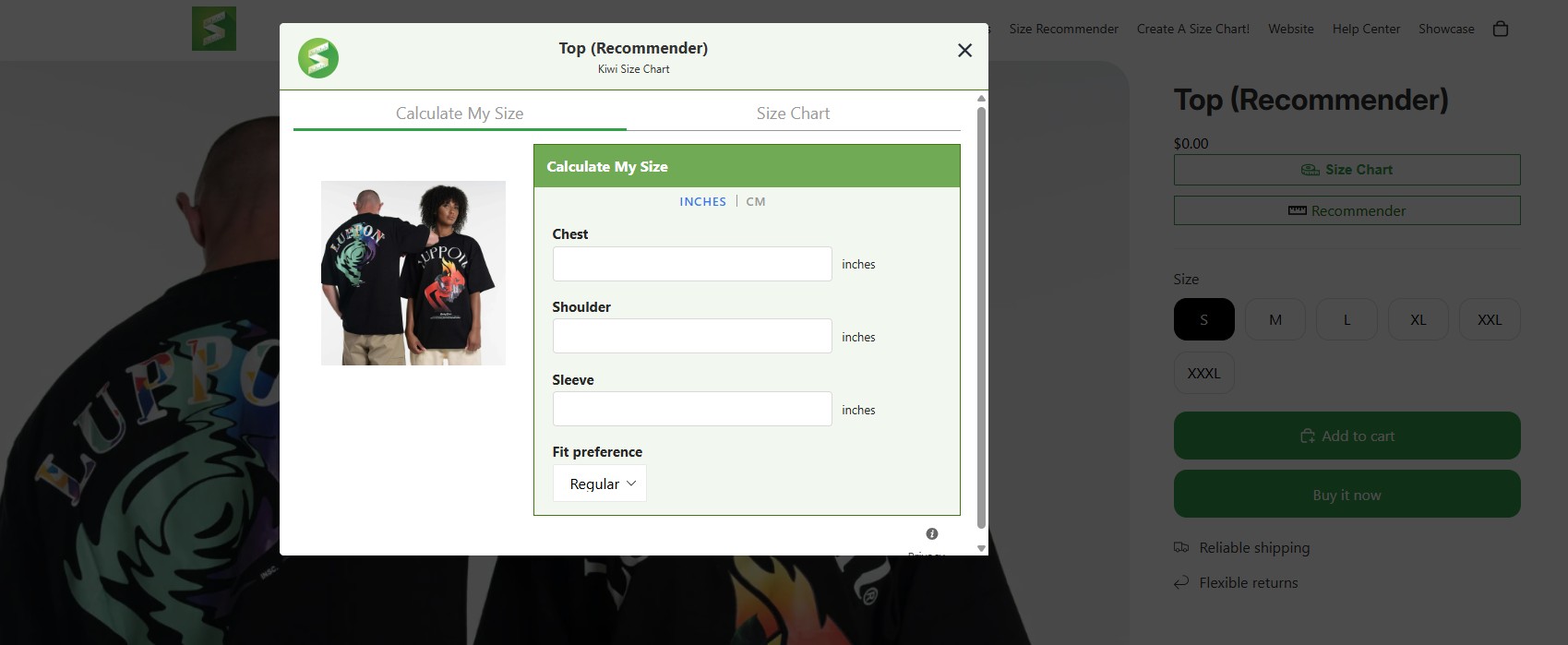
Kiwi has the more advanced recommender: it includes recommender analytics and can add the suggested size straight to cart. But custom recommenders start on the $14.99 Plus plan — you can’t try the feature on free or on the entry tier.
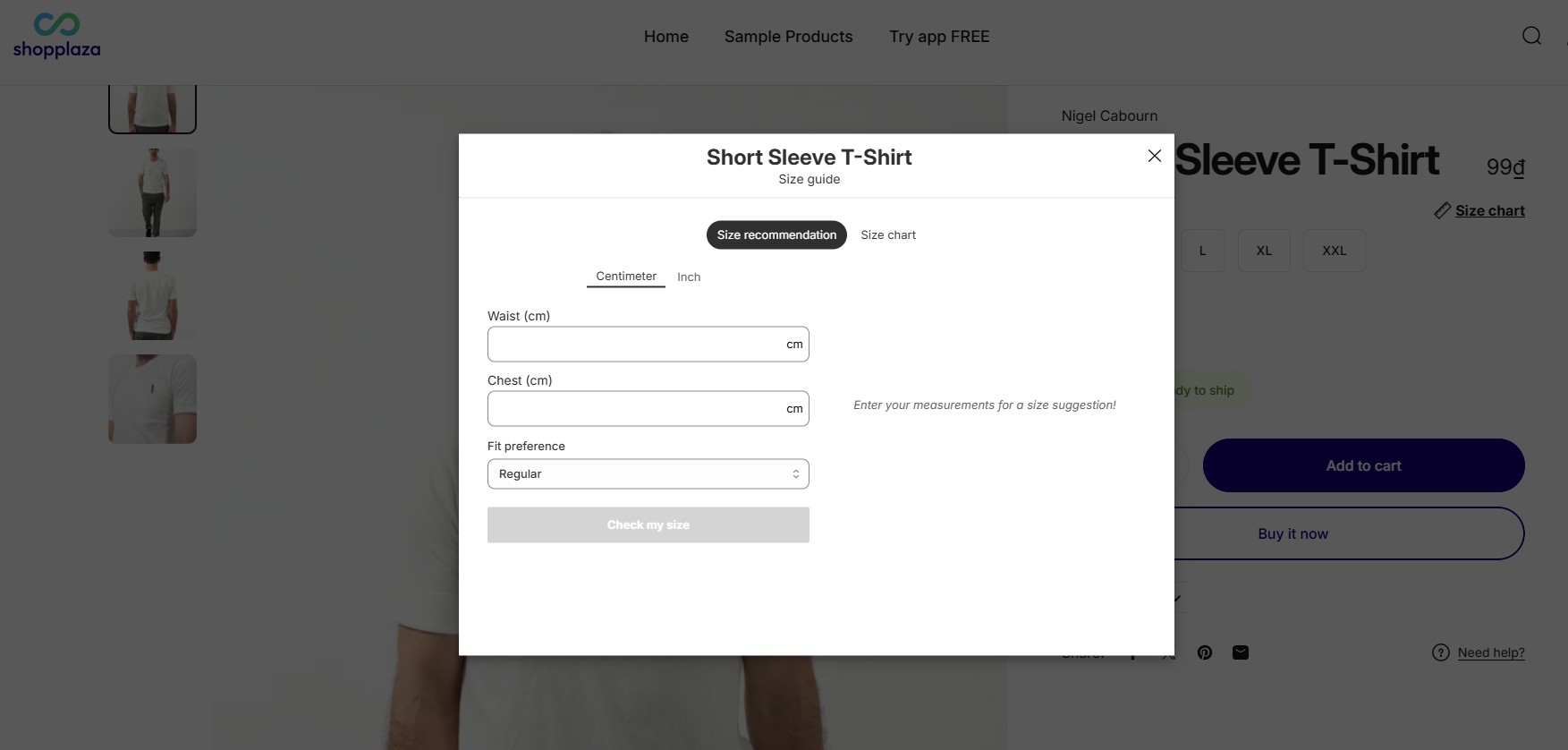
MP Size Chart & Size Guide provides AI size recommendations on every plan, including the free one — 10 requests on Starter, 800 on Growth, 2,000 on Pro, and 5,000 on Advanced. A few inputs return a clear size suggestion, which covers common apparel sizing well without extra configuration.
Who wins:
- Kiwi for depth and analytics
- MP Size Chart for being able to test the feature before you pay for it.
Import/Export & Data Management
Kiwi Sizing is the stronger data tool here. Alongside CSV import/export — unlimited even on the free plan — it can extract charts from product descriptions and existing webpages (HTML extraction) and bulk-create charts from that data. Note that Kiwi sells import credits as a paid add-on, so heavy bulk-import workflows can carry an extra cost.
MP Size Chart & Size Guide keeps data management simple: CSV import/export (20 on Starter, 100 on Growth, unlimited from Pro), auto-generated charts from size variants, and chart migration between stores — plus free done-for-you migration if you’re switching apps.
Who wins:
- Kiwi Sizing for HTML/webpage extraction and unlimited free-plan imports
- MP Size Chart & Size Guide for a simpler workflow, no import add-ons, and hands-on migration support.
Sizing Page (Global Size Guide Page)
This is the clearest functional difference between the two apps.
Kiwi Sizing ties every chart to a product — either a product-page popup or an embedded chart. There’s no standalone, store-wide size guide, which means sizing content stays fragmented across product pages, can’t be linked from your main menu or footer, and is hard to use for SEO or pre-purchase education.
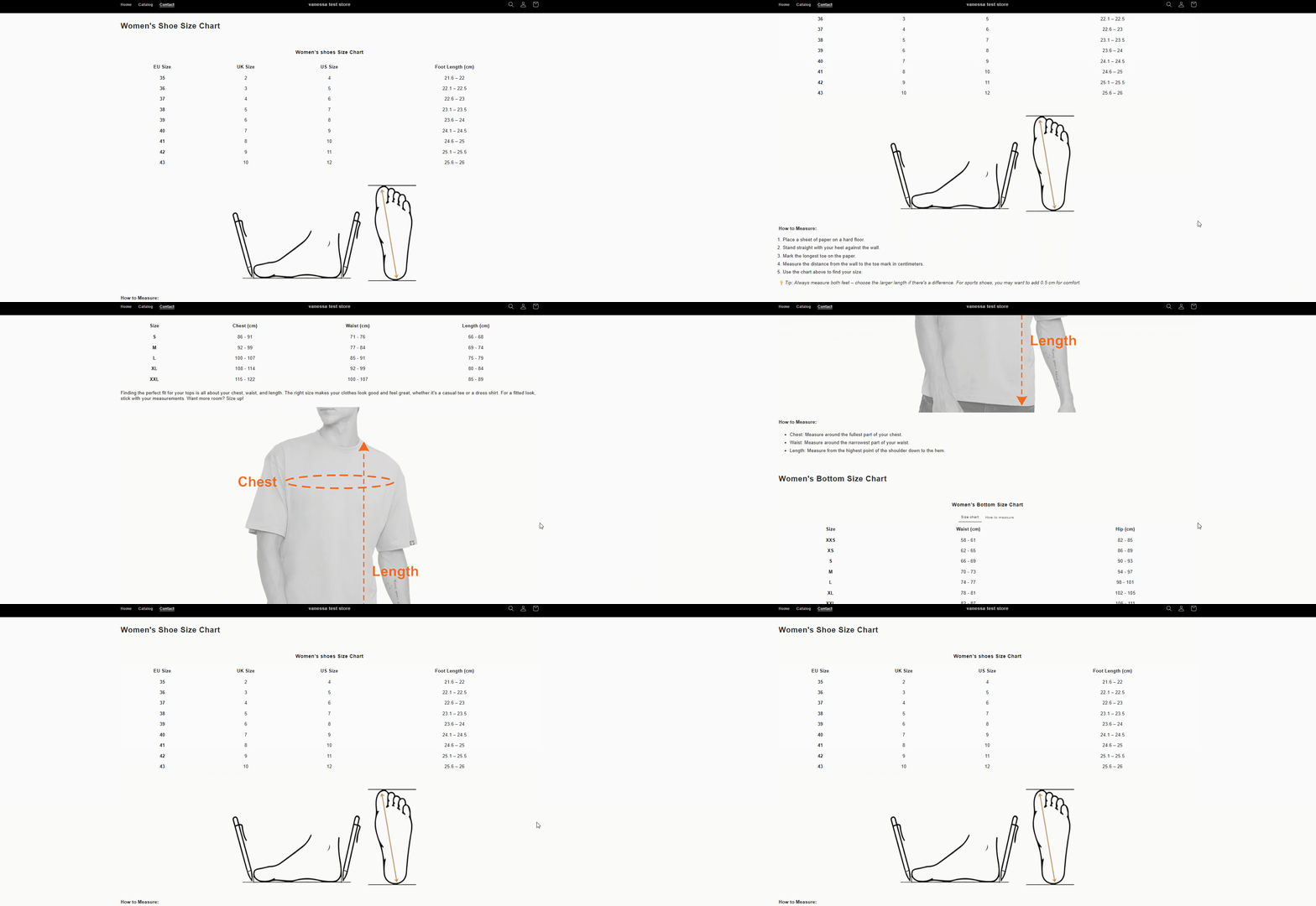
MP Size Chart & Size Guide is the only one of the two that offers a true Sizing Page — a dedicated page (e.g. /pages/size-guide) that aggregates all your sizing in one place.
View sizing page on storefront:
Why that matters:
- One central size guide accessible across the whole store
- Linkable from menus, footers, product pages, and landing pages
- Consistent sizing rules across collections and product types
- An SEO-friendly page that can rank for size-related searches
- Moves sizing earlier in the journey — proactive education, not just a reactive popup
For fashion brands, multi-collection stores, and paid-traffic funnels, this turns sizing from a support feature into a conversion asset.
Who wins:
- MP Size Chart & Size Guide — the only solution offering a true global Sizing Page
- Kiwi Sizing — does not support this capability
Performance & load speed
Kiwi Sizing’s scripts are more powerful but heavier, and the weight scales with how much you configure.
MP Size Chart & Size Guide uses lightweight scripts with faster modal loading — better for Core Web Vitals, mobile, and SEO. MP also carries the Built for Shopify badge, which certifies it against Shopify’s performance bar; Kiwi is powerful but the heavier of the two.
Who wins:
- MP Size Chart & Size Guide (faster, cleaner, Shopify-friendly)
Chart display, placement & visibility
Both apps offer:
- Add size chart per product
- Conditions (collection, tag, vendor, type)
- Placement customization
- Choose size chart width
- Link between products and size chart
- Table styles
Kiwi Sizing
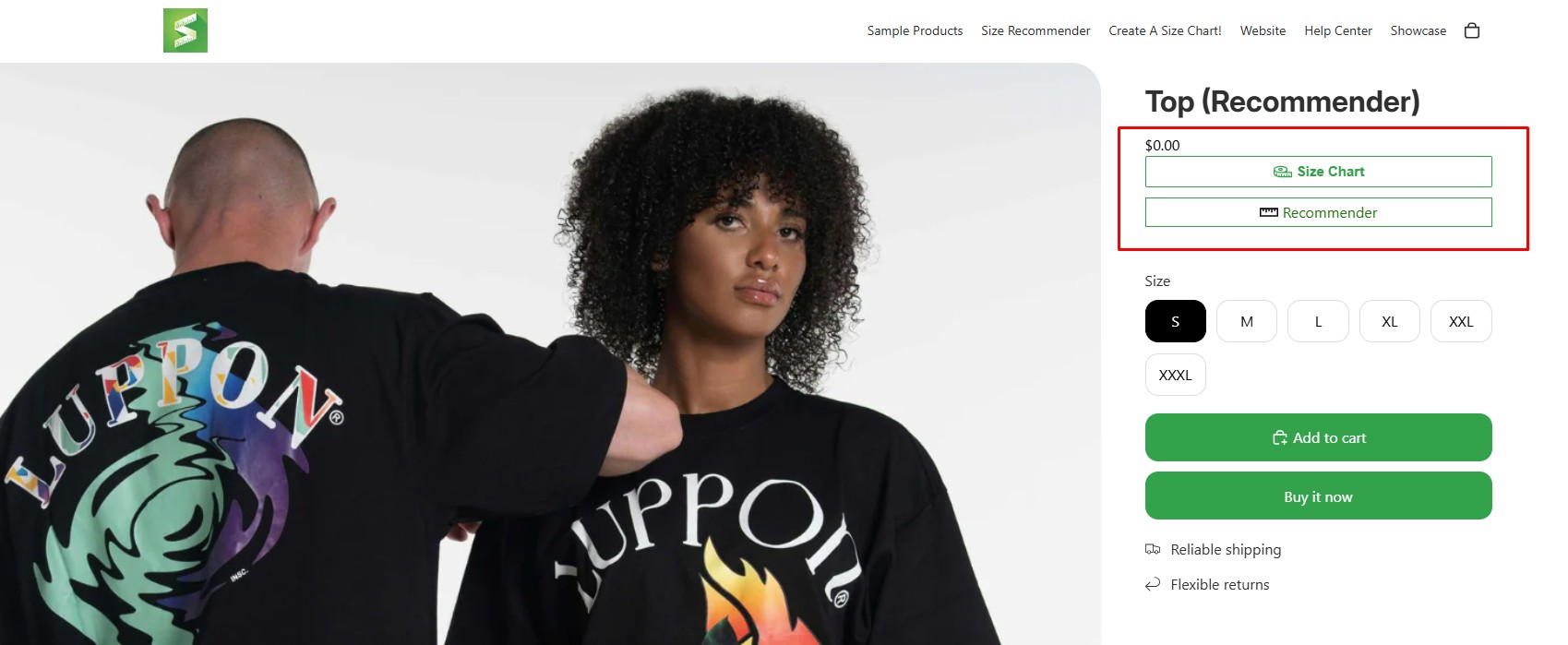
MP Size Chart
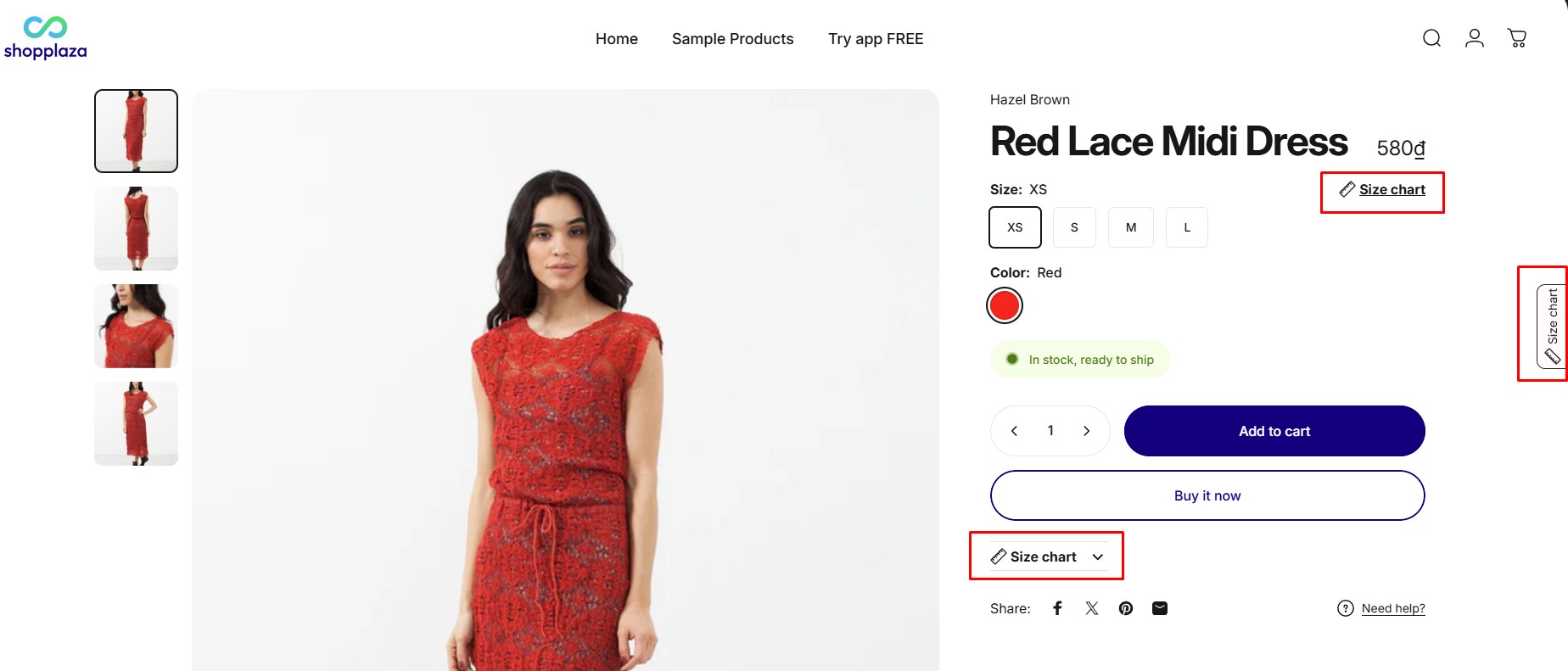
Unique differences:
- Kiwi Sizing: Add logo on chart modal, size chart permalink.
- MP Size Chart & Size Guide: Size chart reminders, display for selected countries.
MP Size Chart: Size reminder
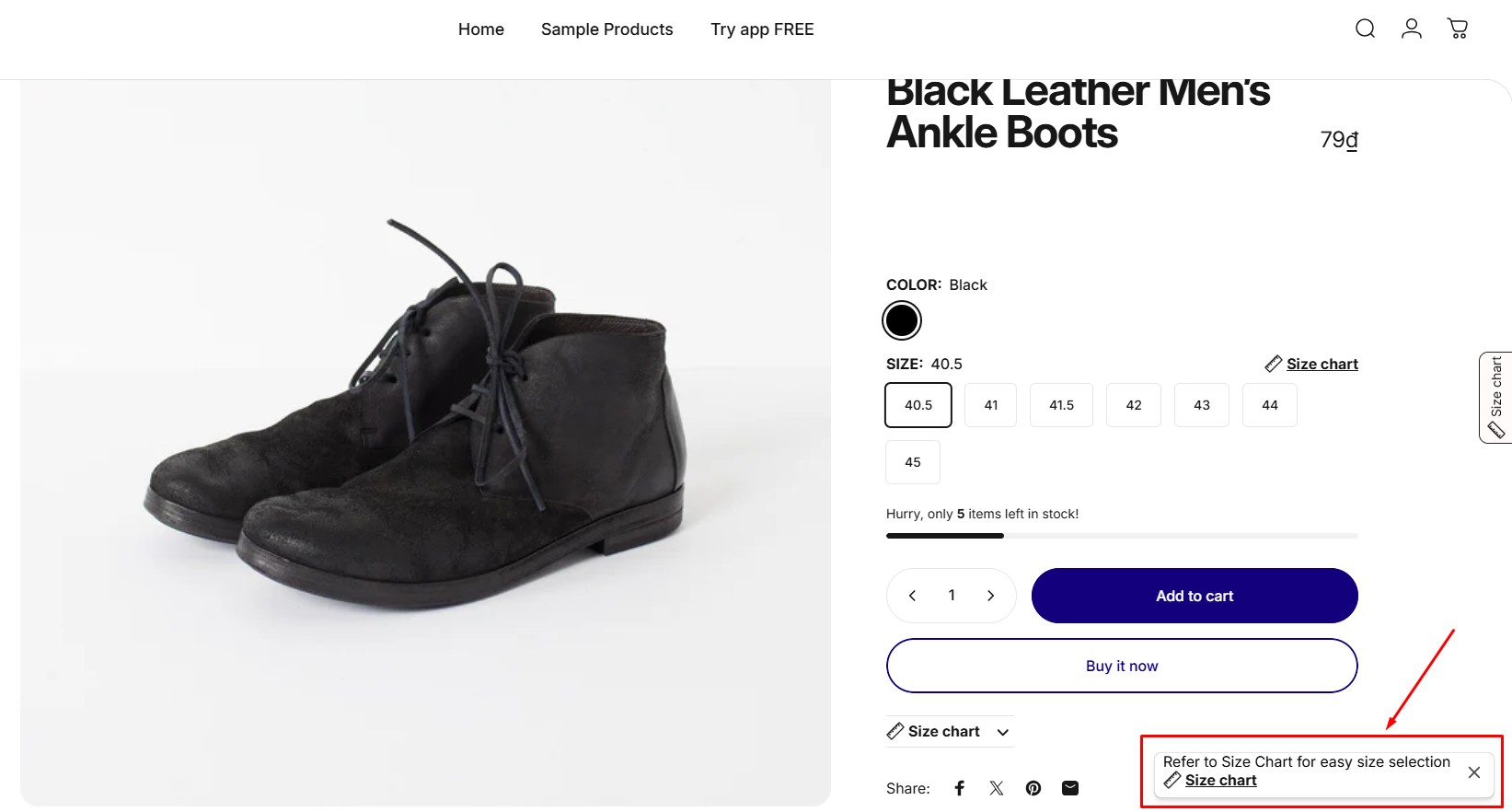
MP Size Chart’s additions lean toward conversion behavior — nudging shoppers to actually open the chart, and tailoring what shows by market — rather than adding raw configuration.
Size and unit conversion
Kiwi Sizing auto-converts units, lets you style the conversion, and supports auto international conversion charts. Auto-translation is tiered: 2 languages on Premium, 6 on Plus, and all 22 only on the $26.99 Ultimate plan.
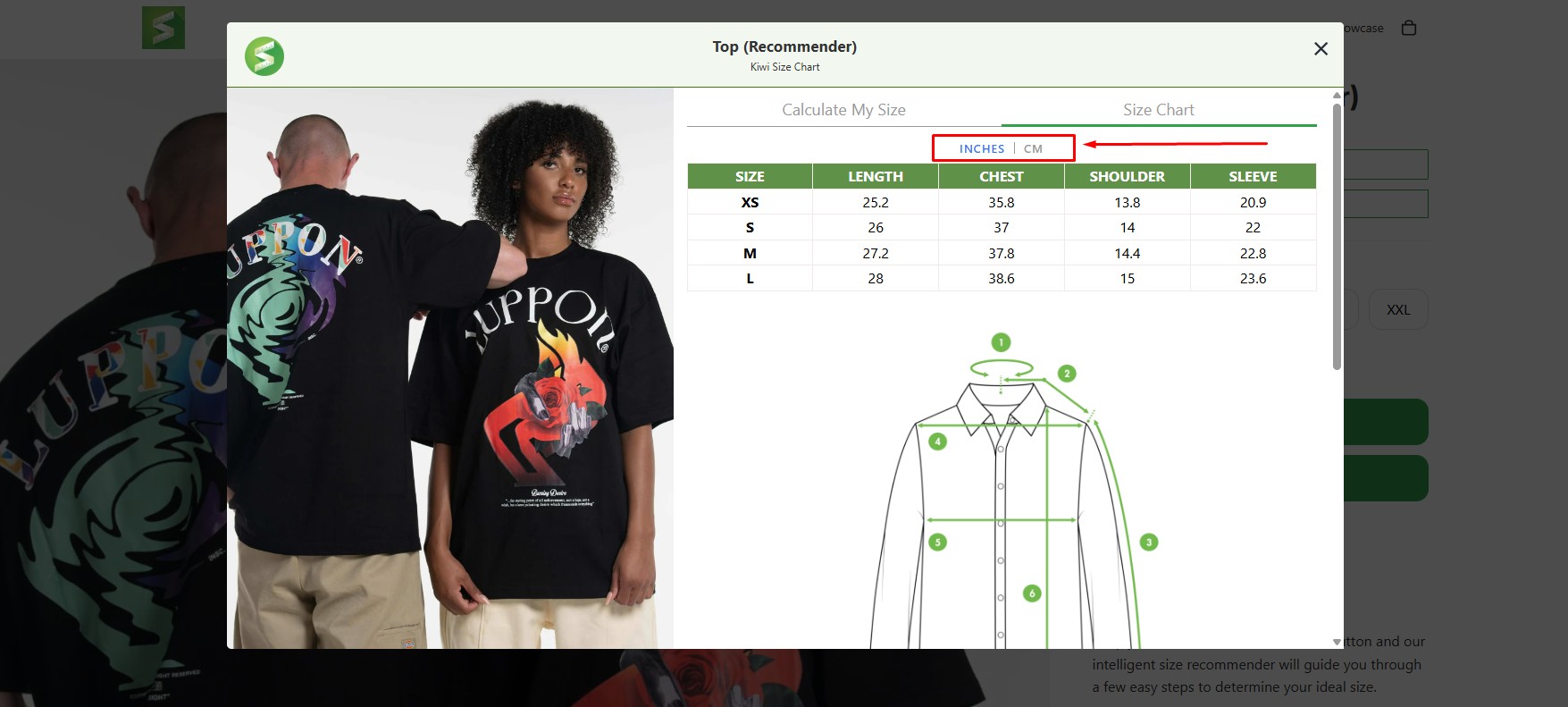
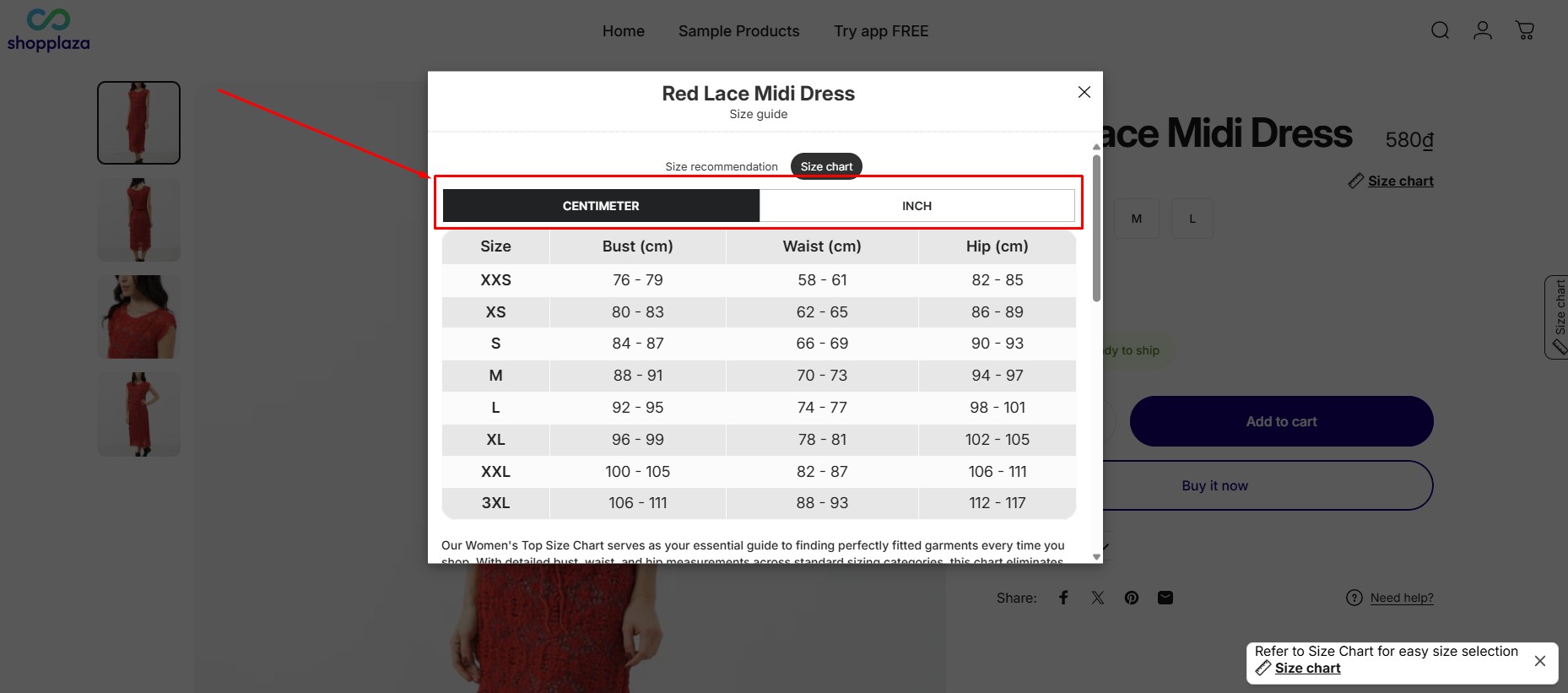
MP Size Chart & Size Guide auto-converts both units (cm ↔ inches) and size labels (US ↔ UK ↔ EU ↔ AU) with minimal setup, and includes 20+ languages on every plan — including free.
Who wins:
- Kiwi for more conversion controls
- MP Size Chart & Size Guide for instant setup, and for not putting international selling behind the top tier.
Pricing & ratings
| Kiwi Sizing | MP Size Chart & Size Guide | |
|---|---|---|
| Free plan | Yes (3 charts, with watermark) | Yes (3 charts + 10 AI requests, no watermark) |
| Entry paid | $7.99/mo | $6.95/mo |
| Mid tier | $14.99/mo | $12.95/mo |
| Top tier | $26.99/mo | $24.95/mo |
| Order-volume surcharge | Yes, on all paid plans | No |
| Annual billing | Yes (save 20%) | Yes (save ~17%) |
| Rating | 4.8★ (1,091 reviews) | 5.0★ (867 reviews) |
Pricing is no longer close. MP Size Chart is cheaper at every paid tier — and that comparison is before Kiwi’s usage charges, which apply to the Plus and Ultimate plans. At 3,000 orders a month, Kiwi Plus totals $74.99 and Ultimate $146.99, against a flat $12.95 or $24.95 for MP. The other clear gap is the rating: MP Size Chart holds a 5.0★, the highest in the category, while Kiwi sits at 4.8★ with a larger, longer-running review base. More reviews signal maturity; a higher rating signals current satisfaction. Both are worth weighing.
Who wins: MP Size Chart on price, billing predictability, and rating; Kiwi on review volume and track record.
Built for Shopify badge
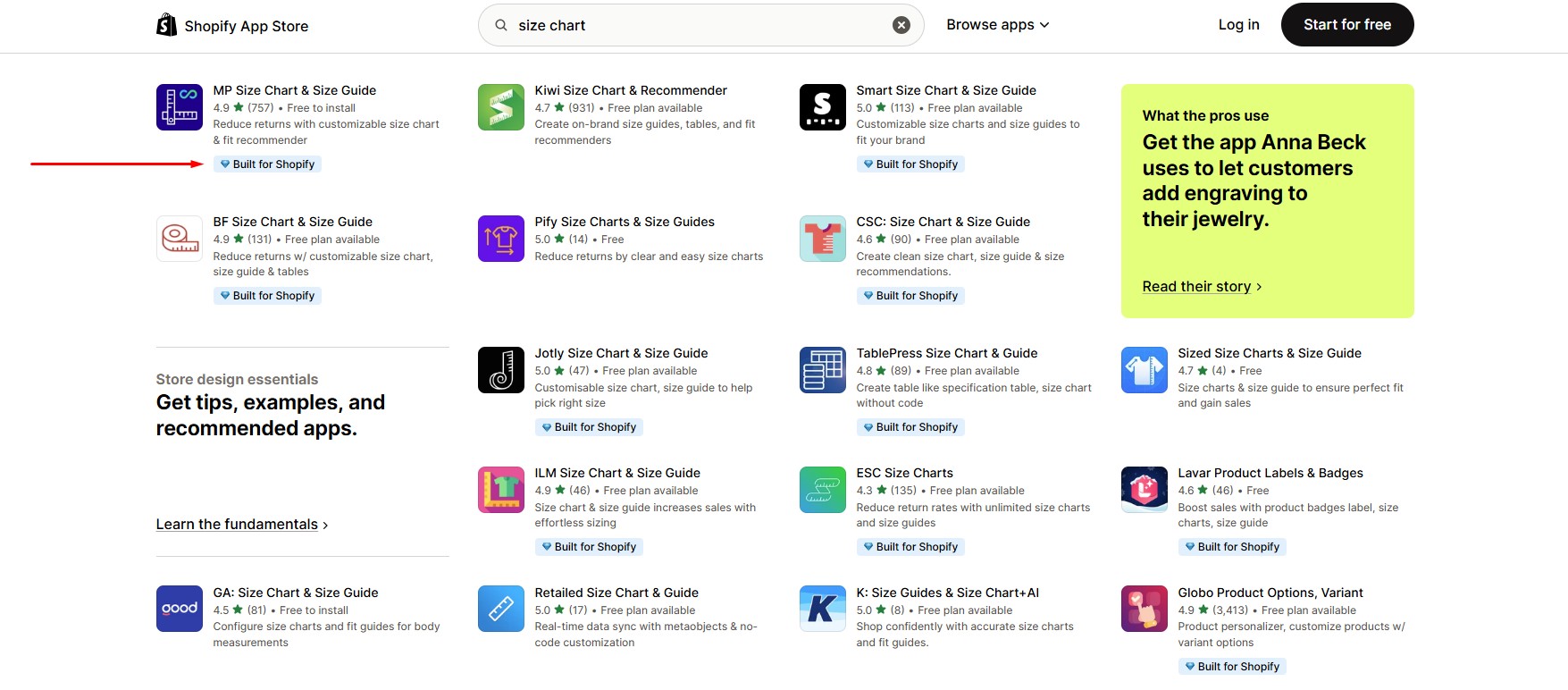
This is a genuine point of difference. MP Size Chart & Size Guide carries the Built for Shopify badge; Kiwi Sizing does not. Of the major size chart apps on the store, most have earned the badge — Kiwi is one of the few that haven’t.
The badge is Shopify’s highest app-quality certification, awarded for meeting their standards on:
- Performance and load speed
- Reliability and security
- UX and design quality
- Online Store 2.0 compatibility
- Support quality
It doesn’t make Kiwi a bad app — it’s popular and well-reviewed — but it does mean MP has passed Shopify’s certification bar and Kiwi hasn’t. For merchants who weight long-term stability and Shopify’s own trust signal, that’s a real advantage for MP.
Who wins:
- MP Size Chart & Size Guide — it’s Built for Shopify certified; Kiwi is not.
Switching From Kiwi Sizing: We Rebuild Your Size Charts For Free
The reason merchants stay on a size chart app they’ve outgrown is almost never the app. It’s the charts. Once you’ve built 100+ of them, with product and collection rules attached to each, moving looks like weeks of manual work — and that’s exactly what the reviewer quoted earlier described.
So Shopplaza does it for you, at no cost:
- We export your existing charts from Kiwi Sizing (or any other size chart app)
- We rebuild every chart inside MP Size Chart & Size Guide
- We recreate your product, collection, tag and vendor assignment rules
- We verify the charts display correctly on your live product pages
This is free on any plan, including the free Starter plan. There’s no minimum tier, no migration fee, and no commitment to a paid plan first. Your only job is to install the app and tell our team you’re switching — start a chat with the Shopplaza team or email [email protected].
Which App Should You Choose?
A practical, honest split:
Choose Kiwi Sizing if you:
- Need maximum customization and custom HTML/CSS layouts
- Want webpage / HTML chart extraction for migrating existing content
- Need multi-tab or complex multi-table charts
- Want deeper recommender analytics and granular fit logic
- Run a low order volume, so the order-based surcharge stays small
- Value the larger, more established review base
Choose MP Size Chart & Size Guide if you:
- Want a bill you can predict — flat rate, no order-volume component
- Want a fast, no-code app that’s live in minutes
- Want 30+ ready templates and a consistent modern UI
- Need a store-wide Sizing Page for SEO and pre-purchase education
- Want AI size recommendations and 20+ languages without upgrading
- Care about lightweight performance and mobile speed
- Want a Built for Shopify certified app
- Want the highest rating in the category, at a lower price at every tier
Most apparel and fashion stores land on MP because it’s faster to operate, easier for a team to maintain, and simpler to budget for. Stores with complex, highly custom sizing needs — or a developer on hand — often prefer Kiwi’s depth.
If you want to weigh other options too, see the best Shopify size chart apps, or the full MP Size Chart comparison hub.
Switch to MP Size Chart & Size Guide — we'll rebuild your charts free
The highest-rated size chart app on Shopify, at a flat monthly price that doesn't move when your order count does.
- Free done-for-you migration from Kiwi Sizing or any other size chart app — on any plan, including the free one
- Flat pricing: $6.95, $12.95 or $24.95 a month. No order-volume surcharge, no import credits
- AI size recommendations and 20+ languages on every plan, including free
- 30+ industry templates, plus a dedicated store-wide Sizing Page
- Rated 5.0★ on the Shopify App Store with a Built for Shopify badge
Final verdict
Both apps solve the same core problem — fewer size-driven returns, more buyer confidence — and both are strong, AI-equipped tools. What separates them in 2026 is less about features than about what you sign up for:
- Kiwi Sizing wins on depth: custom HTML layouts, webpage extraction, multi-tab charts, recommender analytics, unlimited free-plan CSV imports, and the larger review base. It’s the choice when you want full control and have the time (or the developer) to use it — and when your order volume is low enough that the surcharge on top of the plan fee stays manageable.
- MP Size Chart & Size Guide wins on predictability and structure: a flat bill that’s cheaper at every tier, AI recommendations and 20+ languages on every plan, 30+ templates, a true store-wide Sizing Page, lightweight performance, the Built for Shopify badge, the highest rating in the category (5.0★), and free chart migration if you’re coming from somewhere else.
For the majority of apparel and fashion stores — especially those growing their order count — MP Size Chart & Size Guide is the more efficient, more predictable choice. For stores that need maximum configurability, Kiwi remains the more powerful tool.
FAQs
1. Does Kiwi Sizing charge based on order volume?
On two of its three paid plans, yes. Kiwi’s Plus ($14.99) and Ultimate ($26.99) plans add usage charges banded by monthly order volume, from $0 under 100 orders up to $350/month on Plus and $700/month on Ultimate above 20,000 orders. At 3,000 orders a month that means $74.99 on Plus or $146.99 on Ultimate rather than the plan price. The Premium plan at $7.99 states “no additional monthly charges,” and the free plan has none. MP Size Chart & Size Guide charges a flat monthly fee with no order-based component on any plan.
2. Is MP Size Chart cheaper than Kiwi Sizing?
Yes, at every tier, before any surcharge is applied. MP Size Chart is $6.95 / $12.95 / $24.95 a month against Kiwi’s $7.99 / $14.99 / $26.99 — $1.04 less at the entry tier and $2.04 less at the mid and top tiers. Because Kiwi adds order-volume charges on top of those figures and MP does not, the gap widens as your store grows.
3. How do I move my size charts from Kiwi Sizing to MP Size Chart?
Shopplaza migrates them for you, free of charge, on any plan including the free Starter plan. The team exports your existing charts, rebuilds each one in MP Size Chart & Size Guide, recreates your product and collection assignment rules, and verifies that everything displays correctly on your live product pages. You install the app and tell support you’re switching — there’s no migration fee and no requirement to be on a paid plan.
4. Is Kiwi Sizing better than MP Size Chart & Size Guide?
Neither is universally “better” — they optimize for different things. Kiwi Sizing offers deeper customization (custom HTML, multi-tab charts, webpage extraction) and has more reviews (4.8★, 1,091). MP Size Chart & Size Guide is easier and faster to use, ships 30+ templates and a store-wide Sizing Page, bills at a flat rate, and holds the higher rating (5.0★, 867 reviews). Most apparel stores pick MP Size Chart for speed, ease and predictable billing; stores needing heavy customization pick Kiwi.
5. Do both apps have AI size recommendations?
Both do, but they’re priced differently. MP Size Chart includes AI size recommendations on every plan, including the free one (10 requests on Starter, up to 5,000 on Advanced). Kiwi’s custom recommenders start on the $14.99 Plus plan, so you can’t trial the feature on its free or entry tier. Kiwi’s recommender is the more advanced of the two, adding analytics and add-to-cart of the suggested size.
6. Does the Kiwi Sizing free plan add a watermark?
Yes. Kiwi’s free plan displays a Kiwi watermark on your size charts; removing it requires the $7.99 Premium plan or above. MP Size Chart’s free Starter plan has no watermark, and also includes 10 AI size recommendation requests and 20+ languages.
7. Are both apps Built for Shopify?
No. MP Size Chart & Size Guide carries the Built for Shopify badge — Shopify’s highest app-quality certification for performance, reliability, UX, and security. Kiwi Sizing does not. It’s a genuine point of difference in MP’s favor for merchants who weight Shopify’s own trust signal.
8. Which app loads faster: Kiwi Sizing or MP Size Chart?
MP Size Chart & Size Guide uses lighter-weight scripts and faster modal loading, which is better for Core Web Vitals and mobile. Kiwi is more powerful but heavier, and its weight scales with how much you configure.
9. Which sizing app is easier to set up?
MP Size Chart & Size Guide is easier to set up, thanks to 30+ ready templates and a no-code drag-and-drop editor — most stores are live in minutes. Kiwi is more configurable but takes longer to learn.
10. Does Kiwi Sizing have a standalone size guide page?
No. Kiwi ties charts to individual products (popups or embeds) and does not offer a standalone, store-wide Sizing Page. MP Size Chart & Size Guide is the only one of the two with a dedicated Sizing Page you can link from menus and footers.
11. Do both apps support CSV import?
Yes, both support CSV import/export. Kiwi offers unlimited CSV imports even on its free plan, but sells import credits as a paid add-on for heavier workflows. MP Size Chart allows 20 imports on Starter, 100 on Growth and unlimited from Pro, auto-generates charts from size variants, and migrates existing charts for free if you’re switching apps.
12. Which app is better for large SKU catalogs?
MP Size Chart & Size Guide is generally better for large catalogs because of its template library and flexible assignment rules (product, collection, tag, vendor, global), which apply charts at scale without per-product work. It’s also the safer choice on cost, since large catalogs usually come with the order volume that triggers Kiwi’s additional charges.
13. How many languages does each app support?
MP Size Chart & Size Guide includes 20+ languages with in-app translation on every plan, including free. Kiwi’s auto-translation is tiered: 2 languages on Premium, 6 on Plus, and all 22 only on the $26.99 Ultimate plan.