If you sell clothing, shoes, or anything with a size, you already know the most expensive two words in ecommerce: “didn’t fit.” Shoppers can’t try things on, feel the fabric, or check whether a ring will actually slide on — so they guess. And when they guess wrong, the product comes back.
It adds up fast. According to Coresight Research and Alvanon (2025), size and fit issues drive about 70% of all online apparel returns — making “it didn’t fit” the single biggest reason customers send things back. And returns aren’t cheap: retailers lose roughly $30 for every $100 in returned merchandise (RILA Returns Panel, via Optoro).
The fix is simpler than it sounds: give shoppers clear sizing information before they add to cart. A good Shopify size chart app does exactly that — and the best ones now add AI fit recommendations on top, so customers don’t even have to read the table.
In this guide we compare the 10 best Shopify size chart apps for 2026 — with updated ratings, real pricing, and honest pros and cons — so you can pick the right one whether you sell apparel, footwear, jewelry, or accessories. New to size charts in general? Start with our complete Shopify size chart guide.
Explore more toplist
Shopify Size Chart Apps: Quick Comparison
| App | Rating (reviews) | Free plan | Paid from | Top tier | AI size recommender | Built for Shopify | Order-volume surcharge |
|---|---|---|---|---|---|---|---|
| 1. MP Size Chart & Size Guide | 5.0 (867) | Yes — 3 charts, no watermark | $6.95 | $24.95 | Yes | Yes | No |
| 2. Smart Size Chart & Fit Finder | 5.0 (131) | Yes — 2 charts, no watermark | $9 | $19 | Yes | Yes | No |
| 3. CSC: Size Chart & Size Guide | 5.0 (94) | Yes — 2 charts, no watermark | $6.99 | $29.99 | Yes | Yes | No |
| 4. Pify Size Charts & Size Guides | 5.0 (33) | Yes — fully free | — | Free | No | Yes | No |
| 5. Kiwi Size Chart & Recommender | 4.8 (1,094) | Yes — 3 charts, Kiwi watermark | $7.99 | $26.99 | Yes | No | Yes — on Plus & Ultimate |
| 6. Jotly Size Chart & Size Guide | 5.0 (63) | Yes — 2 guides, no watermark | $6.99 | $24.99 | No | Yes | No |
| 7. BF Size Chart & Size Guide | 4.7 (127) | Yes — 3 charts, no watermark | $5.99 | $11.99 | No | Yes | No |
| 8. ILM Size Chart & Size Guide | 4.9 (42) | Yes — 2 charts, no watermark | $4.99 | $6.99 | No | Yes | No |
| 9. ESC Size Charts | 3.8 (124) | Yes — 3 charts, ESC watermark | $4.99 | $4.99 | No | Yes | No |
| 10. True Fit: AI Size Guidance | 4.4 (18) | Free to install | Not published | Not published | Yes | No | Not published |
Ratings, review counts, and pricing verified on the Shopify App Store in August 2026. App Store numbers change often — check each listing for the latest. "Not published" means the app does not list that figure publicly on its Shopify App Store page.
What is a Shopify size chart app, and why do you need one?
A Shopify size chart app adds sizing guides and measurement tables directly to your product pages. Instead of burying sizing in the product description (or skipping it entirely), the app shows a clean, on-brand size guide right where shoppers decide which size to buy — so they choose correctly the first time.
Modern size chart apps for Shopify usually offer:
- Ready-made templates for tops, bottoms, shoes, kids, jewelry, and more
- AI-powered fit recommendations that suggest a size from a few shopper inputs
- Visual guides with images, icons, and how-to-measure diagrams
- Multi-unit support (inches, centimeters, and international sizing)
- Mobile-optimized display, since most shopping now happens on phones
- Theme integration via Shopify app blocks — no developer required
What a size chart app actually does for your store
You don’t need invented percentages to see the value — the mechanism is straightforward:
- Fewer size-related returns. Size and fit cause ~70% of apparel returns (Coresight & Alvanon, 2025), so clearer sizing targets the #1 return reason at the source.
- More confident checkouts. When shoppers can verify a measurement, they hesitate less and add to cart more.
- Fewer “what size am I?” tickets. A self-serve size guide deflects a large share of pre-sale messages.
- A more professional storefront. A polished, consistent size guide signals that you care about getting the fit right.
Key benefits of a Shopify size chart app
We all know the letdown of ordering clothes online, waiting days for delivery, and then — they don’t fit. A good size chart app is built to prevent exactly that. Here’s what the best ones help you do:
- Reduce returns and exchanges by helping shoppers pick the right size the first time.
- Increase shopper confidence so fit uncertainty stops killing add-to-carts.
- Lift conversions when customers feel sure about the size they’re choosing.
- Improve the product-page experience with clear, accessible sizing.
- Look more professional with on-brand, consistent size guides.
- Cut down support tickets by answering sizing questions before they’re asked.
- Support international shoppers with unit conversion and regional sizing.
- Match your brand through customizable colors, fonts, and layouts.
- Apply automatically to the right products, collections, or tags.
In short, a Shopify size chart app helps both you and your customers. Below are the 10 best options for 2026 — pick the one that fits your catalog and budget.
10 Best Shopify Size Chart Apps to Help You Cut Returns and Boost Conversions
1. MP Size Chart & Size Guide
- Rating: 5.0/5 / Total reviews: 867
- Best for: Stores that want polished templates plus AI size recommendations on a free or low-cost plan.
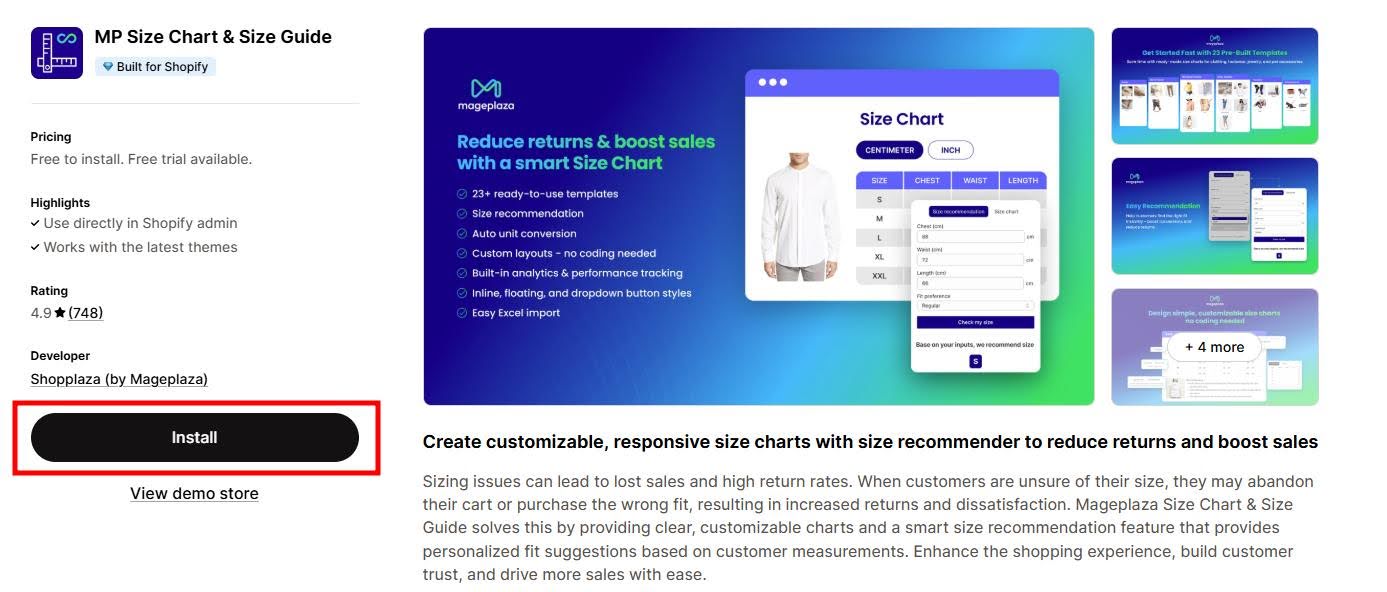
With the mission to help 1 million online enterprises grow revenue, Shopplaza built MP Size Chart & Size Guide to solve a very specific business problem: shoppers leaving because they’re not sure about the size.
MP Size Chart & Size Guide is one of those must-have Shopify apps that helps online stores cut size-related returns with clear, customizable size guides — now paired with AI-powered size recommendations that suggest the right fit for each shopper. The app is Built for Shopify certified and holds a 5.0 rating across 867+ merchant reviews.
The app ships with ready-to-use templates for Men’s & Women’s shoes, tops, bottoms, kids’ sizes, and more. You can fully customize the display — icons, background colors, text colors, overlays — and choose between a floating size chart that stays on screen, an inline link, or both.
To keep setup fast, MP Size Chart lets you preview every change in the backend before publishing, and decide whether a chart applies to all products or just a few.
Want the full picture? See the MP Size Chart & Size Guide app page, or read how Loveable boosted conversions and reduced returns with MP Size Chart.
Key features of the MP Size Chart & Size Guide by Shopplaza
- Create unlimited size chart campaigns.
- Ready-to-use templates for many industries — launch in minutes.
- AI size recommendation: personalized fit suggestions based on shopper inputs.
- Fully customizable design: colors, fonts, layout, plus images or videos.
- Bulk import charts to save hours of setup time.
- Responsive display options: inline, floating, or dropdown, with fast loading on any device.
- Place size guides on product, collection, and homepages.
- Preview changes live on desktop and mobile before publishing.
- Automatic unit conversion for international customers.
- Organize multiple charts with tabbed layouts.
- Track engagement with built-in Google Analytics integration and custom CSS support.
Pros & Cons
Pros
- Clear sizing that helps reduce returns.
- No “powered by” watermark on any plan, including the free Starter tier.
- AI recommendations included even on lower tiers.
- Plenty of templates and styling options to match your brand.
- Unit conversion and responsive design across devices.
- Beginner-friendly setup with live preview.
- Helpful, responsive support team.
Cons
- The most generous AI request limits sit on higher tiers.
- A large template and option set can feel like a lot at first.
- Charts still need accurate sizing data kept up to date.
Pricing
- Starter: Free — 3 published size charts, AI recommendation requests to try, and no “powered by” watermark
- Growth: $6.95/month
- Pro: $12.95/month
- Advanced: $24.95/month
2. Smart Size Chart & Fit Finder by SmartSize
- Rating: 5.0/5 / Total reviews: 131
- Best for: Stores that want stylish charts plus a guided fit-finder quiz experience.

Smart Size Chart & Fit Finder (by SmartSize) focuses on stylish, responsive size charts and fit guides that look great on any device. Whether you sell clothing, shoes, or jewelry, it makes it simple to give shoppers the info they need — and its fit-finder helps customers answer “find my size” without reading a table.
With customizable templates, personalized styling, and an image library, you can build size guides that match your brand and load quickly. Comparing options? See Smart Size Chart vs MP Size Chart.
Key features of Smart Size Chart & Fit Finder by SmartSize
- Create and manage multiple charts for different products.
- Fit-finder experience to guide shoppers to the right size.
- Switch between centimeters and inches.
- Customize fonts, colors, and icons to match your theme.
- Templates for shirts, dresses, bikinis, tops, bottoms, shoes, jewelry, and more.
- Custom images or a built-in image library.
Pros & Cons
Pros
- Simple, clean interface.
- Responsive on mobile and desktop.
- Multiple chart support.
- Category templates (clothing, shoes, jewelry).
- Personalized styling and image library.
- Active improvement based on user feedback.
Cons
- Lowest paid tier starts higher than some rivals ($9).
- Some setup time to fully customize.
- Focused on charts and fit guides only.
Pricing
- Free (2 size charts, no watermark)
- Starter: $9/month
- Growth: $12/month
- Pro 100: $19/month
3. CSC: Size Chart & Size Guide by TaskHusky
- Rating: 5.0/5 / Total reviews: 94
- Best for: Stores that want preset styles plus AI recommendations and one-click chart generation.
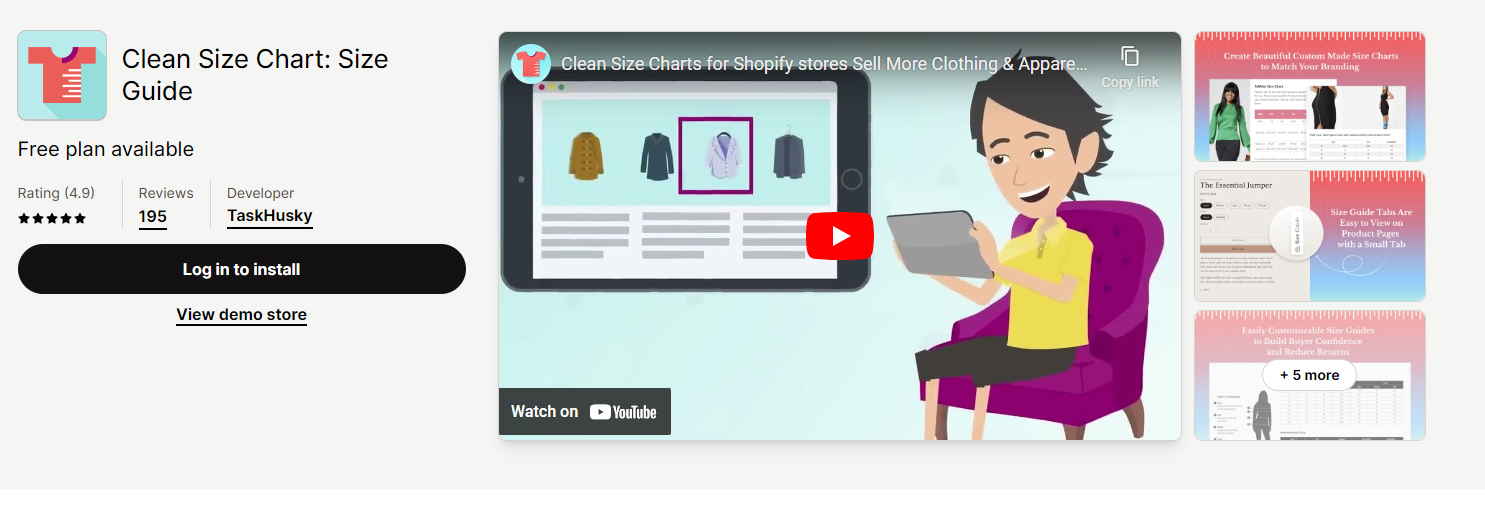
CSC: Size Chart & Size Guide (by TaskHusky, formerly “Clean Size Charts”) helps merchants add professional size guides in about five minutes. It now leans on AI-powered fit recommendations and one-click chart generation from your product data, on top of its preset styles.
It adapts to different catalogs — clothing, shoes, or accessories — and emphasizes simplicity, so merchants can communicate sizing clearly and build buyer confidence. Deciding between the two? See CSC Size Chart vs MP Size Chart.
Key features of CSC: Size Chart & Size Guide by TaskHusky
- 18 preset styles, or build from scratch with images and layout control.
- Display inline, fixed to the right, or as a table via app blocks.
- Assign charts to collections, products, vendors, and types.
- Create or edit multiple charts at once.
- AI-powered size recommendations to reduce returns.
- Import/export for bulk creation and editing.
Pros & Cons
Pros
- 18 preset styles or full customization.
- Flexible placement options.
- Optimized for all devices.
- AI recommendations to help reduce returns.
- One-click chart generation from product data.
Cons
- Building from scratch has a learning curve.
- Some features are paid-only.
- AI recommendations may need occasional tuning.
Pricing
- Free (2 published charts, no watermark)
- Grow: $6.99/month
- Advanced: $14.99/month
- Plus: $29.99/month
4. Pify Size Charts & Size Guides by pifyapp
- Rating: 5.0/5 / Total reviews: 33
- Best for: Stores that want a completely free, Built-for-Shopify size chart with no upsell.
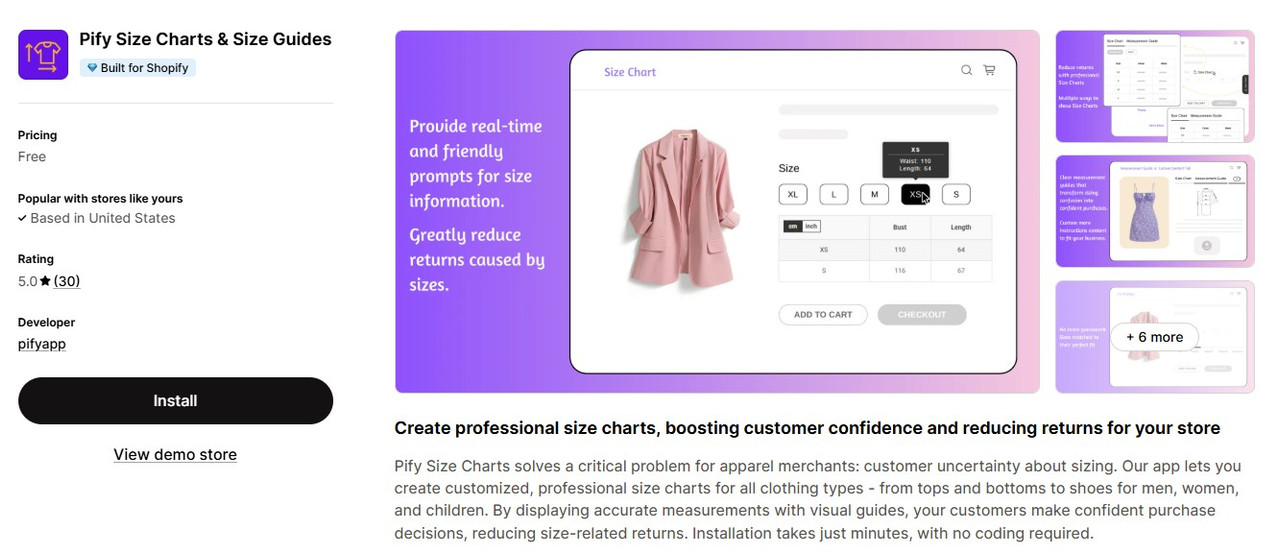
Pify Size Charts & Size Guides is a newer, fully free option that punches above its weight. It’s Built for Shopify, installs in minutes with no coding, and lets you create professional size charts for all clothing types — tops, bottoms, and shoes for men, women, and kids — with measurements and visual guides that help shoppers buy with confidence.
Because it’s free with a small but perfect review record, it’s a strong pick for newer or smaller stores that don’t want a paywall, though the feature set is lighter than the premium apps on this list. See how the two stack up: Pify Size Chart vs MP Size Chart.
Key features of Pify Size Charts & Size Guides
- Free to install and use, with no paid tier required.
- Built for Shopify (performance, design, integration standards).
- Pre-built chart styles for common apparel and footwear.
- Add measurements, text, and visual guides.
- Assign charts to specific products.
- Responsive display with no coding needed.
Pros & Cons
Pros
- Genuinely free — no hidden upgrade wall.
- Built for Shopify badge.
- Quick, no-code setup.
- Responsive support known for fast, custom help.
Cons
- Smaller review base than the established apps.
- Fewer advanced features (no AI recommender, lighter customization).
- Best for simpler catalogs rather than complex sizing logic.
Pricing
- Free (no paid plans)
5. Kiwi Size Chart & Recommender by Staytuned
- Rating: 4.8/5 / Total reviews: 1,094
- Best for: Stores that want a proven AI size recommender with a large, established review base.

Want a different guide table for each product and a smart recommender on top? Kiwi Size Chart & Recommender by Staytuned is one of the most established options in this category, with over a thousand reviews. It simplifies unit conversion and offers three recommender types:
- Advanced Apparel Recommender: machine learning suggests the best fit based on gender and age.
- Generic Table Recommender: helps with products that are hard to predict, like kids’ or pet items.
- Custom Size Recommender: build recommendations on your own logic.
Kiwi also makes it easy to customize the table’s design — size, color, and stock status — with no coding required.
Compare directly: Kiwi Size Chart vs MP Size Chart
Key features of Kiwi Size Chart & Recommender by Staytuned
- Product-specific size recommendations to reduce returns.
- Customizable chart layouts to match your brand.
- Recommender widgets for apparel, pet collars, snowboards, and more.
- Import charts from images, web pages, or CSV — or build your own.
- Add multiple tables, images, videos, and tabs to charts.
- Product- or collection-based guides that auto-apply to new items.
- Automatic unit conversion.
Pros & Cons
Pros
- Large, mature review base.
- Multiple import options.
- Auto-applied guides for new products.
- Flexible charts for many product types.
- AI recommendations to cut returns.
- Rich content with images, videos, and tabs.
Cons
- Advanced features take time to learn.
- The most useful recommenders sit on higher tiers.
- The Plus and Ultimate plans add usage charges tied to monthly order volume, so the bill scales with sales rather than staying flat. Merchants running high order counts have reported costs well above the listed tier price.
- Focused on sizing, not broader product customization.
Pricing
- Free (up to 3 charts, Kiwi watermark)
- Premium: $7.99/month (up to 10 charts, no additional monthly charges)
- Plus: $14.99/month (up to 20 charts)
- Ultimate: $26.99/month (unlimited charts)
- Note: the Plus and Ultimate plans add usage charges based on monthly order volume, so the effective cost rises with sales.
6. Jotly Size Chart & Size Guide by Jotly Apps
- Rating: 5.0/5 / Total reviews: 63
- Best for: Stores that want a lightweight, fast-loading size chart with a watermark-free free plan.

Jotly Size Chart & Size Guide is a newer Built for Shopify app that leads with page speed. It builds size charts and size guides from a drag-and-drop editor with 123 customisable templates, automatic unit conversion between cm, inches, mm, ft, and m, and flexible button placement so the size guide link lands where shoppers look for it.
Its free plan is unusually generous for this category: two size guides with no “Powered by” watermark, which most rivals reserve for a paid tier. Paid plans add unlimited charts, tabs, import/export, AI auto-translation, and analytics.
Key features of Jotly Size Chart & Size Guide by Jotly Apps
- 123 customisable size chart templates.
- Add tabs, images, and multiple tables inside one size guide.
- Auto-convert between cm, inches, mm, ft, and m.
- Assign charts to specific products, collections, tags, or vendors.
- Flexible size chart button placement, including next to the size label.
- Multi-language support with AI auto-translation on the Pro plan.
- Bulk update and delete charts; import/export.
- Google Analytics and Meta Pixel integration.
Pros & Cons
Pros
- Free plan has no watermark — rare at this price point.
- Lightweight build aimed at not slowing down product pages.
- Built for Shopify badge.
- Large template library and drag-and-drop editing.
- Translation support for multi-language stores.
Cons
- No AI size recommender — it displays sizing, it doesn’t predict it.
- Free plan limited to 2 size guides.
- Smaller review base than the category leaders.
Pricing
- Free (2 size guides, no watermark)
- Essentials: $6.99/month
- Pro: $14.99/month
- Analytics: $24.99/month
7. BF Size Chart & Size Guide by Relentless Apps
- Rating: 4.7/5 / Total reviews: 127
- Best for: Budget-conscious stores that still want a “Built for Shopify” badge and clean charts.

BF Size Chart & Size Guide by Relentless Apps is an affordable way to create unlimited, good-looking size charts for products like shoes, shirts, and jewelry. It’s now designated Built for Shopify, meaning it meets Shopify’s highest standards for performance and integration. You can customize charts with titles, descriptions, and images, and instead of dumping every chart on every page, it shows a link to the relevant chart on each product. Weighing it against our app? See BF Size Chart vs MP Size Chart.
Key features of BF Size Chart & Size Guide by Relentless Apps
- Create unlimited size charts.
- Copy and paste from Excel, Google Docs, or CSV.
- Assign multiple charts to unlimited products.
- Show a size chart link on each product.
- Build responsive, stylish charts.
- Smart chart placement on 2.0 themes with app blocks.
- Add text and upload images to your size tables.
Pros & Cons
Pros
- Multiple chart options per product.
- Clean, customizable charts for many product types.
- Helps reduce returns through better size selection.
- Works for apparel, shoes, rings, and more.
- Easy to place on product and collection pages.
- Built for Shopify performance standards.
Cons
- Free plan limited to 3 size charts.
- May need external image hosting for uploaded images.
Pricing
- Basic: Free (3 size charts, no watermark)
- Premium: $5.99/month (up to 100 size charts)
- Unlimited: $11.99/month (unlimited size charts)
8. ILM Size Chart & Size Guide by ILM TECH
- Rating: 4.9/5 / Total reviews: 42
- Best for: Merchants who want both classic and modern chart styles with simple, affordable pricing.

ILM Size Chart & Size Guide is an all-in-one option for removing sizing guesswork. It’s Built for Shopify, works smoothly on mobile and desktop, and ships with customizable pre-made templates you can match to your brand.
You get both classic and modern chart styles with eight preset colors, plus easy unit conversion and custom CSS for full control over the look of your size guides.
Key features of ILM Size Chart & Size Guide by ILM TECH
- Pre-made templates to customize.
- Shopify 2.0 support with app blocks.
- Image upload and an image library.
- Multiple tables for different variations.
- Assign charts to collections, products, vendors, types, and tags.
- Floating, inline, or block display options.
- Classic and modern styles with 8 preset colors.
- Custom CSS for fine-tuning.
Pros & Cons
Pros
- User-friendly with pre-made templates.
- Multiple tables for product variations.
- Easy assignment by product, collection, or tag.
- Versatile display options.
- Built for Shopify standards.
Cons
- Free plan limited to two published charts.
- Custom CSS needs some technical know-how.
- Smaller review base than the category leaders.
Pricing
- Free (2 published size charts, no watermark)
- Premium: $4.99/month
- Ultimate: $6.99/month
9. ESC Size Charts by Eastside Co
- Rating: 3.8/5 / Total reviews: 124
- Best for: Small stores that want a clean, no-frills size guide builder for free or near-free.

ESC Size Charts by Eastside Co (formerly marketed as “Size Matters”) is a straightforward app for building size guides. Admins create charts from the product information they already have, pick from a set of templates, and adjust background colors to match the brand.
You can build an unlimited number of size tables so customers aren’t faced with one long wall of text, and add light animation or transitions to each chart to keep it engaging.
Key features of ESC Size Charts by Eastside Co
- Create multiple size guides.
- Customize with CSS to fit your store.
- Pre-designed templates to start from.
- Generate unlimited size tables.
- Show guides on specific products via tags, or on all products.
- Add images and icons for clearer, more attractive charts.
Pros & Cons
Pros
- Easy size guide creation.
- Customizable design.
- Helps reduce return rates.
- Flexible display options.
- Image and icon support.
- Shopify 2.0 and Shop app compatible.
Cons
- Free plan limited to a few charts and shows an ESC watermark.
- Custom styling may have a small learning curve.
- Focused on size guides only, not broader product info.
Pricing
- Basic: Free (up to 3 charts, ESC watermark)
- Premium: $4.99/month (unlimited charts, no watermark, import/export)
10. True Fit: AI Size Guidance by True Fit Corporation
- Rating: 4.4/5 / Total reviews: 18
- Best for: Established and enterprise brands with the budget for an industry-grade fit platform.

True Fit is an AI size-and-fit platform built for larger brands. It provides size recommendations across footwear and apparel — including swim and intimates — for men, women, kids, and unisex, drawing on one of the biggest fit datasets in the industry.
The trade-off is cost and scale: True Fit is free to install, but it publishes no paid tiers on its Shopify App Store listing — pricing is quoted directly by its sales team and the platform is positioned for enterprise budgets. For most small and mid-size Shopify stores, a template-and-recommender app earlier in this list will deliver more value per dollar.
Key features of True Fit: AI Size Guidance by True Fit Corporation
- Accurate size recommendations across footwear and apparel.
- Broad category coverage and inclusive sizing.
- Personalized size-and-fit to turn browsers into buyers.
- Install in minutes, no coding required.
- Configure to match your brand and product pages.
Pros & Cons
Pros
- Industry-grade fit dataset and recommendations.
- Inclusive sizing across body types.
- Wide category coverage.
- Strong enterprise support history.
- Easy install without coding.
Cons
- No paid pricing is published on the App Store listing — you have to contact sales to get a quote.
- Smaller, mixed review base on the Shopify App Store.
- Depends on AI accuracy and proper product-page integration.
- Shopify-platform dependent.
Pricing
- Free to install — the only plan shown on the Shopify App Store listing
- Paid/enterprise tiers are not published; pricing is quoted by True Fit’s sales team
How to choose the best size chart app for your Shopify store
There’s no single “best” app — the right pick depends on your catalog size, budget, and how much you want AI to do the work. Here’s a quick way to narrow it down.
By store size
- Small stores (< 100 products): Start free with MP Size Chart (templates + AI to try), Pify (free, Built for Shopify), or ESC (clean and simple).
- Medium stores (100–1,000 products): MP Size Chart (bulk import + AI), Kiwi (mature AI recommender), or CSC (one-click generation).
- Large / enterprise stores (1,000+ products): MP Size Chart Advanced (bulk charts + analytics), Kiwi Ultimate, or True Fit if you have the budget for an enterprise platform.
By product category
- Apparel & fashion: MP Size Chart, Kiwi, True Fit.
- Shoes & footwear: MP Size Chart, True Fit, Smart Size Chart.
- Jewelry & accessories: MP Size Chart, Smart Size Chart, ILM.
- Multi-category stores: MP Size Chart, Kiwi, CSC.
By priority
- Lowest cost: Pify (free) or MP Size Chart / ILM / Jotly free plans.
- Best AI recommendations: MP Size Chart, Kiwi, CSC, or True Fit (enterprise).
- Easiest setup: MP Size Chart, Pify, ILM.
Frequently Asked Questions (FAQ)
1. What is the best size chart app for Shopify stores?
MP Size Chart & Size Guide is our top overall pick. It pairs ready-made templates and deep customization with AI-powered size recommendations, holds a 5.0★ rating on the Shopify App Store, and offers a free plan plus affordable paid tiers — so it scales with stores of any size. For a completely free alternative, Pify Size Charts (also Built for Shopify) is worth a look.
2. How much do Shopify size chart apps cost?
Pricing varies by features:
- Free plans: MP Size Chart, Pify (fully free), ESC, BF, Kiwi, ILM, CSC, Smart Size Chart, Jotly, and True Fit (free to install).
- Budget tier: ~$4.99–$6.99/month for core premium features.
- Mid tier: ~$9–$15/month for advanced features and AI recommendations.
- Enterprise: True Fit does not publish paid pricing on its App Store listing — you contact their sales team for a quote.
Most small and mid-size stores find the best value in the $5–$13/month range. One thing to check before you commit: Kiwi’s Plus and Ultimate plans add usage charges based on monthly order volume, so the listed tier price is a floor rather than the full bill. The other apps on this list bill a flat monthly rate.
3. Do size chart apps really reduce returns?
Yes — and the logic is well documented. Since size and fit cause about 70% of online apparel returns (Coresight & Alvanon, 2025), giving shoppers clear measurements and AI fit guidance directly targets the #1 reason products come back. The size of the improvement depends on your products and how accurate and detailed your charts are — so keep your sizing data current and product-specific.
4. Can I use multiple size chart apps on the same Shopify store?
It’s technically possible but not recommended. Running two size chart apps at once can cause code conflicts, slow your pages, confuse shoppers with inconsistent charts, and duplicate costs. Choose one app that covers all your product categories instead — for example, MP Size Chart offers templates across apparel, footwear, jewelry, and more.
5. How long does it take to set up a size chart app?
- Basic setup: about 5 minutes for a simple install.
- Full setup: 15–30 minutes to build product-specific charts and style them to your brand.
6. Are size chart apps mobile-friendly?
Yes — all modern Shopify size chart apps are mobile-responsive, which matters because most ecommerce traffic is now on phones. Quality still varies, so test your chosen app on a few devices before launch. MP Size Chart, Smart Size Chart, and Kiwi all offer strong mobile experiences.
7. Can size chart apps help with international customers?
Yes. The better apps support automatic unit conversion (inches/centimeters), international sizing standards (US, UK, EU, Asia), and clear measurement display so global shoppers can buy with confidence. MP Size Chart, Kiwi, and True Fit all handle international sizing well.
The bottom line
If you sell shirts, pants, shoes, hats, rings, or any sized product, your customers want to get the fit right the first time — and so do you. The 10 Shopify size chart apps above all help, in an easy-to-use way that matches your brand. Most have free plans or short trials, so there’s no risk in installing a couple and testing them on your busiest product pages.
For most stores, MP Size Chart & Size Guide is the best balance of templates, customization, AI recommendations, and price — see how it compares to the other size chart apps head-to-head. If your business needs custom sizing logic, product-specific charts, or deeper theme and customer-data integration, working with a Shopify app development partner like Shopplaza can be the ideal route. Explore custom Shopify app development services to build a fully tailored sizing experience for your customers.