How to make your size chart accessible to every shopper
MP Size Chart & Size Guide is built so every shopper can check their size before buying, including shoppers who use a screen reader or navigate with a keyboard only. The storefront size chart widgets and the app admin UI conform to WCAG 2.1 Level AA.
Accessibility is on by default for every chart, on every plan including Free. You don’t need to turn anything on. The only optional step is adding alt text to the images and videos in your charts.
What’s included
Keyboard-friendly controls
Shoppers can open, navigate and close your size chart without a mouse, using the standard keyboard controls of their browser.
The app admin works the same way, so merchants who use a keyboard can create and manage size charts too.
Screen reader support
Size chart controls and content are structured for assistive technologies. Screen readers can announce the size chart button, the chart content and the size table, so shoppers using a screen reader can read your sizes just like any other shopper.
Accessible media
You can add alt text to the images and videos you upload to your size charts and sizing page. A screen reader reads this text aloud, so shoppers who can’t see the image still know what it shows.
How to add alt text to images and videos
Alt text works the same way in the size chart editor and on the sizing page.
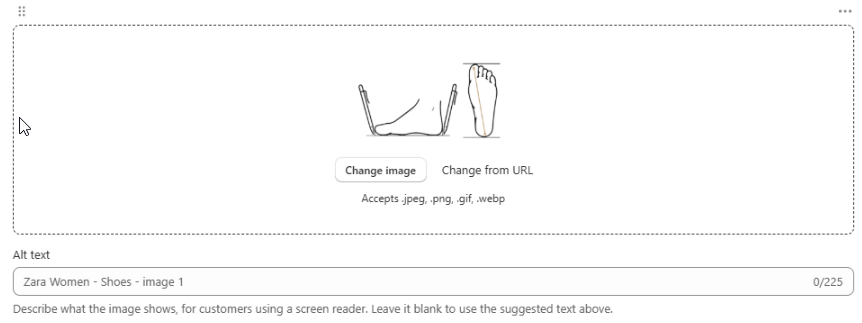
- Open the size chart you want to edit, or go to your Sizing page.
- Find the image or video block.
- In the Alt text box under the block, describe what the image or video shows (up to 225 characters).
- Click Save.
For an image:
For a video:
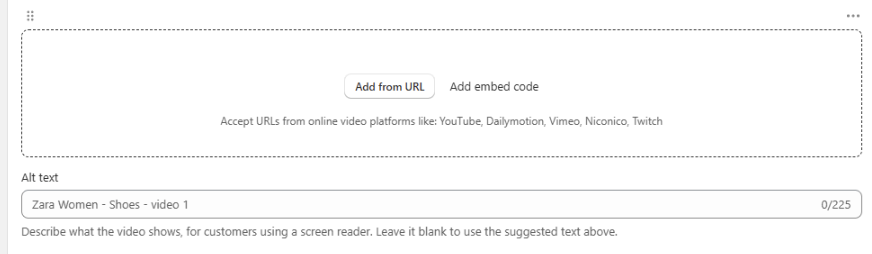
Note: If you leave the Alt text box blank, the app uses the suggested text shown in the box (for example, Zara Women - Shoes - image 1). Your charts still have alt text even if you skip this step.
Tips for writing good alt text
- Describe what the shopper learns, not what the picture looks like. For a measuring guide, say what is being measured.
- Good: How to measure foot length from heel to the longest toe
- Less helpful: Image of a foot
- Keep it short. One clear sentence is usually enough.
- Skip “image of” or “video of”. Screen readers already announce that it’s an image or a video.
- For videos, sum up what the video teaches, for example How to measure your chest, waist and hips with a tape measure.
Wrap up
With keyboard support, screen reader support and alt text, your size chart works for more shoppers. Everyone can check their size with confidence before they buy, whatever way they browse your store.