How to search size charts with Shopify Sidekick
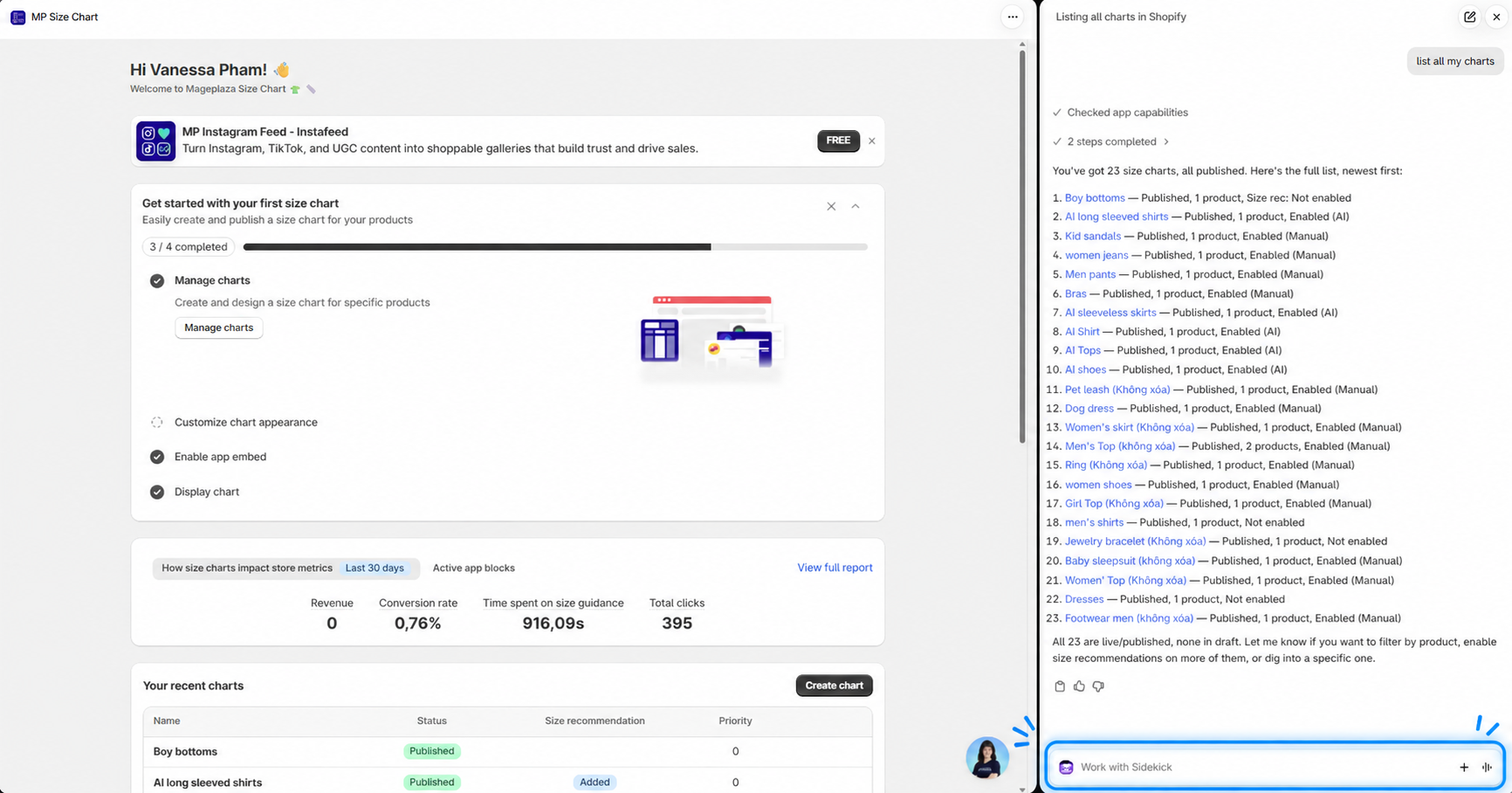
MP Size Chart & Size Guide works with Sidekick, the AI assistant built into your Shopify admin. You can ask Sidekick to find your size charts in plain language, such as “List all my size charts”, without opening the app and scrolling through the chart list.
Before you start
Make sure you have:
- MP Size Chart & Size Guide installed on your Shopify store.
- Access to Sidekick in your Shopify admin.
The integration is available to all MP Size Chart users. You don’t need to set anything up in the app.
How to search your size charts
- Open Sidekick in your Shopify admin.
- Type what you want to find, for example “List all my size charts”.
- Sidekick shows a list of matching charts.
For each chart, Sidekick shows:
- Chart name
- Status (Published or Draft)
- Number of products assigned to the chart
- Size recommendation status (on or off)
What you can ask Sidekick
See all your charts
- “Show me my size charts”
- “List all my size guides”
Charts are listed from the most recently updated to the oldest. Sidekick shows up to 20 charts at a time and tells you the total (e.g., 20/50). Ask Sidekick to show more to see the rest.
See your most recent charts
- “Show me recent charts” (up to 20 charts)
- “Show me 5 recent charts”
See a specific number of charts
- “Show me 12 charts”
Sidekick picks that number of charts from your store. To get the most recently updated charts instead, add “recent” (e.g., “Show me 12 recent charts”).
Filter by status
- “Show me published charts”
- “Show me draft charts”
Find charts by name
- “Show me all men charts”
Sidekick shows every chart whose name contains at least one word from your search. For example, “men” finds “Men’s T-shirt size chart” and “Men’s shoes size chart”.
Tip: If Sidekick can’t find a chart, it suggests trying another keyword or creating a new chart with that name. If you ask for more charts than you have, Sidekick tells you how many charts are in the app and shows them all.
Wrap up
With the Sidekick integration, you can find any size chart by asking a quick question in your Shopify admin. Searching charts by product, collection, or tag is not available yet. In the meantime, see how to add products, tags, and collections to a size chart.