Shopify serves as a platform builder for e-commerce, enabling individuals to effortlessly establish their online shop by selecting and customizing a template, while incorporating all the essential elements required to effectively operate their business.
Nevertheless, there are instances where the capabilities offered by a specific template on Shopify may not suffice to deem your online store as fully comprehensive.
This is precisely where the Shopify Storefront API can help with that. In this post, Mageplaza will provide the top 10 Shopify storefront API examples to inspire your next project, as well as key aspects and top benefits.
The Shopify Storefront API: What is it?
The Shopify Storefront API is a tool provided by Shopify that allows developers to access and retrieve data from a Shopify store’s frontend. It enables developers to build custom storefronts, mobile apps, and other applications that interact with a Shopify store.
What is the Shopify Storefront API?
With the Storefront API, developers can retrieve and display product details, such as images, descriptions, prices, and variants, on external websites or mobile apps. It enables the creation of custom storefronts that are seamlessly integrated with the Shopify platform, allowing businesses to provide a consistent brand experience across different channels.
Key Aspects of the Shopify Storefront API
- Custom Storefronts: The Storefront API allows developers to build custom, headless eCommerce storefronts that are separate from the Shopify online store.
- GraphQL: The API is based on GraphQL, which is a flexible query language for APIs. GraphQL allows clients (e.g., a website or mobile app) to request only the data they need.
- Access to Store Data: With the Storefront API, you can access a wide range of store data, including products, collections, customers, orders, and more.
- Customization: Businesses can customize the look, feel, and functionality of their storefronts to align with their brand identity.
- Dynamic Shopping Experiences: Developers can build dynamic and real-time features such as live product previews, personalized product recommendations, and instant search functionalities.
- Scalability: The API is designed to handle high levels of traffic and can be scaled to meet the demands of growing eCommerce businesses.
- Third-Party Integrations: Businesses can integrate third-party services and tools into their custom storefronts, extending functionality and meeting specific business requirements.
- Headless Commerce: The Storefront API supports the headless commerce approach, where the frontend and backend of an eCommerce site are decoupled.
- Mobile Commerce: It enables the development of mobile shopping apps, providing a seamless and tailored shopping experience for mobile device users.
- Developer Friendly: Shopify provides extensive documentation and resources for developers to make it easier to work with the Storefront API.
In a nutshell, the Shopify Storefront API empowers businesses to create unique, customized, and engaging eCommerce experiences for their customers.
Benefits of Using the Shopify Storefront API
Using the Shopify Storefront API offers several benefits for businesses looking to create custom eCommerce storefronts and enhance their online shopping experiences.
- Ease to Customize: Businesses can design and build fully customized eCommerce storefronts that align with their brand identity and specific requirements.
- Unique Shopping Experiences: The API allows you to create unique and immersive shopping experiences for customers, which can set your brand apart from competitors.
- Headless Commerce: The API supports the headless commerce approach, separating the frontend from the backend.
- Efficient Data Retrieval: Shopify Storefront API is built on GraphQL, which allows clients to request only the specific data they need.
- Real-time Updates: With GraphQL, you can request real-time updates for data changes. This is particularly valuable for features like live product previews, out-of-stock notifications, and price changes that need to be reflected instantly on the storefront.
- Mobile Commerce: The Storefront API allows businesses to develop mobile shopping apps that offer a seamless and optimized experience for mobile device users.
- Third-Party Integrations: You can integrate third-party services and tools into your custom storefront, expanding the functionality and capabilities of your online store.
- Improved Performance: You have more flexibility over performance optimization when you create a bespoke storefront. You may design your storefront to load quickly and efficiently, enhancing customer experience and potentially boosting conversion rates.
- Developer Support and High Security: Shopify provides extensive documentation, code examples, and a developer community. With full control over the frontend and backend, you can implement secure Shopify measures specific to your business needs.
- Competitive Advantage: Creating a unique and innovative shopping experience can give your business a competitive edge in the eCommerce market. Customers are more likely to remember and return to a store that offers a standout shopping experience.
10 Examples for Stores Using the Shopify Storefront API
Example 1: Rebecca Minkoff – Luxury fashion brand
Rebecca Minkoff, known as one of the renowned luxury fashion brands, leverages the capabilities of the Shopify Storefront API to drive their online store.
 Source: https://www.rebeccaminkoff.com/
Thanks to the utilization of this API, Rebecca Minkoff successfully delivers a sophisticated and smooth shopping journey to their esteemed clientele, effectively presenting their extensive product catalog and efficiently managing their inventory.
In addition, the Storefront API empowers Rebecca Minkoff to effectively handle customer accounts and curate personalized shopping experiences for their valued customers.
Example 2: Kylie Cosmetics – Beauty Brand
Kylie Cosmetics is a popular beauty brand that uses the Shopify Storefront API to power their e-commerce platform.
With the Storefront API, Kylie Cosmetics is able to provide customers with a seamless shopping experience for their makeup products. Here are some ways in which Kylie Cosmetics uses the Shopify Storefront API:
- Product Catalog: Kylie Cosmetics uses the Storefront API to manage their product catalog and showcase their makeup products on their online store.
- Shopping Cart: The Storefront API allows Kylie Cosmetics to offer a shopping cart feature on their e-commerce platform, which enables customers to add items to their cart and checkout seamlessly.
Kylie Cosmetics – Shopify storefront API examples
- Order Management: The Storefront API helps Kylie Cosmetics manage their orders efficiently and track customer purchases.
- Payment Processing: Kylie Cosmetics uses the Storefront API to process payments securely and offer various payment options to customers.
- Customer Management: The Storefront API enables Kylie Cosmetics to manage customer accounts and provide personalized shopping experiences for their customers.
Example 3: MVMT Watches – Watch and accessories brand
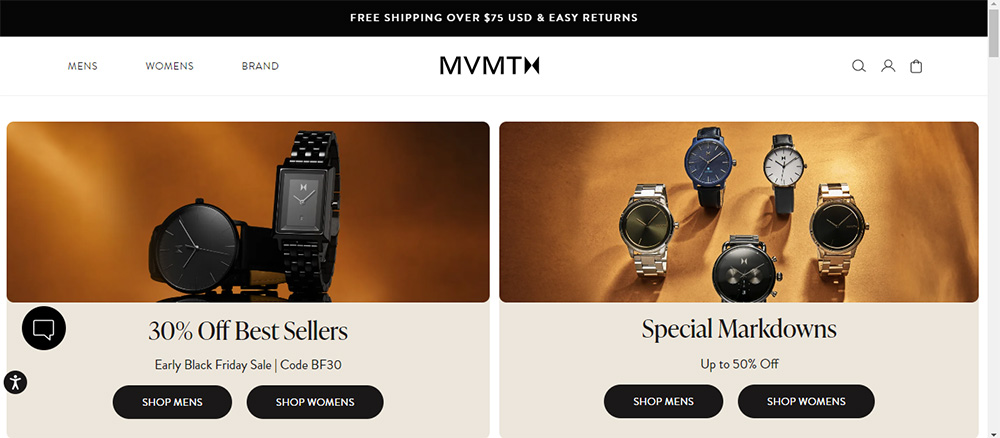 MVMT Watches – Watch and accessories brand
MVMT Watches, a renowned brand for watches and accessories, has successfully harnessed the power of the Shopify Storefront API to revolutionize their online store.
Through this cutting-edge technology, MVMT Watches effortlessly presents their extensive product catalog, efficiently manages inventory, and ensures a hassle-free shopping experience for their valued customers.
Moreover, the Storefront API empowers MVMT Watches to effortlessly handle customer orders, track shipments, and seamlessly process returns or exchanges.
By leveraging the immense potential of the Shopify Storefront API, MVMT Watches has elevated their e-commerce platform to new heights, delivering an unparalleled shopping experience to their esteemed clientele.
Example 4: Gymshark – Fitness apparel brand
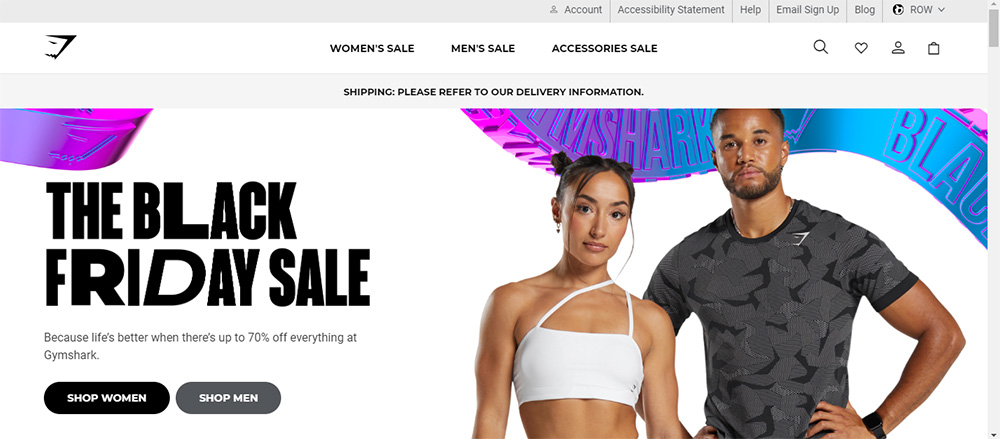 Gymshark – Fitness apparel brand
Utilizing the Shopify Storefront API, Gymshark, a fitness apparel brand, has optimized their e-commerce platform to provide a seamless shopping experience for their customers.
The API has enabled them to efficiently manage their inventory and orders, as well as offer personalized recommendations based on customer browsing history. Gymshark’s use of the Storefront API has resulted in a user-friendly online store that caters to the needs of their customers.
Example 5: Allbirds – Sustainable footwear company
Allbirds – Shopify storefront API examples
Allbirds, an eco-friendly footwear brand, leverages the Shopify Storefront API to operate their online store. The Storefront API empowers Allbirds to exhibit their sustainable shoes and efficiently manage their inventory.
Not only that, it facilitates a hassle-free shopping experience for their customers, enabling them to effortlessly browse and buy products. Through utilizing the Shopify Storefront API, Allbirds can enhance their e-commerce platform and deliver a sustainable and user-centric experience to their customers.
Example 6: Pura Vida Bracelets – Jewelry brand
 Pura Vida Bracelets – Jewelry brand
A jewelry company with a charitable goal, Pura Vida Bracelets, uses the Shopify Storefront API to run their online store smoothly. Through this API, Pura Vida Bracelets effectively presents their handcrafted bracelets and efficiently manages their product catalog.
Plus, the Storefront API empowers Pura Vida Bracelets to offer customers a seamless shopping experience, enabling them to effortlessly browse and purchase products.
By harnessing the capabilities of the Shopify Storefront API, Pura Vida Bracelets optimizes their e-commerce platform, ensuring a remarkable shopping experience while simultaneously supporting charitable initiatives.
Example 7: Sunday Somewhere – Eyewear brand
 Sunday Somewhere – Eyewear brand
Sunday Somewhere is an eyewear brand that utilizes the Shopify Storefront API to power their online store. With the Storefront API, Sunday Somewhere is able to showcase their stylish sunglasses and manage their inventory effectively.
Sunday Somewhere’s consumers can explore and buy their products with ease thanks to the Storefront API, which also makes it possible for them to provide a flawless shopping experience.
Example 8: Death Wish Coffee – Coffee brand
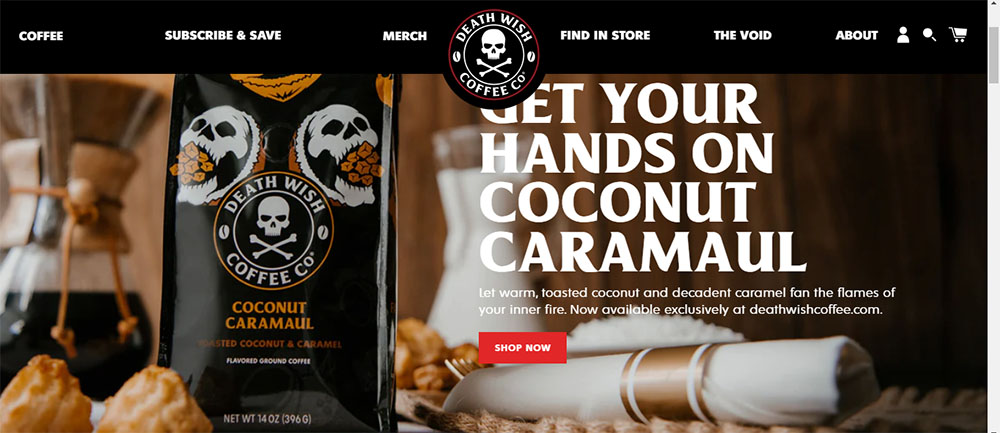 Death Wish Coffee – Coffee brand
Death Wish Coffee, famous for its robust brews, relies on the Shopify Storefront API to run their online store. This powerful tool allows them to effortlessly display their coffee products and efficiently handle their inventory.
Moreover, the Storefront API ensures a smooth shopping experience for Death Wish Coffee’s customers, enabling them to effortlessly explore and buy their favorite products.
Thanks to utilizing the Shopify Storefront API, Death Wish Coffee can enhance their e-commerce platform and deliver an exceptional shopping journey for coffee lovers.
Example 9: Leesa Sleep
Leesa – Shopify storefront API examples
The online store of Leesa Sleep, a mattress and bedding company, is powered by the Shopify Storefront API. Leesa Sleep is able to effectively display their items and manage their inventory thanks to the Storefront API.
Leesa Sleep is also able to provide their consumers with a smooth purchasing experience by using the Storefront API, which makes it simple for them to browse and buy their products.
Customers searching for premium mattresses and bedding will have an excellent buying experience at Leesa Sleep because of their e-commerce platform’s optimization and use of the Shopify Storefront API.
Example 10: Gym+Coffee – Activewear brand
 Gym+Coffee – Activewear brand
And the final store in the collection is Gym+Coffee. The online store of the sportswear company Gym+Coffee is powered by the Shopify Storefront API. Gym+Coffee is able to efficiently manage their inventory and exhibit their fitness clothing thanks to the Storefront API.
Gym+Coffee is also able to provide their consumers with a smooth buying experience by using the Storefront API, which makes it simple for them to browse and buy their products.
By utilizing the Shopify Storefront API, Gym+Coffee can enhance their e-commerce platform and offer an exceptional buying experience to fitness fanatics.
The Shopify Storefront API: How to Get Started
To access the Storefront API, you need to have an access token linked to your Shopify store. This GraphQL API can be accessed from any HTTP client. It’s crucial to remember that there can only be 100 active storefronts and access tokens per shop.
If you’re looking to build a storefront, the Shopify API is flexible and can be used with a variety of frameworks, including Hydrogen, Next.js, Vue, and others. The following instructions will walk you through the process of starting to build your storefront:
Step 1: Set up a Shopify Store
The first step in using the Storefront API is to create a Shopify store. Once you have a Shopify store, you can generate API credentials and set up a development environment to start making requests to the Storefront API.
Step 2: Generate API Credentials
To begin using the Storefront API, you must first generate API credentials. You may get the credentials needed to access the Storefront API and send authenticated queries to your Shopify store by building a private app in your Shopify admin.
Generate API Credentials
You can interact with the data in your store using these credentials and create unique retail experiences. In your Shopify admin, go to Settings and then API & Integrations. To create a new private app, click Manage private apps.
Provide a name and enable the Storefront API access. Save the app, and you’ll receive your API credentials (Storefront Access Token).
Step 3: Comprehend API Endpoints
For the Storefront API to work, it is essential to comprehend API endpoints. Endpoints are the URLs that correspond to particular resources in your Shopify shop and which you will use to send queries to the Storefront API.
By being familiar with the endpoints that are accessible and their respective data types, you can efficiently query and modify the data in your shop using the Storefront API.
Step 4: Authenticate Requests
You must use the proper authentication headers when sending calls to the Storefront API. The X-Shopify-Storefront-Access-Token header, which is used by the Storefront API, requires a legitimate access token.
By establishing a private app in your Shopify admin and collecting the API credentials, you can generate this token. You can safely access the data in your shop using the Storefront API by authenticating yourself and supplying the access token in your requests.
Step 5: Make API Requests
The next step to beginning with the Storefront API is to make requests to the API. To perform calls to the Storefront API endpoints and obtain or alter the data in your shop, utilize tools like GraphQL Playground or Postman.
You can interact with the information in your store’s database and create unique storefront experiences by sending correctly prepared queries and mutations.
Final Words
To sum up, the Shopify Storefront API Examples offer developers valuable resources and code snippets to harness the potential of the Shopify Storefront API.
These examples assist developers in comprehending how to engage with the API and construct personalized storefronts for Shopify stores. By utilizing these examples, developers can craft captivating and smooth shopping experiences for customers on the Shopify platform.