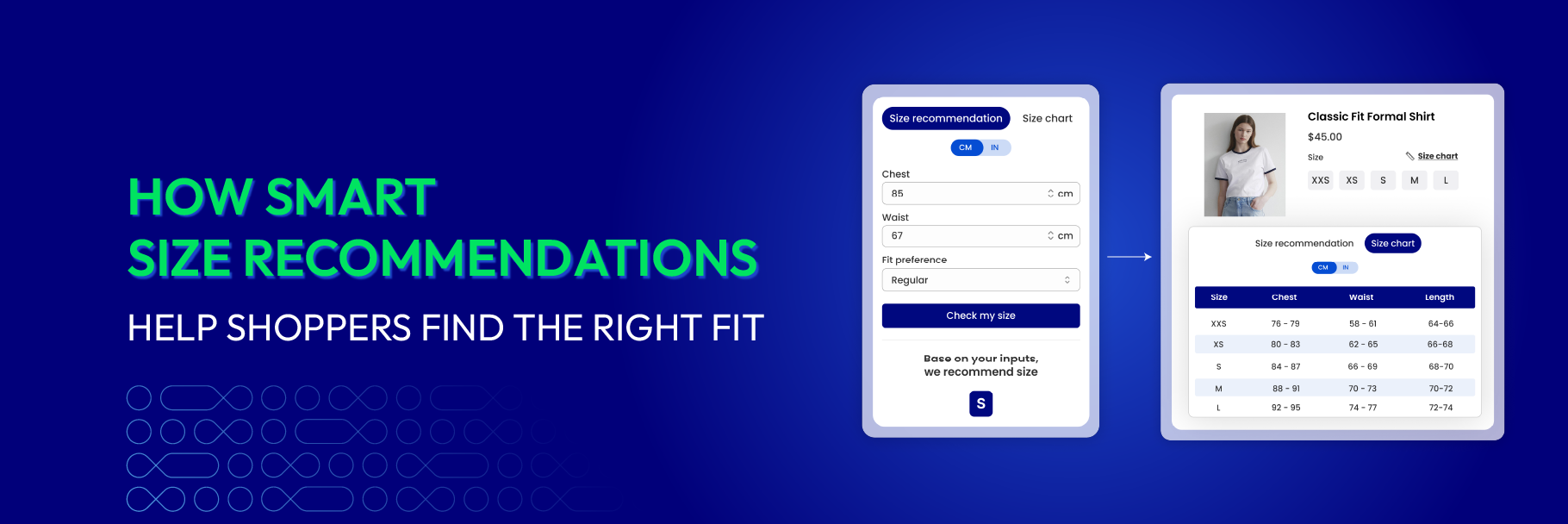
A static size chart shows the measurements. A smart size recommendation picks the size for the shopper.
That difference is the whole point. Most shoppers can read a size chart fine — but they’re not great at translating “bust 90 cm” into “you should order the Medium,” especially when fabric, cut, and brand sizing all vary. A smart (or “AI-powered”) size recommender closes that gap: shoppers enter a few inputs and get a specific size suggestion, calibrated to that exact product.
For apparel, footwear, and other fit-sensitive categories, this is one of the highest-leverage features you can add to a product page. Roughly 70% of online apparel returns trace to size and fit (Coresight Research & Alvanon, 2025) — and a good recommender directly tackles the moment that fails.
This guide covers what smart size recommendations actually are, how they work, when they’re worth installing, what makes a good one, and the common pitfalls to watch out for.
📌 Key takeaways before you dive in:
- A smart size recommendation picks a specific size for the shopper based on their inputs — it doesn't replace the size chart, it works alongside it.
- Strongest leverage: apparel, footwear, denim, swimwear, lingerie, and formalwear — anywhere fit risk is high and AOV is meaningful.
- Quality signals: per-product calibration, a clean 3–5 input flow, a specific output (not a hedged range), fit-preference toggle, and reference-item support.
- Common pitfalls: trusting "AI" marketing without testing the recommendations, hiding the recommender, replacing the static chart, and outgrowing the usage tier silently.
What are smart size recommendations?
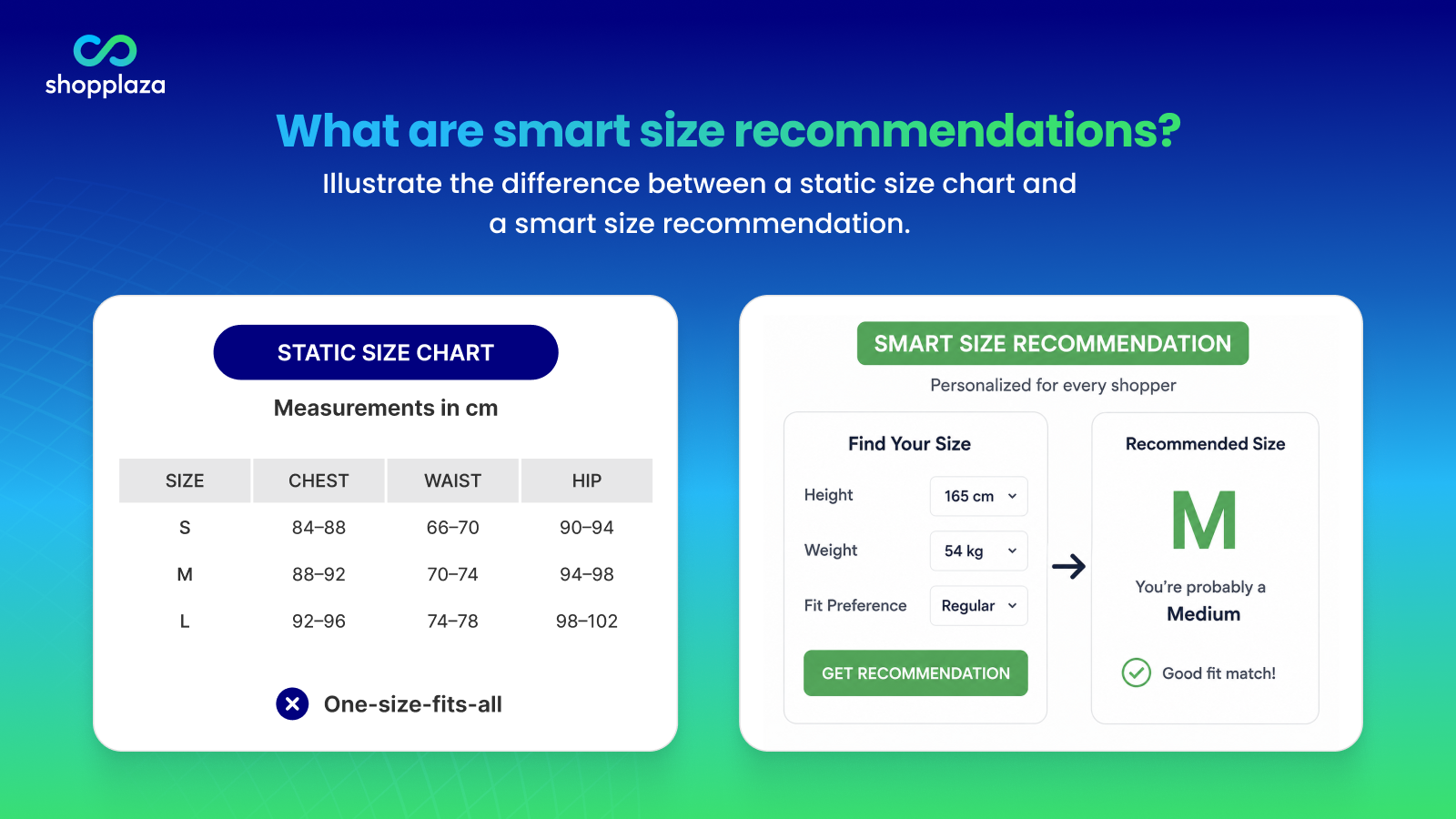
A smart size recommendation is a product-page feature that suggests a specific size to a shopper based on inputs they provide — height, weight, body measurements, fit preference, usual size in another brand, or a similar item they already own. It’s the step beyond a static size chart, which shows measurements but leaves the shopper to do the math.
Most smart recommenders run as part of a size chart app. The shopper clicks a “Find Your Size” button near the variant picker, answers 3–5 quick questions, and gets a recommendation like “You’re probably a Medium” — sometimes with a brief reason and a confidence indicator.
Sub-categories worth knowing apart:
- Input-based recommenders ask the shopper for measurements and run them through a per-product fit logic.
- Reference-item recommenders ask about a brand and size the shopper already wears well, then match the new product to that fit profile.
- AI/ML recommenders combine multiple inputs and improve over time as more shoppers use them and return data flows back.
- Hybrid recommenders combine all of the above.
The terminology in app store listings is loose — “smart,” “AI-powered,” “size recommender,” “fit finder” usually describe similar features. What matters is the quality of the recommendation, not the name.
How smart size recommendations work
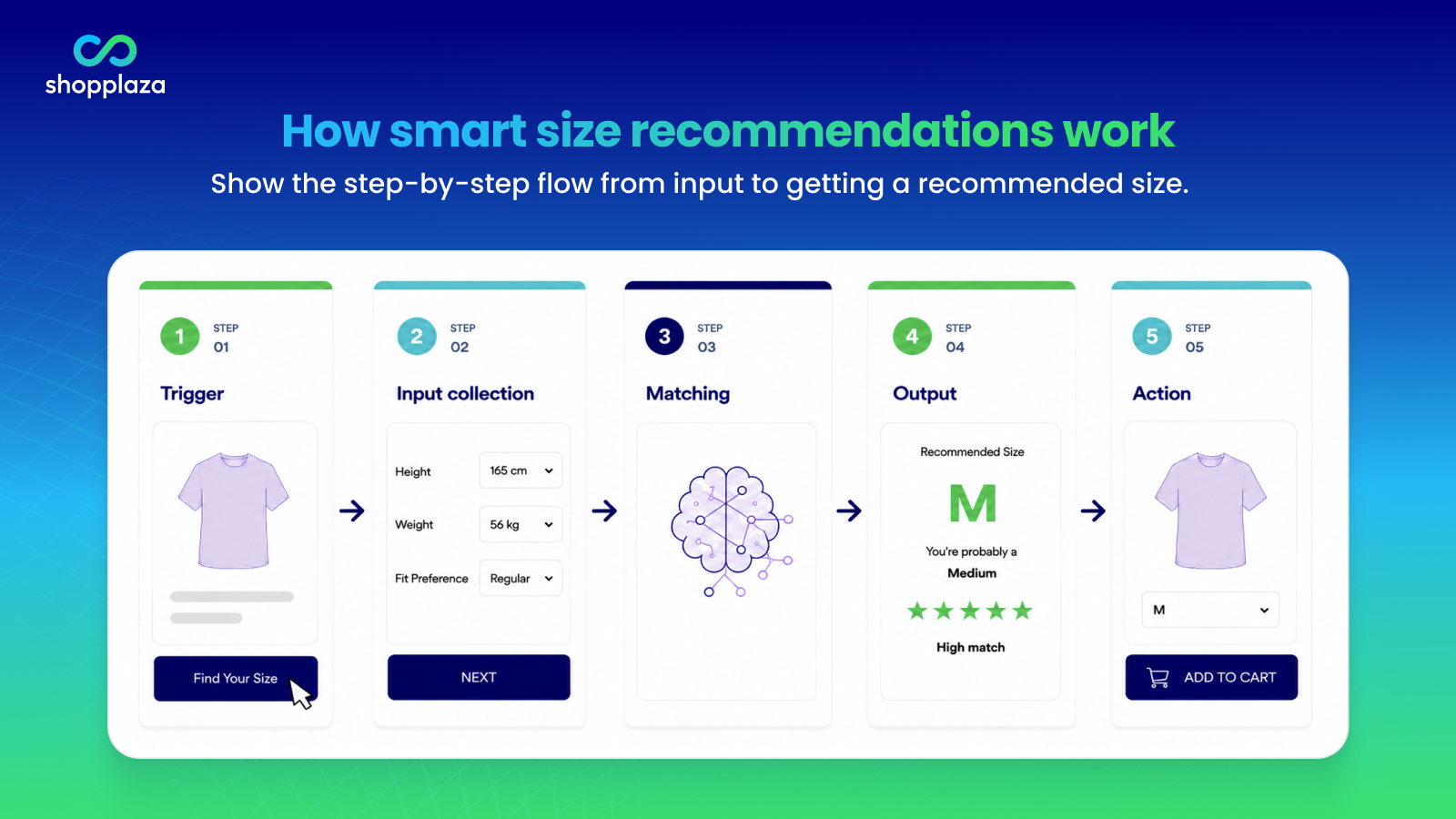
The basic flow is the same regardless of the underlying logic:
- Trigger. Shopper clicks a “Find Your Size” or “Size Recommender” link near the variant picker.
- Input collection. Shopper enters 3–5 inputs — height, weight, fit preference, body measurements, or a similar item they own.
- Matching. The recommender compares the inputs against the product’s fit profile (the brand’s own sizing logic, ideally calibrated per product).
- Output. A specific size suggestion appears: “You’re probably a Medium,” ideally with a brief reason (“based on your measurements and the slim fit of this style”).
- Action. Shopper adds the recommended size to cart — or revisits inputs to compare.
The inputs that work best, by category:
- Tops and dresses: bust, waist, hips, height, weight, fit preference
- Bottoms: waist, hip, inseam, fit preference
- Shoes: foot length (cm), width, usual US/UK/EU size
- Rings: finger circumference or diameter
- Outerwear: chest, shoulder width, sleeve length, layering intent
Reference-item recommenders — “you said you wear a Medium in Uniqlo, so for this brand you’d probably be a Large” — work well when shoppers don’t want to measure themselves. They’re particularly effective for first-time brand customers who have a well-fitting reference garment but don’t know how a new brand’s sizing translates.
When smart size recommendations are worth installing
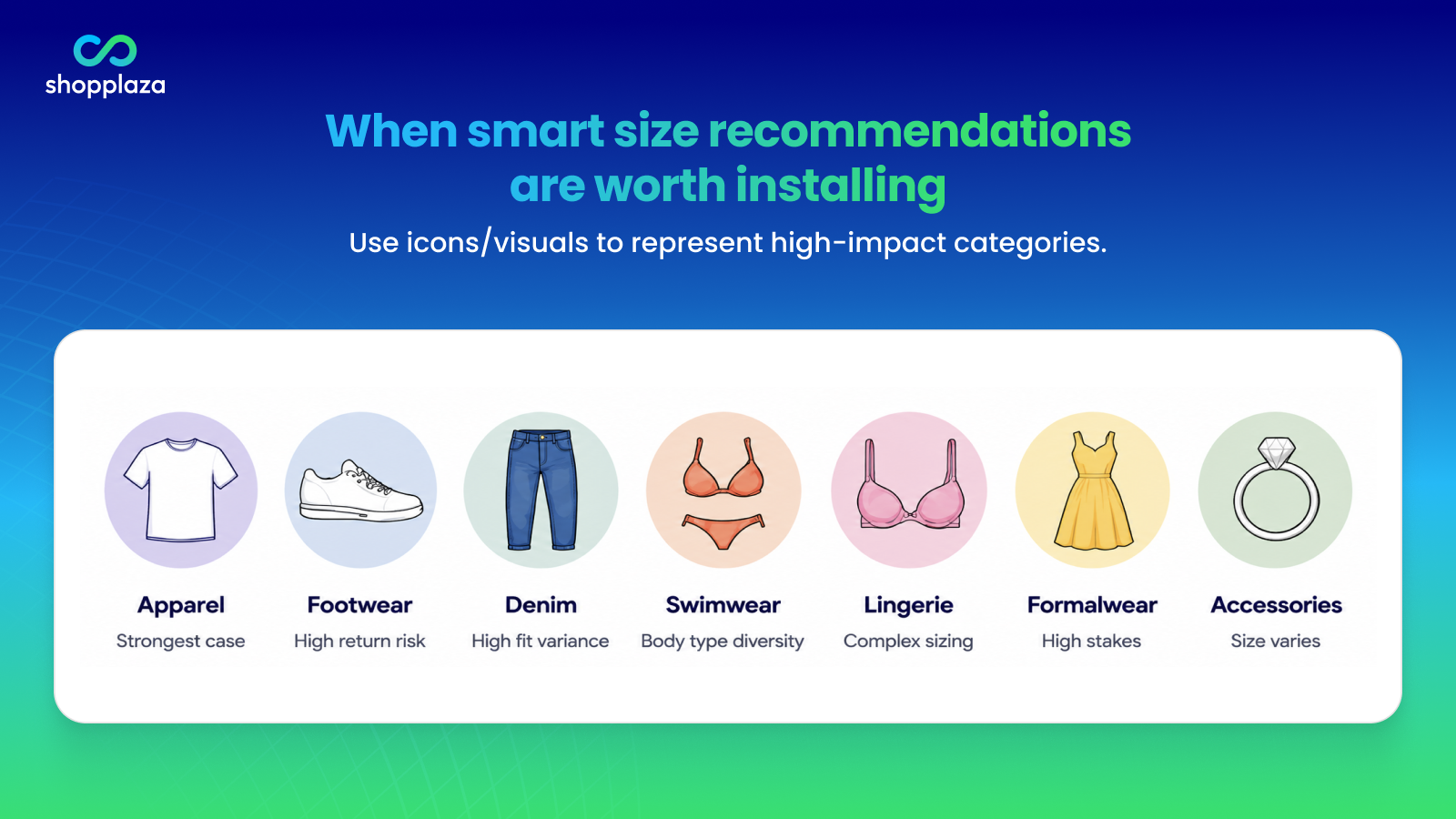
Not every store needs one. Here’s where the ROI is real.
By category
- Apparel — strongest case. ~70% of apparel returns are size/fit-driven. A recommender directly cuts that share.
- Footwear — strong. International sizing confusion (US/UK/EU) plus foot shape variance creates high return risk.
- Denim — particularly strong. Vanity sizing + cut variance + fabric stretch make this category one of the worst offenders for fit returns.
- Swimwear — strong if you sell across body types or styles.
- Lingerie and intimates — strong. Cup sizes and body diversity make guided sizing especially valuable.
- Formalwear — strong on high-AOV items where a return is meaningfully expensive.
- Jewelry — moderate. Rings benefit from a recommender; necklaces and bracelets less so.
- Pet accessories — moderate, depending on whether you sell harnesses and collars with multiple size variables.
For an apparel-specific deep dive into the full fit-confidence stack (of which smart recommendations are one layer), see how to reduce clothing returns caused by size and fit issues.
Lower-leverage categories: home decor, electronics, beauty, consumables. Static charts (where needed) are usually enough.
By store stage
- Small store, single category, AOV under $30. Usually overkill. A clear size chart + fit notes does most of the work.
- Growing apparel or footwear store, AOV $30–$100. Sweet spot. The ROI from cutting size returns and lifting variant-picker conversion typically covers the app subscription several times over.
- Multi-category store, AOV above $100. Nearly required. Returns cost more, conversion at the variant picker matters more, and a static chart leaves money on the table.
- International store. Especially valuable because the recommender normalizes US/UK/EU sizing confusion automatically.
By signal
Beyond category and stage, watch for these signals that a recommender will pay back fast:
- Pre-purchase support tickets are dominated by “what size should I get?”
- Return-reason data showing 30%+ of returns are “wrong size”
- Bracketing rate (orders containing 2+ sizes of the same item) above ~10%
- Visible conversion drop at the variant picker (high abandonment after the size selector loads)
For a real example of these signals translating into measurable returns reduction, see how one apparel store boosted conversions and reduced returns with a clearer size guide and AI recommendations.
👉 Rule of thumb — install a smart recommender when at least one is true:
- You sell apparel or footwear at AOV $40 or above.
- Your fit-return rate sits measurably above ~15% (vs the apparel average of ~23.4%).
- You see regular pre-purchase "what size?" support tickets across multiple products.
What makes a good smart size recommender
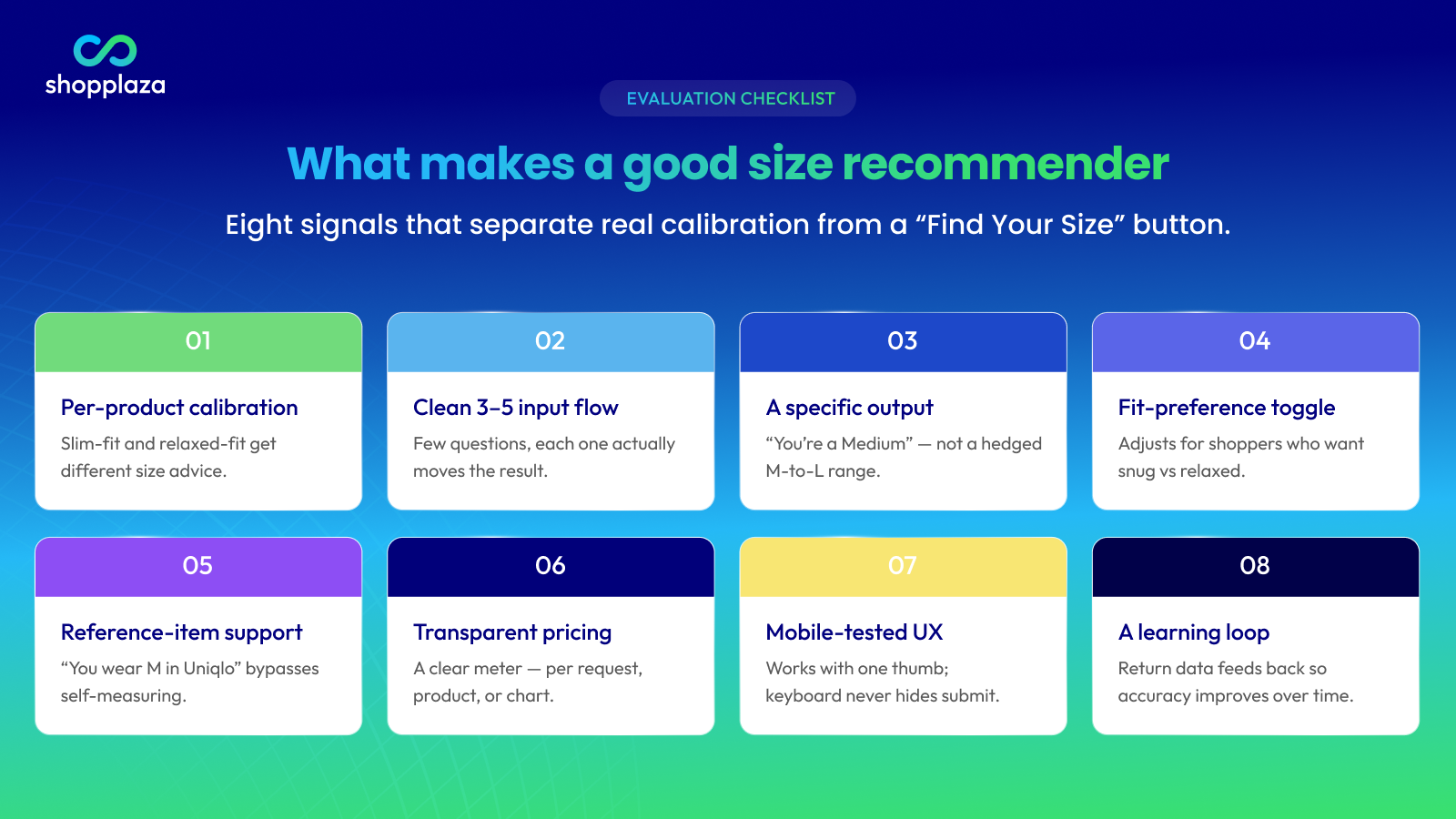
The market is uneven. Some apps ship a real ML-based recommender with per-product calibration; others rebrand a static lookup table with a “Find Your Size” button. Eight things to look for when you evaluate one:
1. Per-product calibration
A good recommender knows your slim-fit shirt and your relaxed-fit shirt fit differently and adjusts per product. A weak one runs the same logic for every item in the catalog.
Test: Open the recommender on a slim-fit product and a relaxed-fit product, and enter identical inputs. The recommendation should differ.
2. A clean input flow
3–5 quick questions max. Each question should feel like it changes the recommendation. If the form asks for 12 inputs and outputs “Medium” regardless, the recommender is cosmetic — the inputs aren’t actually driving the output.
3. A specific output, not a hedged range
“You’re probably a Medium” is actionable. “You could be between Medium and Large” isn’t — that’s just kicking the decision back to the shopper.
A small confidence indicator (“recommended with high confidence” or “close call between M and L”) is fine and often helpful. A vague range is not.
4. Fit-preference toggle
Some shoppers want snug. Some want loose. A recommender that adjusts for “I prefer a closer fit” vs “I prefer a relaxed fit” handles real shopper variance. A rigid one ignores it.
5. Reference-item support
“Tell us a brand and size you already wear well” is one of the highest-quality inputs available because it bypasses self-measurement error entirely. The shopper isn’t measuring themselves wrong — they’re describing a known good fit.
Recommenders that support this input usually outperform measurement-only flows in adoption rate too, because the question is faster to answer.
6. Transparent, usage-based pricing
AI recommendations cost the vendor compute. Most apps meter them — pay attention to whether the meter is per request, per active product, or per chart. A clear meter prevents surprise overages.
As a benchmark, MP Size Chart & Size Guide meters AI recommendation requests per plan (10 / 800 / 2,000 / 5,000 requests across the four tiers), with the request count visible in-app.
7. Mobile-tested UX
The recommender flow should work cleanly on a phone with one thumb. Open the app’s demo on your phone before installing — if the input fields are tiny, the keyboard covers the submit button, or the result text overflows, the flow won’t convert on your real traffic.
8. A learning loop (advanced)
The best recommenders feed return-reason data back into the model so the recommendations improve over time. This is rare today but increasingly relevant — especially in apparel where supplier sizing shifts.
For the broader app evaluation framework that smart recommendations sit within (along with the 9 other features that matter), see what to look for in a Shopify size chart app.
Smart size recommendations vs static size charts
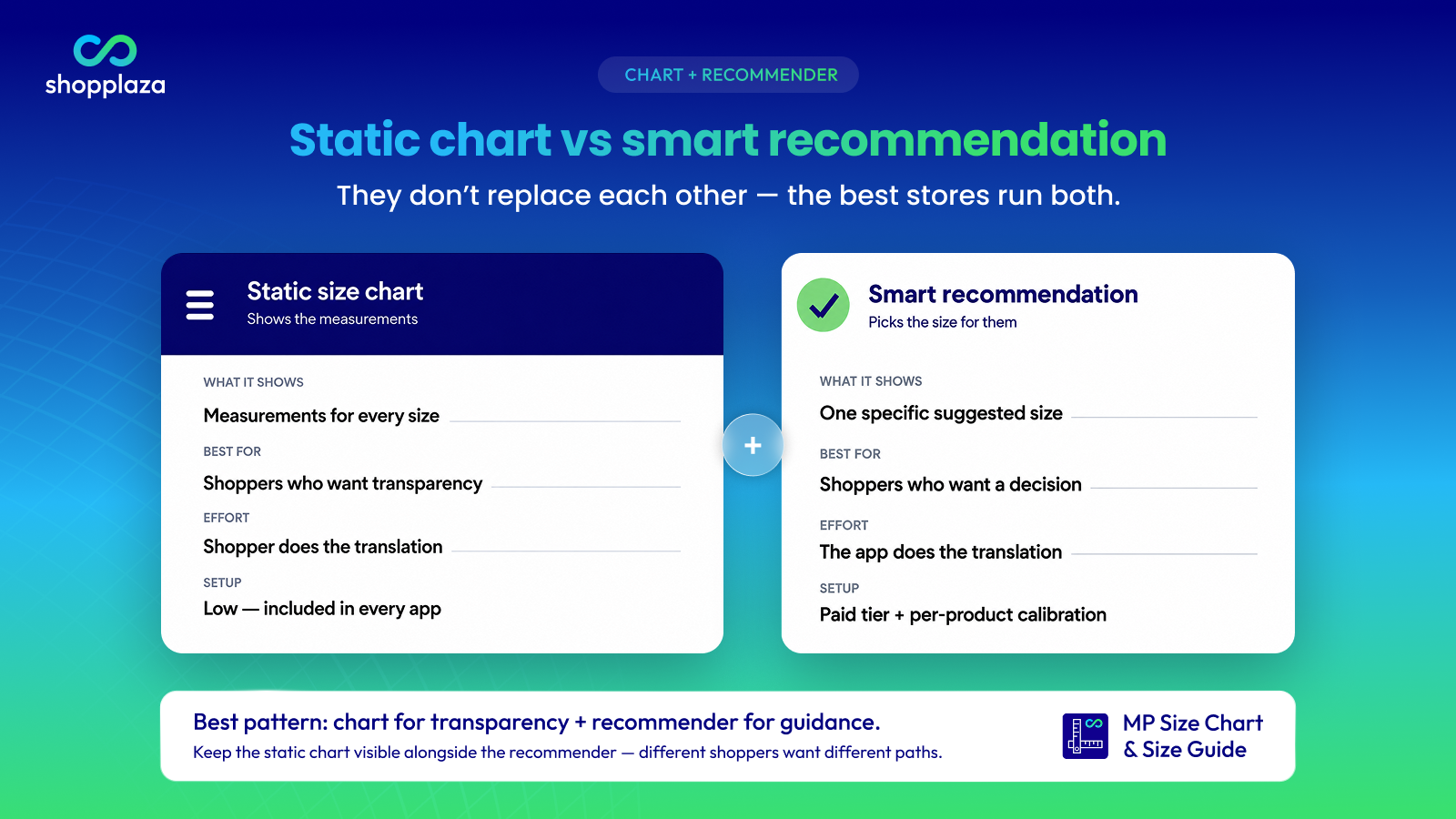
The two work together — they don’t replace each other.
| Static size chart | Smart size recommendation | |
|---|---|---|
| What it shows | Measurements per size | A specific suggested size |
| Best for | Shoppers who want transparency, prefer reading the chart | Shoppers who want a decision, don’t want to measure |
| Effort to use | Shopper does the translation | App does the translation |
| Setup cost | Low — every size chart app includes it | Higher — usually a paid feature tier |
| Maintenance | Update when supplier sizing changes | Same, plus per-product fit calibration |
| Best on its own | Small catalogs, simple sizing | Rarely the best on its own — pairs with the chart |
The ideal pattern is chart for transparency + recommender for guidance. Shoppers who like the chart get the chart. Shoppers who want a decision click “Find Your Size.” Both routes lead to the variant picker with confidence.
Don’t replace the chart with the recommender. Always keep the chart visible as the fallback — different shoppers want different paths, and you don’t know which.
Common pitfalls when adding a smart size recommender
- Trusting “AI” marketing without testing the recommendations. Many “AI-powered” recommenders are static lookup tables in disguise. Before installing, test the demo on a few products with varying inputs and see if the recommendation actually changes.
- Skipping per-product calibration. Out of the box, recommenders often use a generic model. If you sell slim-fit + relaxed-fit + oversized in the same store, set fit profiles per product (or per collection) before going live. Otherwise, the recommendations will be wrong for at least two of your three fits.
- Hiding the recommender behind a click. “Find Your Size” should be visible near the variant picker — same line as the size chart link, not buried in a “more info” tab. Adoption rates fall off a cliff when shoppers don’t see the trigger.
- Replacing the size chart entirely. Some shoppers will always want to read the chart. Hide it and you lose conversion from the chart-reading segment.
- Not tracking the recommender’s impact. Set up tracking from day one: adoption rate (% of size-selector views that use the recommender), recommended-size conversion vs non-recommended-size conversion, and return rate for recommended-size orders. Without measurement, you can’t tune the recommender — and you can’t justify the subscription tier to your CFO.
- Outgrowing the usage tier silently. If the app meters AI recommendation requests, store traffic growth can hit the limit mid-month. Pick a tier with 6–12 months of headroom, and monitor usage monthly.
Implementation checklist
When you’re ready to install a smart size recommender:
- Pick an app with per-product calibration support
- Set fit profiles per collection or per fit type (slim, relaxed, oversized, petite, tall)
- Place the “Find Your Size” trigger near the variant picker — same line as the size chart link
- Test the flow on mobile, with a thumb, on 5 different products
- Set up tracking for adoption rate, recommended-size conversion, and recommended-size return rate
- Pick a pricing tier with usage headroom for 6–12 months of expected traffic
- Keep the static size chart visible alongside the recommender
- Schedule a quarterly review of the recommendation accuracy against actual return data
Add AI size recommendations to your Shopify store
MP Size Chart & Size Guide ships with AI-powered recommendations — no code required.
- AI-powered size recommendations with per-product calibration (metered 10 / 800 / 2,000 / 5,000 requests per plan)
- 30+ industry-specific templates + per-product, collection, and tag display rules
- 20+ languages with auto unit and size conversion
- Rated 5.0★ on the Shopify App Store with a Built for Shopify badge
Conclusion
A smart size recommender is the natural next step for any apparel, footwear, or fit-sensitive store that’s already running a clean size chart. For shoppers who don’t want to do the measurement math, the recommender does it for them — and for the store, the result is fewer “wrong size” returns and more confidence at the variant picker.
The decision isn’t “should I add AI?” — it’s “does my catalog and AOV justify paying for a recommender tier?” For multi-category apparel stores at AOV ≥ $40, the answer is usually yes. For very small stores, a static chart still does most of the job.
If you’re comparing the leading apps with AI recommendations, see the best Shopify size chart apps. For the head-to-head against the most-installed alternative, see MP Size Chart vs Kiwi Sizing. Whichever app you land on, pair it with the static chart — the recommender adds direction, the chart keeps the transparency.
Frequently asked questions
What is a smart size recommendation?
A smart size recommendation is a product-page feature that suggests a specific size to each shopper based on inputs like height, weight, body measurements, fit preference, or a similar item they already own. It complements (rather than replaces) the static size chart — shoppers who want a clear decision use the recommender; shoppers who want transparency use the chart.
How is a smart size recommender different from a size chart?
A size chart shows the measurements for each size and lets the shopper choose. A smart recommender takes the shopper’s inputs and picks a size for them. The chart gives transparency; the recommender makes a decision. Best practice is to offer both — different shoppers want different paths.
Are smart size recommendations really “AI”?
Some are, some aren’t. Real AI/ML recommenders combine multiple inputs and learn from purchase + return data over time. Cosmetic “AI” features are often static lookup tables in disguise. Before installing, test the recommender on the same product with different inputs — the output should genuinely change.
Do smart size recommendations reduce returns?
For apparel and footwear, yes — because they target the single largest cause of returns: shoppers picking the wrong size. The exact impact depends on the quality of the recommender, your catalog, and how prominently you place the trigger on the product page. Track adoption rate and return rate by recommended-size to measure the actual effect on your store.
When are smart size recommendations worth the cost?
Install one when at least one of these is true: you sell apparel or footwear at AOV $40+, your fit-return rate is measurably above ~15%, or you regularly get pre-purchase “what size?” support tickets. For very small stores, single-category brands, or non-apparel categories, a static chart with fit notes is usually enough.
What inputs should a smart size recommender ask for?
For tops/dresses: bust, waist, hips, height, weight, fit preference. For bottoms: waist, hip, inseam, fit preference. For shoes: foot length in cm, width, and usual US/UK/EU size. For rings: finger circumference or diameter. 3–5 inputs is the sweet spot — more than that and adoption drops.
Should I hide the size chart once I add a smart recommender?
No. Keep the chart visible alongside the recommender. Some shoppers will always prefer to read the chart and choose for themselves; hiding it will cost you conversions from that segment.
How much do smart size recommendations cost?
Most apps offer them on a mid-to-top tier (~$10–25/mo) with a usage meter on AI recommendation requests. Pricing varies — pay attention to whether the meter is per request, per active product, or per chart, and pick a tier with 6–12 months of usage headroom.
How do I measure whether a smart recommender is working?
Track three things from day one: adoption rate (share of size-selector views that use the recommender), conversion lift (orders from recommended-size sessions vs others), and return rate by recommended-size. If adoption is below 10%, the trigger probably isn’t visible enough. If the return rate isn’t improving, the per-product calibration probably needs work.
Can smart size recommendations work for international shoppers?
Yes — and they’re especially valuable for international stores because they normalize US / UK / EU sizing confusion automatically. Pick a recommender that supports multi-region sizing and your store’s languages.