A shopper sees a post in your Instagram feed, likes the jacket, and taps it. Then comes the question every shopper asks before paying: do other people actually like this?
If the answer sits three clicks away on a product page, plenty of shoppers never go looking for it.
That’s the gap this integration closes. MP Instagram Feed now works with Judge.me Product Reviews. Star ratings and review counts from Judge.me show up on the products you tag in your shoppable feed, right next to the price and the Add to cart button. It’s one toggle in the app settings.
📌 Key takeaways before you dive in:
- MP Instagram Feed can now show Judge.me star ratings and review counts on every tagged product in your shoppable feed.
- Setup is one toggle: Shoppable feed → Product tagging posts → toggle Social proof → choose Judge.me → Save.
- Judge.me has to be installed and enabled on your store first. If it isn't, the app shows a banner with a quick fix.
- MP Instagram Feed is 100% free, and Judge.me offers a free plan too, so you can try the full setup without paying for either.
Why Social Content and Product Reviews Work Better Together
Instagram posts, Reels, TikTok clips and customer photos do one job really well: they show a product in real life. A dress on a real person, a serum on a bathroom shelf, a bag on a commute. That’s what gets a shopper interested in the first place.
Interest isn’t the same as confidence, though. Once someone is curious about a product, they start looking for proof that it works the way the post made it look. Ratings and reviews are the quickest proof there is, because they come from people who already bought it.
When the two live in different places, the shopper has to connect them on their own. They leave the feed, find the product page, scroll to the reviews, and then try to remember which post got them there. Some do. A lot of them don’t.
Putting the rating on the product card in the feed shortens that path:
Discover a product in a post → Explore it by tapping the tag → Check what other customers say → Shop
Nothing about the feed changes except that the “check” step now happens in the same place as the “discover” step.
What the MP Instagram Feed × Judge.me Integration Does
The integration pulls your existing Judge.me ratings into the product cards in your shoppable feed. You don’t recreate reviews or maintain a second set of social proof. Whatever Judge.me shows for a product is what the feed shows for that product.
Here’s what it covers:
- Star rating and review count on tagged products. Shoppers see something like “★★★★★ 4 reviews” the moment they tap a tagged product in a post.
- Works across your social content. Shoppable posts and Reels from Instagram, TikTok content, and UGC in the same feed all use the same product cards, so they get the same ratings.
- Rating, price and Add to cart in one card. Shoppers can see how a product is rated without leaving the feed to check the product page.
- Same numbers as your product page. The rating in the feed comes from the same Judge.me data as your product page, so shoppers don’t see two different versions of your reputation.

A tagged product in the shoppable feed, showing the Judge.me rating beside the price and Add to cart.
What the Shopping Experience Looks Like
For a shopper, nothing new has to be learned. This is how it plays out:
- They find a product through social content. A post, Reel or customer photo in your MP Instagram Feed gallery catches their eye.
- They tap the tagged product. The product card opens with its image, name and price.
- The Judge.me rating is already there. The star rating and review count sit on the card, so they can see how other customers rated it without opening another page.
- They keep going. They add it to the cart, or open the full product page to read the written reviews. Either way, they made the call with more information in front of them.
We’re not claiming this will lift your conversion rate by a set percentage, because results depend on your products, your reviews and your traffic. What it does is remove one step where shoppers used to drop off the path to go and look for proof.
Why This Matters for Shopify Merchants
Trust shows up where interest starts. Shoppers don’t have to leave the feed and hunt for reviews. The signal is on the card they’re already looking at.
UGC does more than look good. A customer photo is great inspiration. A customer photo with a 4.8-star product behind it is inspiration plus a reason to believe. If you’re building a bigger social proof strategy for your Shopify store, this connects two pieces that usually sit apart.
One consistent story. The stars in your feed match the stars on your product page, because they come from the same place. That consistency is worth more than it sounds, since shoppers notice when numbers don’t line up.
No extra work if you already use Judge.me. Your reviews are already collected and moderated. The feed simply reads them.
Who Should Turn This On
This integration is most useful if two things are true: you already run a shoppable feed (or plan to), and you already collect reviews with Judge.me.
It tends to matter most for stores where shoppers want reassurance before buying something they can’t hold first. Fashion and apparel, beauty and skincare, accessories, and home and decor are the obvious ones. They’re also the categories that lean hardest on Instagram, TikTok and UGC for discovery, so the feed is often where the first impression happens.
If you’re still choosing a review app, our guide to product review apps for Shopify compares the main options. Judge.me has a free plan, so it’s an easy one to try alongside the feed.
How to Show Judge.me Reviews on Your Shoppable Feed
Before you start, make sure that:
- MP Instagram Feed is installed.
- Judge.me Product Reviews is installed and enabled on your store.
- Your products already have Judge.me reviews (products with no reviews yet won’t have a rating to show).
Then:
- In your Shopify admin, go to MP Instagram Feed → Shoppable feed. In the Product tags section, click Set up on the Product tagging posts card.
- Under Social proof, toggle on social proof.
- In the Select your review provider dropdown, choose Judge.me Product Reviews App.
- Click Save.
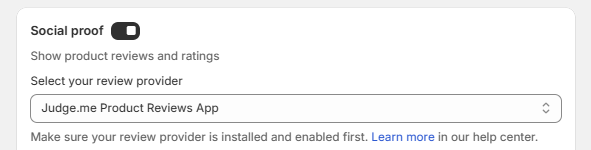
If Judge.me isn’t installed or enabled yet, you’ll see a banner with Install Judge.me and Enable app now links. Use those, then come back and save.
Want a hand? The full walkthrough is in our help center guide on showing product reviews and ratings on your shoppable feed, or you can message the support team and they’ll switch it on and check how it looks on your storefront.
About MP Instagram Feed
MP Instagram Feed helps Shopify merchants turn Instagram, TikTok, Reels, Stories and UGC into shoppable galleries on their storefront. You can tag products on your posts, choose from 11 layouts, and place feeds on your homepage, product pages and collection pages.
The app is 100% free, with every feature included and no watermark on your feed. If you’re comparing options, our roundup of Instagram feed apps for Shopify shows how it stacks up.
About Judge.me Product Reviews
Judge.me is a product reviews app for Shopify. Merchants use it to collect and display customer ratings and reviews on their storefront. You can find it on the Shopify App Store.
Frequently Asked Questions
Does MP Instagram Feed work with Judge.me?
Yes. MP Instagram Feed integrates with Judge.me Product Reviews. Once you turn it on, Judge.me star ratings and review counts appear on the products you tag in your shoppable feed.
How do I show Judge.me reviews on my Instagram feed in Shopify?
Install and enable Judge.me, then open MP Instagram Feed → Shoppable feed → Product tagging posts → Set up. Under Social proof, toggle it on, select Judge.me Product Reviews App as your provider, and click Save.
Do I need a paid plan for the integration?
No. MP Instagram Feed is 100% free with every feature included, and Judge.me offers a free plan. You can check Judge.me’s current plans on its own listing.
Can I use a review app other than Judge.me?
MP Instagram Feed also supports AG Product Reviews App & UGC as a review provider. You choose which one to use from the Select your review provider dropdown.
Why don’t I see ratings on some of my tagged products?
The most common reasons are that Judge.me isn’t installed or enabled yet, or the product has no Judge.me reviews so far. Fix either one and the rating shows once reviews exist.
The Integration Is Live
MP Instagram Feed × Judge.me is available now. If you already use both apps, you can switch it on in a minute from your settings. If you use one but not the other, both are free to install.
Ready to put reviews on your shoppable feed?
MP Instagram Feed turns your Instagram, TikTok and UGC into shoppable galleries, and Judge.me adds the ratings.
- Judge.me ratings on every tagged product
- 11 layouts, unlimited product tags, no watermark
- 100% free, with 24/6 support