A shopper saved a linen shirt last week. Today they open their wishlist to decide. They still like it, but one question stops them before they click Add to cart: is it actually any good?
If the answer is on the product page, they have to leave the wishlist and scroll to the reviews. Then they come back and repeat it for the next item. Some shoppers do that. Many put the decision off again.
This integration fixes that. MP Wishlist & Back in Stock now works with Judge.me Product Reviews. Every saved item in the wishlist shows its Judge.me star rating and review count, next to the price and the Add to cart button, whether your wishlist opens as a page, modal, drawer or popover. You turn it on with one toggle in the app settings.
📌 Key takeaways before you dive in:
- MP Wishlist & Back in Stock can now show Judge.me star ratings and review counts on every saved item in the wishlist: page, modal, drawer or popover.
- Setup: Settings → Integrations → turn on Product reviews & rating → choose Judge.me Reviews → Save.
- Judge.me must be installed, with its app embed on and its review widget on your product pages. If something is missing, the app shows a banner with a quick fix.
- MP Wishlist & Back in Stock is 100% free, and Judge.me has a free plan, so you can try the full setup without paying for either.
Why Product Reviews Belong on the Wishlist
A wishlist is where shoppers park products they want but aren’t ready to buy. When they come back, they’re not browsing anymore. They’re choosing. They’re asking which of these items to buy now, which one is worth the price, and whether it will be as good as it looks.
Ratings answer that faster than anything else, because they come from people who already bought the product.
Without the integration, the wishlist page shows the product, the variant and the price, but not what other customers think. The shopper has to go and find that proof on their own. With the integration, the proof is on the same row as the Add to cart button:
Save a product → Come back to the wishlist → Check the rating → Buy
The only change is that the “check” step now happens on the wishlist page, so shoppers don’t have to leave it.
What the MP Wishlist & Back in Stock × Judge.me Integration Does
The integration reads the ratings you already collect in Judge.me and shows them on the wishlist page. You don’t import reviews or manage a second set of ratings. Whatever Judge.me shows for a product is what the wishlist shows.
Here’s what it covers:
- Star rating and review count on every saved item. Each item shows something like “★★★★★ 1 review” under the product name.
- Works however your wishlist opens. Ratings show on the wishlist page and in the modal, drawer and popover, so shoppers see them wherever they open their list.
- Always in sync with Judge.me. New reviews show on the wishlist page automatically. You don’t update anything by hand.
- The same numbers as your product page. Shoppers see the same rating on the wishlist as on the product page.
- Rating, variant, price and Add to cart in one place. Shoppers compare their saved items and buy without opening each product again.
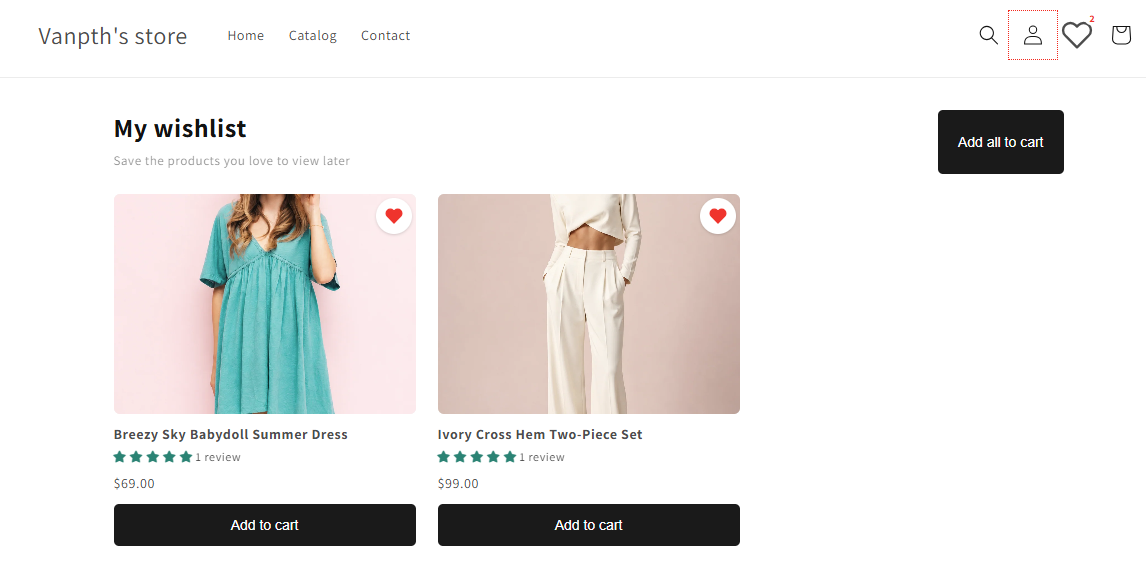
Saved items on the wishlist page, each showing its Judge.me rating under the product name.
What the Shopping Experience Looks Like
Shoppers don’t need to learn anything new. Here’s how it works for them:
- They save a product. They tap the wishlist button on a product page or a product card, and the app saves the exact size and color they picked.
- They come back. Maybe they’re ready to buy. Maybe they got an email that their size is back in stock or the price has dropped.
- The rating is already there. In the wishlist, each saved item shows its Judge.me stars and review count, so shoppers can see which items other customers rated well.
- They decide. They add one item or the whole list to the cart, or open the product page to read the full reviews.
We won’t promise a set conversion lift, because results depend on your products, your reviews and your traffic. What the integration does is remove a step where shoppers often left the wishlist to look for reviews and didn’t come back.
Why This Matters for Shopify Merchants
Proof shows up at the moment of decision. A returning shopper with a full wishlist is close to buying. A rating at that point helps them choose instead of putting the decision off again.
Your reviews do more work. Reviews you’ve already collected now help on a second page, not just the product page. If you’re building a wider social proof strategy for your Shopify store, the wishlist page is one more place where it can help.
The same rating everywhere. The stars on the wishlist come from the same Judge.me data as the stars on your product pages. Shoppers notice when numbers don’t match, and here they always do.
No extra work if you already use Judge.me. Your reviews are already collected and moderated. The wishlist simply reads them.
Who Should Turn This On
This integration is most useful if you already use Judge.me and your shoppers save products before they buy.
It matters most in categories where shoppers compare a few options and want reassurance before they pay: fashion and apparel, shoes, beauty and skincare, jewelry and accessories, and home decor. In these stores, shoppers often save several sizes, colors or styles, then come back to pick one. A rating on each saved item makes that choice easier.
If you’re still choosing a review app, our guide to product review apps for Shopify compares the main options. Judge.me has a free plan, so it’s easy to try alongside the wishlist.
How to Show Judge.me Reviews on Your Wishlist Page
Before you start, make sure that:
- MP Wishlist & Back in Stock is installed and the MP Wishlist app embed is on in your theme.
- Judge.me Product Reviews is installed, its app embed is on, and its review widget is on your product pages.
- Your products already have Judge.me reviews. Products with no reviews yet show on the wishlist page without stars.
Then:
- In your Shopify admin, open MP Wishlist & Back in Stock and go to Settings → Integrations.
- Turn on Product reviews & rating.
- Under Review app, select Judge.me Reviews. The preview on the right shows the star ratings on the saved items.
- Click Save.
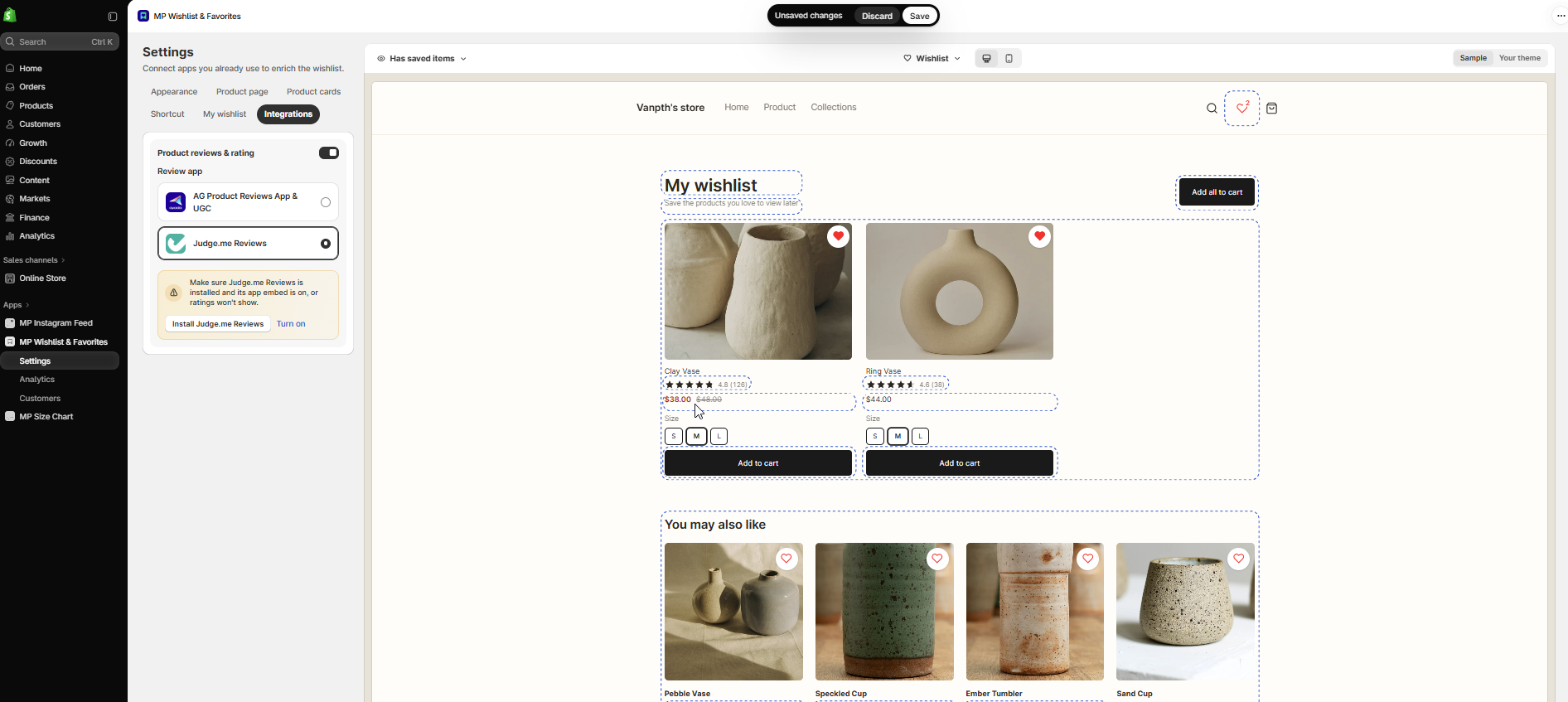
If Judge.me isn’t ready yet, a banner appears under Judge.me Reviews. Click Install Judge.me Reviews to add the app, or click Turn on to open your theme editor on the Judge.me app embed. Switch it on, click Save, then come back and save your MP Wishlist settings.
Want a hand? The full walkthrough is in our help center guide on showing product reviews on the wishlist page. You can also message our support team, and they’ll turn it on and check how it looks on your storefront.
About MP Wishlist & Back in Stock
MP Wishlist & Back in Stock is a free wishlist app for Shopify stores that sell sizes and colors. Shoppers save the exact variant they want, with or without an account. When a saved item is back in stock, drops in price or runs low, the app emails them from your store so they can come back and buy. Shoppers can also share their wishlist with a note on each item, and you can see your most-saved variants in Analytics.
The app is 100% free, with one free plan that includes every feature and no branding on your storefront. If you’re comparing options, our roundup of the best free wishlist apps for Shopify shows how it stacks up.
About Judge.me Product Reviews
Judge.me is a product reviews app for Shopify. Merchants use it to collect and display customer ratings, reviews, photos and videos on their storefront. Judge.me offers a free plan and a paid Awesome plan.
Frequently Asked Questions
Does MP Wishlist & Back in Stock work with Judge.me?
Yes. MP Wishlist & Back in Stock integrates with Judge.me Product Reviews. Once you turn it on, every saved item in the wishlist shows its Judge.me star rating and review count, on the wishlist page and in the modal, drawer and popover.
How do I show Judge.me reviews on my Shopify wishlist?
Install Judge.me, turn on its app embed and add its review widget to your product pages. Then, in MP Wishlist & Back in Stock, go to Settings → Integrations, turn on Product reviews & rating, select Judge.me Reviews and click Save.
Do I need a paid plan for the integration?
No. MP Wishlist & Back in Stock is 100% free with every feature included, and the integration works with Judge.me’s free plan and its Awesome plan.
Can I use a review app other than Judge.me?
Yes. MP Wishlist & Back in Stock also works with AG Product Reviews App & UGC. You choose one review app at a time under Review app in the Integrations tab.
Why don’t some saved items show a rating?
Most often, the product has no published Judge.me reviews yet. Stars show as soon as the first review is published. If no items show ratings, check that Product reviews & rating is on, that Judge.me Reviews is selected, and that the Judge.me app embed is on in your theme.
Do the ratings show on the wishlist buttons too?
No. Ratings show in the wishlist itself, whether it opens as a page, modal, drawer or popover. The wishlist buttons on your product pages and product cards stay the same.
The Integration Is Live
MP Wishlist & Back in Stock × Judge.me is available now. If you already use both apps, you can turn it on in a minute from your settings. If you use only one of them, the other has a free plan, so you can try the full setup at no cost.
Ready to put reviews on your wishlist?
MP Wishlist & Back in Stock saves the exact size and color shoppers want, and Judge.me adds the ratings that help them buy.
- Judge.me ratings on every saved item
- Back in stock, price drop and low stock emails
- 100% free, with every feature included