3. Coupon Blocker
Coupon Blocker helps you detect when browser extensions try to apply your discount codes while customers shop.
Depending on your settings, SP Stop Coupon Leaks can either record these attempts for review or try to block the coupon from being applied. You can also see which orders and discount codes were affected.
3.1. How Coupon Blocker works
When a supported browser extension tries to use one of your discount codes, Coupon Blocker detects the activity and records what happened.
You can use Coupon Blocker in two modes:
- Payout only: Records coupon injection attempts without blocking the code. This gives you evidence to review or dispute affiliate payouts.
- Full Block: Attempts to stop discount codes injected by browser extensions from being applied.
Note: Coupon Blocker may not be able to block every attempt. Some checkout flows or extension behaviors can limit what the app can detect or block.
3.2. Understand your Coupon Blocker overview

At the top of the Coupon Blocker page, you can see three key metrics:
- Injection attempts: Number of detected attempts by browser extensions to use your discount codes.
- Orders affected: Number of orders connected to detected coupon activity.
- Codes exposed: Number of discount codes involved in detected attempts.
These metrics help you quickly understand how much coupon-extension activity has occurred on your store.
3.3. Review affected orders
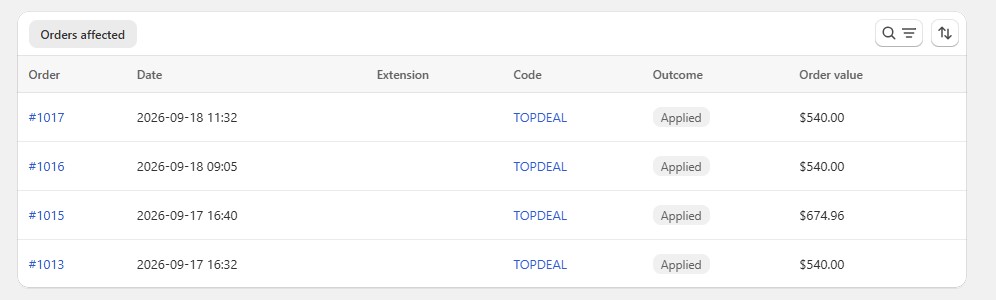
The Orders affected table shows orders where Coupon Blocker detected extension activity.
For each order, you can review:
- Order: The Shopify order associated with the activity.
- Date: When the order was placed.
- Extension: The browser extension detected, when available.
- Code: The discount code involved.
- Outcome: What happened to the discount code.
- Order value: The value of the completed order.
Click an order number to open the order in Shopify Admin.
3.4. Understand coupon outcomes
The Outcome tells you what happened after coupon activity was detected.
| Outcome | What it means |
|---|---|
| Applied | The code was applied and the customer completed the order with it. |
| Blocked | Coupon Blocker detected the attempt and prevented the code from remaining applied. |
| Couldn't block | The activity was detected, but Coupon Blocker couldn't prevent the code from being applied. |
| Not confirmed | Activity was detected, but the app couldn't confirm the final result. |
An injection attempt does not always mean that a coupon was successfully applied. Check the outcome to understand what happened.
3.5. Review extension activity
Below the affected orders, you can see additional information about detected activity, including:
- Extension Breakdown: Shows which browser extensions are associated with detected attempts.
- Injections by browser: Shows which browsers the detected attempts came from.
This information can help you understand where coupon activity is coming from.
3.6. Export affiliate evidence
Coupon Blocker records detected activity so you can review it when checking affiliate payouts.
To export the data:
- From your Shopify Admin, open SP Stop Coupon Leaks.
- Go to Coupon Blocker.
- Review or filter the affected orders.
- Click Export.
- Export the available records as a CSV file.
You can use this data as supporting evidence when reviewing or disputing affiliate payouts.
3.7. Coupon Blocker limitations
Coupon Blocker provides additional protection against unwanted coupon usage, but it doesn’t guarantee that every attempt can be detected or blocked.
For example:
- A customer may manually type or paste a coupon code.
- Some checkout flows may not allow the app to block a discount.
- Some affiliate or cashback activity can happen without using a coupon.
- Detection doesn’t always mean the coupon was successfully applied.
For this reason, use the Outcome and affected-order data to understand what happened instead of treating every detected attempt as a blocked coupon.