A shopper in Germany lands on your store. The navigation is in German, the product description is in German, the price is in euros. Everything feels local, until they open the size guide and find “Chest”, “Waist” and “How to measure” in English.
For a lot of shoppers, that’s the moment they stop being sure. Sizing is already the part of buying clothes online that people worry about most. Reading it in a second language makes it harder.
That’s the gap this integration closes. MP Size Chart & Size Guide now works with langify, the Shopify translation app. Your size charts and sizing pages can now be translated in langify, alongside the rest of your store, so shoppers see sizing information in the same language as everything else.
📌 Key takeaways before you dive in:
- MP Size Chart & Size Guide now integrates with langify, so you can translate size charts and sizing pages into every language your store supports.
- Setup takes one toggle in langify: Apps → Integrated Apps → Available Integrations → switch on MP Size Chart.
- Size chart translations then live in their own MP Size Chart menu in langify, next to your other store translations.
- You need a paid langify plan for the integration. Not using langify? MP Size Chart's built-in Auto-translate is another option.
Why Multilingual Size Charts Matter for International Shopify Stores
When you sell in several languages, shoppers expect the whole store to speak their language, not just the parts that were easy to translate. A size chart is one of the most important parts of a fashion product page, so leaving it in one language stands out.
Here’s why localized sizing information is worth the effort:
- Shoppers understand their size faster. Measurement names, fit notes and “how to measure” steps are easier to follow in your first language. Nobody should need a dictionary to work out whether “inseam” is the number they need.
- Less confusion, fewer wrong sizes. When a shopper misreads a chart, they guess. Guessing leads to ordering two sizes, or to a return. Size and fit are already the main reason people send clothes back, as we cover in our guide to reducing clothing returns caused by size and fit.
- The store feels consistent. A fully translated product page with an English-only size guide looks unfinished. Consistency is part of what makes a store feel trustworthy to someone buying from abroad for the first time.
- It matters most for categories where fit decides the sale. Fashion, apparel, footwear, lingerie, sportswear and accessories stores selling internationally get the most out of it.
If you’re expanding into new countries with Shopify Markets, translated size charts are one of the details that make a new market feel local rather than imported.
What the MP Size Chart × langify Integration Does
The integration connects your MP Size Chart content to langify. Instead of building a separate chart for every language, you keep one set of size charts and translate their content inside langify.
Here’s what it covers:
- Size charts and sizing pages in every store language. Titles, column and row labels, measurement descriptions and guidance text can all be translated.
- A dedicated MP Size Chart menu in langify. Once the integration is on, size chart translations sit in their own section of langify, next to the rest of your store’s translations.
- Manual or machine translation. Type translations yourself, or start with langify’s machine translation and edit the result. That’s useful for fit notes, where the exact wording matters.
- Bulk updates. Check for Changes pulls in content from all your charts for the languages you choose, so you can translate everything in one pass instead of chart by chart.
- Translations are kept if you switch it off. You can turn the integration off at any time. Your translations are saved and come back when you turn it on again.
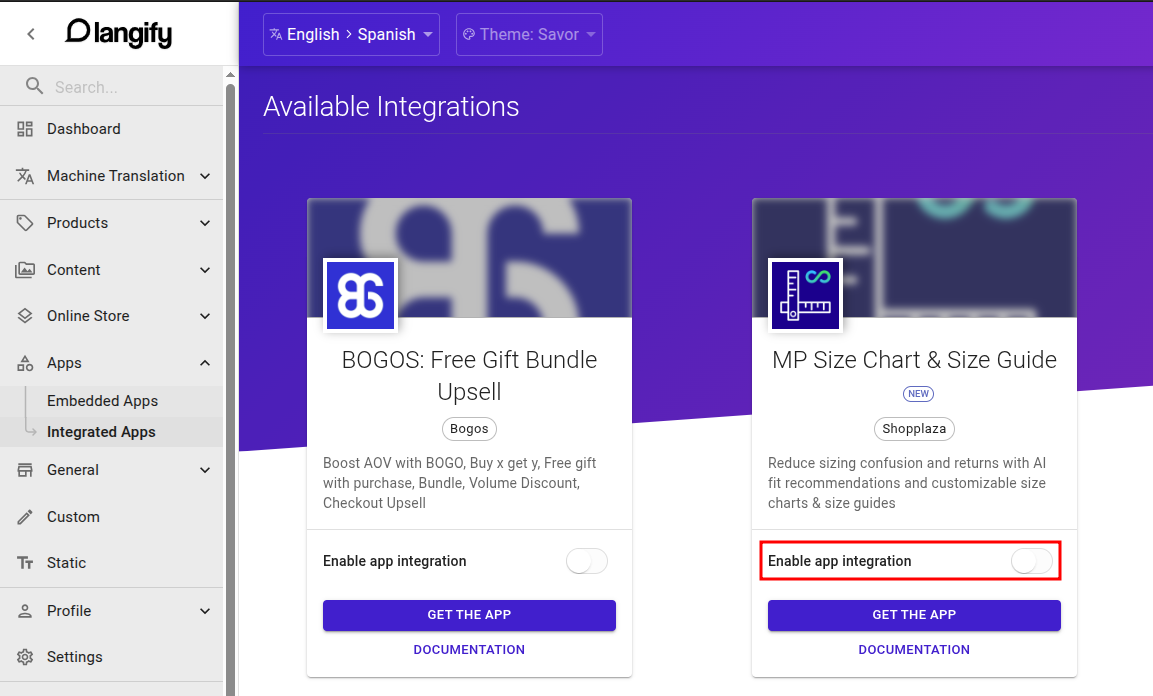
Turning on the MP Size Chart integration in langify.
What Merchants Can Achieve with the Integration
Localize size guide content. Shoppers read sizing information in the language they chose on your store, from the chart title to the last fit note.
Keep the storefront consistent. Product descriptions, navigation and size guides all follow the same language. Shoppers don’t hit a section that suddenly switches back to English.
Make international shopping easier. A shopper who understands the chart can pick a size with more confidence before they buy. We’re not going to promise a set drop in returns, because that depends on your products and your charts. What the integration does is remove the language barrier from the step where shoppers decide on size.
Scale localization without extra workflows. Size chart translations sit in the same tool as the rest of your store translations. Adding a new market doesn’t mean rebuilding every chart in a new language by hand.
How to Translate Size Charts on Shopify with langify
Before you start, make sure you have:
- MP Size Chart & Size Guide installed on your Shopify store.
- At least one size chart already created.
- An active paid langify plan. The integration isn’t available on langify’s free plan.
- Your store languages set up in langify.
1. Turn on the integration
- In your Shopify admin, open langify.
- Go to Apps → Integrated Apps → Available Integrations.
- Find the MP Size Chart card and switch the toggle on.
A new MP Size Chart menu now appears in langify’s sidebar.
2. Translate your size charts
- In langify, click MP Size Chart in the sidebar.
- Open the size chart or sizing page you want to translate.
- Choose the target language.
- Enter the translation, or use machine translation and edit the result.
- Save your changes.
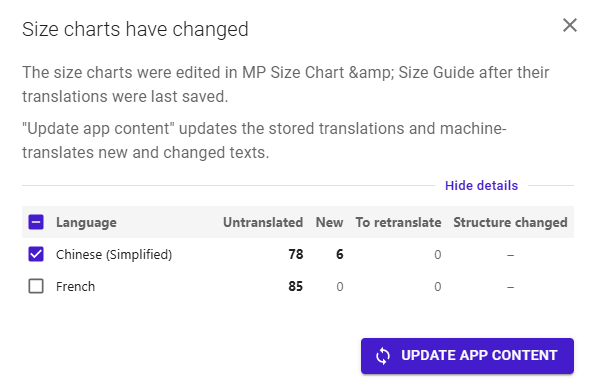
To translate several charts at once, click Check for Changes in the upper right corner, select your target languages and click Update App Content.
3. Preview on your storefront
Switch your store to a translated language with the language selector, open a product that has a size chart and check that the title, labels and text show in that language. If a piece of text is still in your original language, go back to langify and check that the field has a saved translation.
4. Keep translations up to date
Translations don’t update on their own. When you edit a chart in MP Size Chart, for example by adding a size row or renaming a column, langify shows a popup with an Update App Content button. If you close the popup, click Check for Changes at any time to bring in the new content, then translate what changed.
The full walkthrough, see the langify guide on how to integrate MP Size Chart with langify.
langify Integration vs. Auto-translate: Which Should You Use?
MP Size Chart also has a built-in Auto-translate feature. Both get your size charts into other languages, but they suit different stores.
| MP Size Chart × langify | MP Size Chart Auto-translate | |
|---|---|---|
| How it works | You translate chart content inside langify, manually or with machine translation | Charts are translated automatically into the language the shopper selects |
| Control over wording | Full: review and edit every label and fit note | Automatic, with no review step |
| Where you manage it | In langify, with the rest of your store translations | In MP Size Chart’s Settings |
| What you need | A paid langify plan | MP Size Chart only |
| Best for | Stores already using langify, or brands that want reviewed, on-brand translations | Stores that want multilingual charts quickly without a translation app |
If langify already handles your store translations, the integration keeps everything in one place. If you don’t use a translation app, see our help article on displaying your size chart in multiple languages to set up Auto-translate.
Who Should Turn This On
The integration is most useful if two things are true: you sell to shoppers in more than one language, and you already use (or plan to use) langify to translate your store.
It matters most for stores where fit decides the sale:
- Fashion and apparel brands selling across Europe, Latin America or Asia
- Footwear stores, where size systems already differ between the US, UK and EU (see our international shoe size conversion guide)
- Lingerie, swimwear and sportswear, where shoppers check measurements closely
- Accessories such as rings, belts, hats and gloves, where one wrong measurement means a return
If you’re still setting up your size charts, start with our Shopify size chart guide, then translate them once they’re in place.
How MP Size Chart Supports International Stores
MP Size Chart & Size Guide helps Shopify merchants add clear size charts and size guides to their product pages. For stores selling internationally, the features that matter most are:
- 30+ industry-specific templates for apparel, footwear, accessories and more
- Product-specific size guides, assigned to products, collections or tags
- Several display options, with an inline link, a button or a floating button that opens the size chart popup
- Unit conversion across cm, inches, mm, kg and lbs, so shoppers can read measurements in the system they know
- AI-powered size recommendations that suggest a size from a shopper’s measurements
- Multilingual size charts through langify or the built-in Auto-translate
There’s a free plan, and no “powered by” watermark on any plan, including the free one.
How langify Supports Store Localization
langify is a translation app for Shopify. Merchants use it to:
- Translate storefront content, including pages, products, navigation, images and third-party apps
- Manage several languages from one dashboard
- Combine manual translation with machine translation
- Create a localized experience for each market they sell in
With the MP Size Chart integration, size charts become one more part of the store that langify translates.
Frequently Asked Questions
Does MP Size Chart work with langify?
Yes. MP Size Chart & Size Guide is an official langify integration. Once you switch it on in langify, you can translate your size charts and sizing pages into every language your store supports.
How do I translate size charts on Shopify?
If you use langify, go to Apps → Integrated Apps → Available Integrations in langify and turn on MP Size Chart. Then open the new MP Size Chart menu, pick a chart and a language, add your translations and save. Without langify, you can use MP Size Chart’s built-in Auto-translate.
Do I need a paid plan for the integration?
The integration requires a paid langify plan. It isn’t available on langify’s free plan. On the MP Size Chart side, you need the app installed and at least one size chart created.
Do translations update automatically when I edit a size chart?
No. When you change a chart, langify shows an Update App Content popup. If you miss it, click Check for Changes in the MP Size Chart section of langify, then translate the new or changed text.
What happens to my translations if I turn the integration off?
They’re kept. If you switch the integration back on later, your translations are still there.
Why don’t I see the MP Size Chart card in langify?
Check that you’re on a paid langify plan, that MP Size Chart & Size Guide is installed, and that you’ve created at least one size chart.
Final Words: Size Charts That Speak Your Shoppers’ Language
Translating your store is a big step toward selling internationally. Translating the size guide finishes the job for the page where shoppers decide which size to buy. MP Size Chart × langify is available now. If you already use both apps, you can turn it on in a minute from langify.
Ready to translate your size charts?
MP Size Chart & Size Guide gives shoppers clear sizing on every product, and langify puts it in their language.
- Size charts and sizing pages in every store language
- 30+ templates, unit conversion and AI size recommendations
- Free plan, with no watermark on any plan