Post-purchase upsell
11. Post-purchase upsell
Post-purchase Upsell lets you offer additional products after payment and before the order confirmation page.
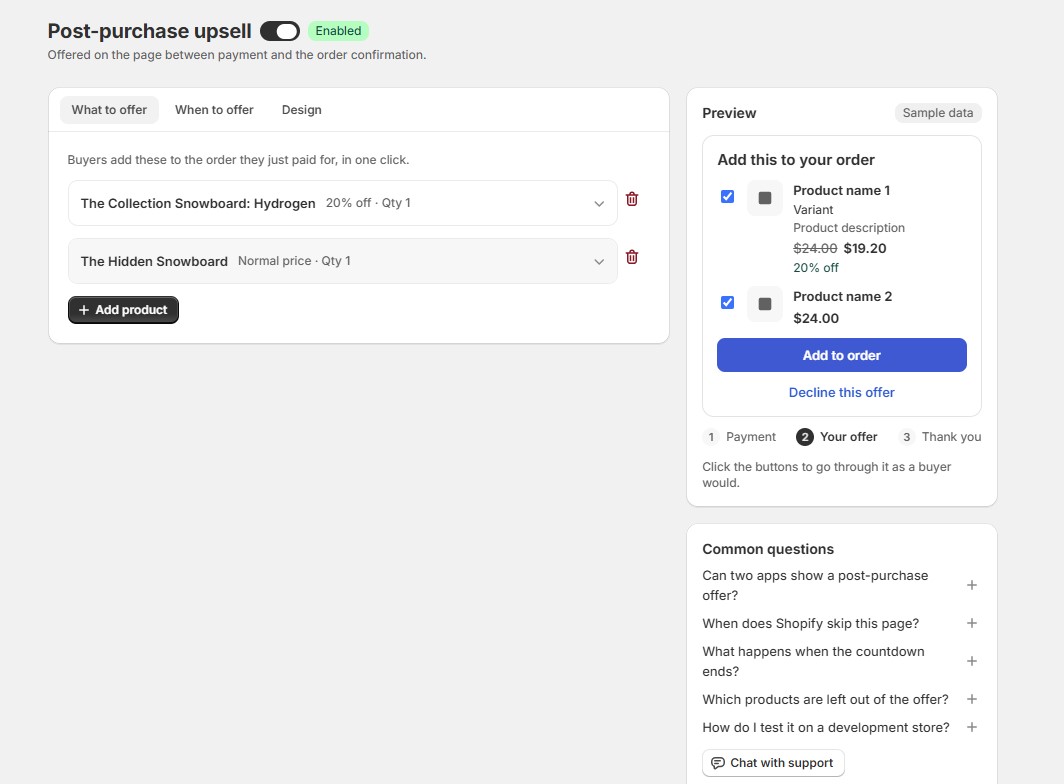
11.1. Choose products to offer
Go to What to offer and click Add product.
For each product, you can set:
- Quantity
- Discount
- Label and description
Customers can select the products they want and add them to their order in one click.
11.2. Set when to show the offer
Go to When to offer and configure:
- Minimum order total: Minimum order value required. Set to
0for all orders. - Countdown: Set an offer time limit from
0–3600seconds.0turns it off. - Countries: Choose which countries can receive the offer.
All conditions must be met for the offer to appear.
11.3. Customize the offer
Go to Design to customize:
- Heading
- Add to order button
- Decline link
- Heading size
- Countdown style
- Product images
- Original price
- Discount label
The offer uses your Shopify checkout colors and fonts automatically.
11.4. Preview and enable
Use Preview to check the customer journey:
Payment → Your offer → Thank you
When you’re ready, turn on Post-purchase upsell to start showing the offer to eligible customers.