How to uninstall MP Wishlist & Favorites
How to uninstall MP Wishlist & Favorites
If you decide to stop using MP Wishlist & Favorites, you can uninstall it right from the app. The app is free, so uninstalling is a single step.
Step-by-step guide
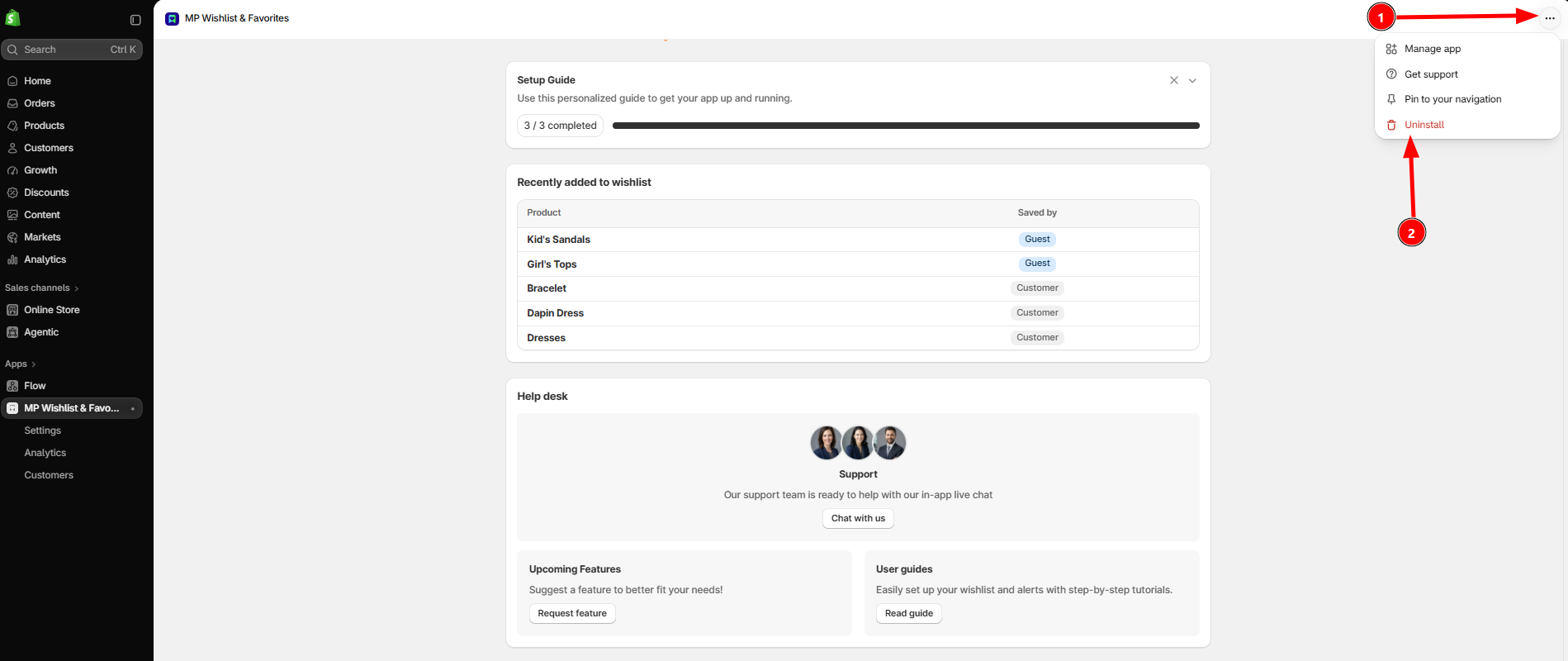
#1. From your Shopify admin, open MP Wishlist & Favorites.
#2. Click the ⋯ (More actions) button in the top-right corner of the app.
#3. Choose Uninstall, then confirm.
That’s it! The app is removed from your store, and the wishlist buttons, shortcut, and wishlist page stop showing on your storefront.
Tip: You can also uninstall from Settings → Apps in your Shopify admin. Find MP Wishlist & Favorites in the list, click ⋯ next to it, and choose Uninstall.
Important notes:
- Before uninstalling, you may want to check your Analytics and Customers pages and note anything you’d like to keep, such as your most saved products.
- Having trouble with the app? Click Get support in the same ⋯ menu, or Chat with us on the app home page. Our team may be able to fix it for you.
- We’d greatly appreciate it if you could share why you decided to uninstall. Your feedback helps us get better!
👉 Still need assistance? Contact our support team anytime, and we’ll be happy to help.