s !== '1. Getting Started');
} else {
activeSections.push('1. Getting Started');
history.pushState(null, '', '/docs/size-chart/getting-started/overview');
loadContent('/docs/size-chart/getting-started/overview');
}
">
1. Getting Started
s !== '2. Size Recommendations');
} else {
activeSections.push('2. Size Recommendations');
history.pushState(null, '', '/docs/size-chart/size-recommendations/set-up-size-recommendation');
loadContent('/docs/size-chart/size-recommendations/set-up-size-recommendation');
}
">
2. Size Recommendations
s !== '3. Customization');
} else {
activeSections.push('3. Customization');
history.pushState(null, '', '/docs/size-chart/customization/select-position-to-show-your-size-chart');
loadContent('/docs/size-chart/customization/select-position-to-show-your-size-chart');
}
">
3. Customization
s !== '4. Data Management');
} else {
activeSections.push('4. Data Management');
history.pushState(null, '', '/docs/size-chart/data-management/migrate-data-from-one-store-to-another-store');
loadContent('/docs/size-chart/data-management/migrate-data-from-one-store-to-another-store');
}
">
4. Data Management
s !== '5. Analytics & Reports');
} else {
activeSections.push('5. Analytics & Reports');
history.pushState(null, '', '/docs/size-chart/analytics-reports/enable-google-analytics-for-size-chart');
loadContent('/docs/size-chart/analytics-reports/enable-google-analytics-for-size-chart');
}
">
5. Analytics & Reports
s !== '6. FAQs');
} else {
activeSections.push('6. FAQs');
history.pushState(null, '', '/docs/size-chart/faqs/my-size-chart-isnt-showing');
loadContent('/docs/size-chart/faqs/my-size-chart-isnt-showing');
}
">
6. FAQs
s !== '7. Billing');
} else {
activeSections.push('7. Billing');
history.pushState(null, '', '/docs/size-chart/billing/uninstall-mp-size-chart');
loadContent('/docs/size-chart/billing/uninstall-mp-size-chart');
}
">
7. Billing
s !== '1. Getting Started');
} else {
activeSections.push('1. Getting Started');
history.pushState(null, '', '/docs/instagram-feed/getting-started/overview');
loadContent('/docs/instagram-feed/getting-started/overview');
}
">
1. Getting Started
s !== '2. Display & Customization');
} else {
activeSections.push('2. Display & Customization');
history.pushState(null, '', '/docs/instagram-feed/display-customization/manage-feed');
loadContent('/docs/instagram-feed/display-customization/manage-feed');
}
">
2. Display & Customization
s !== '3. Settings');
} else {
activeSections.push('3. Settings');
history.pushState(null, '', '/docs/instagram-feed/settings/configure-general-settings');
loadContent('/docs/instagram-feed/settings/configure-general-settings');
}
">
3. Settings
s !== '4. Analytics & Reports');
} else {
activeSections.push('4. Analytics & Reports');
history.pushState(null, '', '/docs/instagram-feed/analytics-reports/use-analytics-feature');
loadContent('/docs/instagram-feed/analytics-reports/use-analytics-feature');
}
">
4. Analytics & Reports
s !== '5. Integrations');
} else {
activeSections.push('5. Integrations');
history.pushState(null, '', '/docs/instagram-feed/integrations/integrate-air-product-reviews');
loadContent('/docs/instagram-feed/integrations/integrate-air-product-reviews');
}
">
5. Integrations
s !== '6. FAQs');
} else {
activeSections.push('6. FAQs');
history.pushState(null, '', '/docs/instagram-feed/faqs/why-do-i-see-notification-saying-invalid-token');
loadContent('/docs/instagram-feed/faqs/why-do-i-see-notification-saying-invalid-token');
}
">
6. FAQs
s !== '7. Billing');
} else {
activeSections.push('7. Billing');
history.pushState(null, '', '/docs/instagram-feed/billing/uninstall-mp-instagram-feed');
loadContent('/docs/instagram-feed/billing/uninstall-mp-instagram-feed');
}
">
7. Billing
s !== '1-how-to-connect-a-google-account.md');
} else {
activeSections.push('1-how-to-connect-a-google-account.md');
history.pushState(null, '', '');
loadContent('');
}
">
1-how-to-connect-a-google-account.md
s !== '2-how-to-create-feed-and-sync-feed-on-your-gmc.md');
} else {
activeSections.push('2-how-to-create-feed-and-sync-feed-on-your-gmc.md');
history.pushState(null, '', '');
loadContent('');
}
">
2-how-to-create-feed-and-sync-feed-on-your-gmc.md
s !== '3-how-to-manage-product-feed.md');
} else {
activeSections.push('3-how-to-manage-product-feed.md');
history.pushState(null, '', '');
loadContent('');
}
">
3-how-to-manage-product-feed.md
s !== '4-how-to-view-google-error-report-and-manage-products-in-feed.md');
} else {
activeSections.push('4-how-to-view-google-error-report-and-manage-products-in-feed.md');
history.pushState(null, '', '');
loadContent('');
}
">
4-how-to-view-google-error-report-and-manage-products-in-feed.md
s !== '5-how-to-configure-settings.md');
} else {
activeSections.push('5-how-to-configure-settings.md');
history.pushState(null, '', '');
loadContent('');
}
">
5-how-to-configure-settings.md
s !== '6-how-to-use-dashboard.md');
} else {
activeSections.push('6-how-to-use-dashboard.md');
history.pushState(null, '', '');
loadContent('');
}
">
6-how-to-use-dashboard.md
s !== '7-information-center.md');
} else {
activeSections.push('7-information-center.md');
history.pushState(null, '', '');
loadContent('');
}
">
7-information-center.md
s !== '8-privacy-policy.md');
} else {
activeSections.push('8-privacy-policy.md');
history.pushState(null, '', '');
loadContent('');
}
">
8-privacy-policy.md
s !== '9-faqs.md');
} else {
activeSections.push('9-faqs.md');
history.pushState(null, '', '');
loadContent('');
}
">
9-faqs.md
s !== '1. Getting Started');
} else {
activeSections.push('1. Getting Started');
history.pushState(null, '', '/docs/digital-download/getting-started/overview');
loadContent('/docs/digital-download/getting-started/overview');
}
">
1. Getting Started
s !== '2. Customization');
} else {
activeSections.push('2. Customization');
history.pushState(null, '', '/docs/digital-download/customization/manage-digital-products');
loadContent('/docs/digital-download/customization/manage-digital-products');
}
">
2. Customization
s !== '3. FAQs');
} else {
activeSections.push('3. FAQs');
history.pushState(null, '', '/docs/digital-download/faqs/how-will-customers-receive-their-digital-files-after-purchase');
loadContent('/docs/digital-download/faqs/how-will-customers-receive-their-digital-files-after-purchase');
}
">
3. FAQs
s !== '4. Billing');
} else {
activeSections.push('4. Billing');
history.pushState(null, '', '/docs/digital-download/billing/how-do-i-uninstall-or-delete-mp-digital-downloads');
loadContent('/docs/digital-download/billing/how-do-i-uninstall-or-delete-mp-digital-downloads');
}
">
4. Billing
s !== '1. Getting Started');
} else {
activeSections.push('1. Getting Started');
history.pushState(null, '', '/docs/product-quiz/getting-started/overview');
loadContent('/docs/product-quiz/getting-started/overview');
}
">
1. Getting Started
s !== '2. Quiz Design & Customization');
} else {
activeSections.push('2. Quiz Design & Customization');
history.pushState(null, '', '/docs/product-quiz/design-customization/link-products-collections-to-quiz-answers');
loadContent('/docs/product-quiz/design-customization/link-products-collections-to-quiz-answers');
}
">
2. Quiz Design & Customization
s !== '3. FAQs');
} else {
activeSections.push('3. FAQs');
history.pushState(null, '', '/docs/product-quiz/faqs/what-should-I-do-if-I-encounter-issues-with-the-app');
loadContent('/docs/product-quiz/faqs/what-should-I-do-if-I-encounter-issues-with-the-app');
}
">
3. FAQs
s !== '4. Billing');
} else {
activeSections.push('4. Billing');
history.pushState(null, '', '/docs/product-quiz/billing/how-to-uninstall-mp-product-quiz');
loadContent('/docs/product-quiz/billing/how-to-uninstall-mp-product-quiz');
}
">
4. Billing
s !== '0-how-to-create-an-access-control-rule.md');
} else {
activeSections.push('0-how-to-create-an-access-control-rule.md');
history.pushState(null, '', '');
loadContent('');
}
">
0-how-to-create-an-access-control-rule.md
s !== '1-how-to-create-a-hide-price-rule.md');
} else {
activeSections.push('1-how-to-create-a-hide-price-rule.md');
history.pushState(null, '', '');
loadContent('');
}
">
1-how-to-create-a-hide-price-rule.md
s !== '91-faqs.md');
} else {
activeSections.push('91-faqs.md');
history.pushState(null, '', '');
loadContent('');
}
">
91-faqs.md
s !== '0-how-to-manage-quotes.md');
} else {
activeSections.push('0-how-to-manage-quotes.md');
history.pushState(null, '', '');
loadContent('');
}
">
0-how-to-manage-quotes.md
s !== '1-how-to-customize-storefront-experience.md');
} else {
activeSections.push('1-how-to-customize-storefront-experience.md');
history.pushState(null, '', '');
loadContent('');
}
">
1-how-to-customize-storefront-experience.md
s !== '2-how-to-automate-communication-email.md');
} else {
activeSections.push('2-how-to-automate-communication-email.md');
history.pushState(null, '', '');
loadContent('');
}
">
2-how-to-automate-communication-email.md
s !== '3-settings-advanced-configuration.md');
} else {
activeSections.push('3-settings-advanced-configuration.md');
history.pushState(null, '', '');
loadContent('');
}
">
3-settings-advanced-configuration.md
s !== '4-currency-markets.md');
} else {
activeSections.push('4-currency-markets.md');
history.pushState(null, '', '');
loadContent('');
}
">
4-currency-markets.md
s !== '5-language.md');
} else {
activeSections.push('5-language.md');
history.pushState(null, '', '');
loadContent('');
}
">
5-language.md
s !== '91-faqs.md');
} else {
activeSections.push('91-faqs.md');
history.pushState(null, '', '');
loadContent('');
}
">
91-faqs.md
s !== '0-glossary-of-important-terms.md');
} else {
activeSections.push('0-glossary-of-important-terms.md');
history.pushState(null, '', '');
loadContent('');
}
">
0-glossary-of-important-terms.md
s !== '1-how-to-configure-product-dimensions.md');
} else {
activeSections.push('1-how-to-configure-product-dimensions.md');
history.pushState(null, '', '');
loadContent('');
}
">
1-how-to-configure-product-dimensions.md
s !== '2-how-to-set-shipping-rate-rules.md');
} else {
activeSections.push('2-how-to-set-shipping-rate-rules.md');
history.pushState(null, '', '');
loadContent('');
}
">
2-how-to-set-shipping-rate-rules.md
s !== '3-how-to-set-up-carrier-methods.md');
} else {
activeSections.push('3-how-to-set-up-carrier-methods.md');
history.pushState(null, '', '');
loadContent('');
}
">
3-how-to-set-up-carrier-methods.md
s !== '4-how-to-create-batch-rules.md');
} else {
activeSections.push('4-how-to-create-batch-rules.md');
history.pushState(null, '', '');
loadContent('');
}
">
4-how-to-create-batch-rules.md
s !== '5-how-to-monitor-and-manage-batches.md');
} else {
activeSections.push('5-how-to-monitor-and-manage-batches.md');
history.pushState(null, '', '');
loadContent('');
}
">
5-how-to-monitor-and-manage-batches.md
s !== '6-how-to-allow-customers-to-choose-future-delivery-dates.md');
} else {
activeSections.push('6-how-to-allow-customers-to-choose-future-delivery-dates.md');
history.pushState(null, '', '');
loadContent('');
}
">
6-how-to-allow-customers-to-choose-future-delivery-dates.md
s !== '7-how-to-use-email-notifications.md');
} else {
activeSections.push('7-how-to-use-email-notifications.md');
history.pushState(null, '', '');
loadContent('');
}
">
7-how-to-use-email-notifications.md
s !== '91-faqs.md');
} else {
activeSections.push('91-faqs.md');
history.pushState(null, '', '');
loadContent('');
}
">
91-faqs.md
s !== '0-case-1-stores-using-legacy-customer-accounts.md');
} else {
activeSections.push('0-case-1-stores-using-legacy-customer-accounts.md');
history.pushState(null, '', '');
loadContent('');
}
">
0-case-1-stores-using-legacy-customer-accounts.md
s !== '1-case-2-stores-using-new-customer-accounts.md');
} else {
activeSections.push('1-case-2-stores-using-new-customer-accounts.md');
history.pushState(null, '', '');
loadContent('');
}
">
1-case-2-stores-using-new-customer-accounts.md
s !== '2-restore-the-customers-original-email.md');
} else {
activeSections.push('2-restore-the-customers-original-email.md');
history.pushState(null, '', '');
loadContent('');
}
">
2-restore-the-customers-original-email.md
s !== '3-resume-or-end-an-active-session.md');
} else {
activeSections.push('3-resume-or-end-an-active-session.md');
history.pushState(null, '', '');
loadContent('');
}
">
3-resume-or-end-an-active-session.md
s !== '4-configure-time-limits-for-login-sessions.md');
} else {
activeSections.push('4-configure-time-limits-for-login-sessions.md');
history.pushState(null, '', '');
loadContent('');
}
">
4-configure-time-limits-for-login-sessions.md
s !== '91-faqs.md');
} else {
activeSections.push('91-faqs.md');
history.pushState(null, '', '');
loadContent('');
}
">
91-faqs.md
s !== '0-for-merchants.md');
} else {
activeSections.push('0-for-merchants.md');
history.pushState(null, '', '');
loadContent('');
}
">
0-for-merchants.md
s !== '1-for-b2b-customers.md');
} else {
activeSections.push('1-for-b2b-customers.md');
history.pushState(null, '', '');
loadContent('');
}
">
1-for-b2b-customers.md
s !== '91-faqs.md');
} else {
activeSections.push('91-faqs.md');
history.pushState(null, '', '');
loadContent('');
}
">
91-faqs.md
Why are Instagram Collab posts not syncing while other Instagram posts sync normally?
Possible cause
- The collaborator account is a Personal account: Collab posts tagged by a Personal Instagram account cannot be synced. This issue only occurs when using the Instagram source.
- Required permissions were turned off during connection: During the Instagram connection process, one or more required permission toggles were switched OFF in the Allow modal, preventing Collab posts from syncing.
Solution
- If the post is tagged by a Personal account: Ask the collaborator to switch their Instagram account to Professional, or switch to using the Instagram with Facebook Page source.
- If permissions were not fully granted: Reconnect your Instagram account and make sure all permission toggles are turned ON in the Allow modal.
How to fix the issue (permission-related)
#1. Open the app in your Shopify admin and go to the Dashboard.
#2. Click Reconnect next to your connected Instagram account.
#3. When the Instagram permission modal appears, review all permission toggles carefully.
- Make sure all permissions are turned ON, especially those related to post and collaboration access.
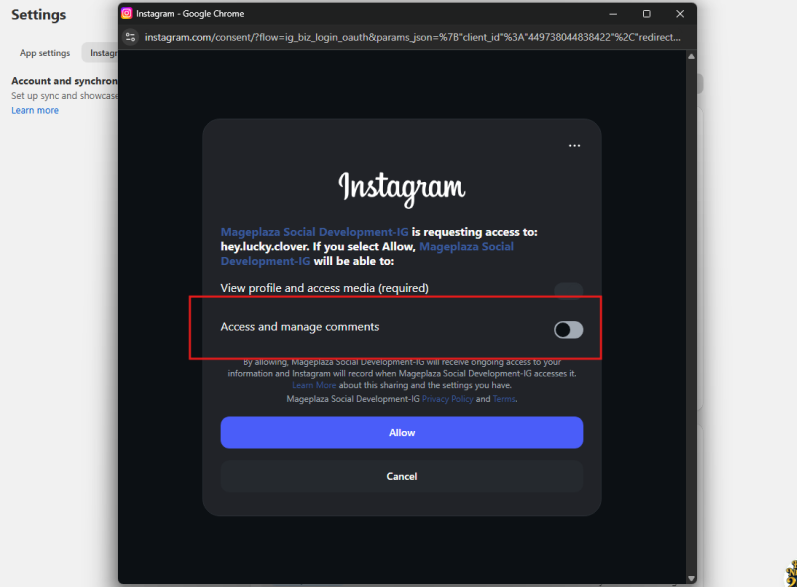
#4. Click Allow to complete the reconnection.
#5. Return to the app dashboard and wait for syncing to finish.
- Collab posts will start syncing automatically.
Note: If required permissions were previously turned off, the app will display a content warning after setup and syncing to indicate that Collab posts cannot be synced due to missing permissions. Reconnecting and allowing all permissions will resolve this issue without affecting existing feeds or settings.