How to uninstall/delete MP Instagram Feed
How do I uninstall/ delete MP Instagram Feed
If you decide to stop using MP Instagram Feed, you can easily uninstall it from your Shopify admin. The app is free, so uninstalling is a single step — nothing to cancel first.
Step-by-step guide
#1. Log in to your Shopify Dashboard.
#2. In the left-hand menu, click Apps.
#3. Scroll down and select App and sales channel settings at the bottom.
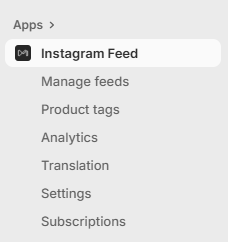
#4. Locate MP Instagram Feed in the list, then click the “…” (More actions) button next to it.
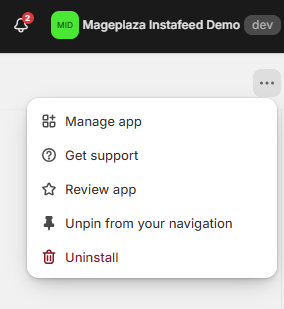
#5. Choose Uninstall.
That’s it! The app will be removed from your store.
Important notes:
- If you reinstall MP Instagram Feed later, your previous feeds and settings may not be retained.
- We’d greatly appreciate it if you could share why you decided to uninstall — your feedback helps us get better!
👉 Still need assistance? Contact our support team anytime, and we’ll be happy to help.