How to configure the general settings of MP Instagram Feed app
How to configure the general settings of MP Instagram Feed app
The App Settings page lets you control how the app behaves on your storefront, set language preferences, and sync data — all in one place.
1. Plan
MP Instagram Feed is 100% free, so this section is purely informational: your store is already on the free plan with every feature active.
2. App settings
App status: This feature allows you to activate the app on the storefront.
- Select App status > Enable app and you will be redirected to Shopify App embeds.

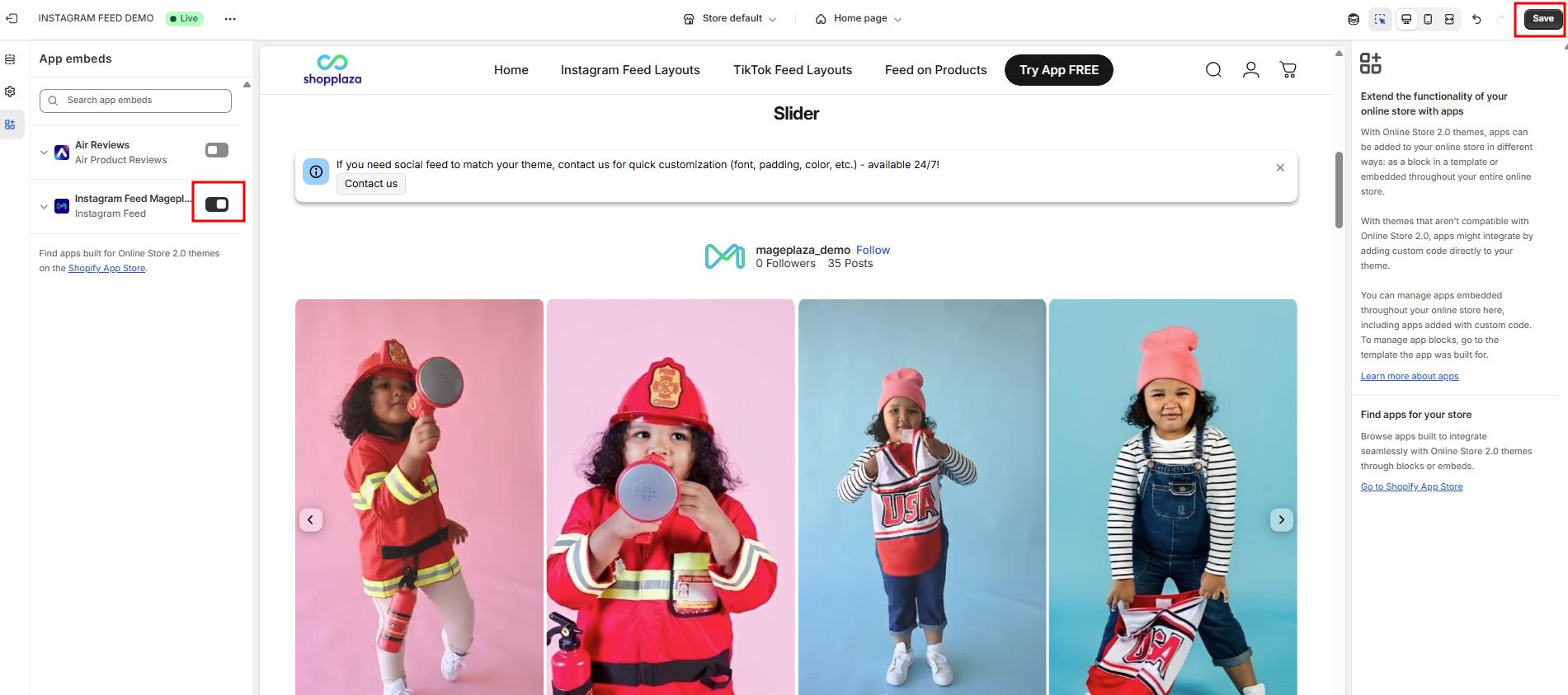
- In the Shopify App embeds, activate MP Instagram Feed application and save the change.
- Back to the app, you need to click on Refresh status to update the app status.
- Besides, you can deactivate the app by pressing the Disable button.

App language
- Supported languages include English, Spanish, French, Italian, Japanese, German, Swedish, Dutch, Czech, Danish, Norwegian (Bokmål), Polish, Portuguese (Brazil), Portuguese (Portugal), Finnish, Turkish, Thai, Chinese (Simplified), Chinese (Traditional), and Korean.
Republish app
Here are some cases where republishing is needed:
- The theme has been changed
- Currency has been changed → republish to ensure the correct currency appears on product tags on the storefront
- If the app is disabled, but the merchant updates the settings while it’s disabled and then enables the app afterward, it may cause errors.
- Data in the app (feed, account, media, etc.) is not in sync with what’s shown on the store

Wrap up
The General Settings page is your control center for activations, languages, and syncs. Keeping these settings updated ensures that your Instagram Feed runs smoothly and continues to deliver maximum value on your Shopify store.